

v1.2.4+1
thawani_payment
Pacote Flutter ajuda você a usar a API do Thawani Checkout com cartões salvos e adicionar pagamento Thawani no aplicativo Flutter
14Curtidas 52Downloads em 30 dias140Pontos Pub
AndroidiOSmacOS
Pacote Flutter permite adicionar pagamento Thawani ao seu aplicativo Flutter
Texto original em inglês. Visite o GitHub para a versão atual.


Nasr Al-Rahbi @abom_me


thawani_payment using the official webview_flutter.
| Android | iOS | |
|---|---|---|
| Support | SDK 19+ or 20+ | iOS 9+ |
Pubspec changes:
      dependencies:
        thawani_payment: <last_verison>
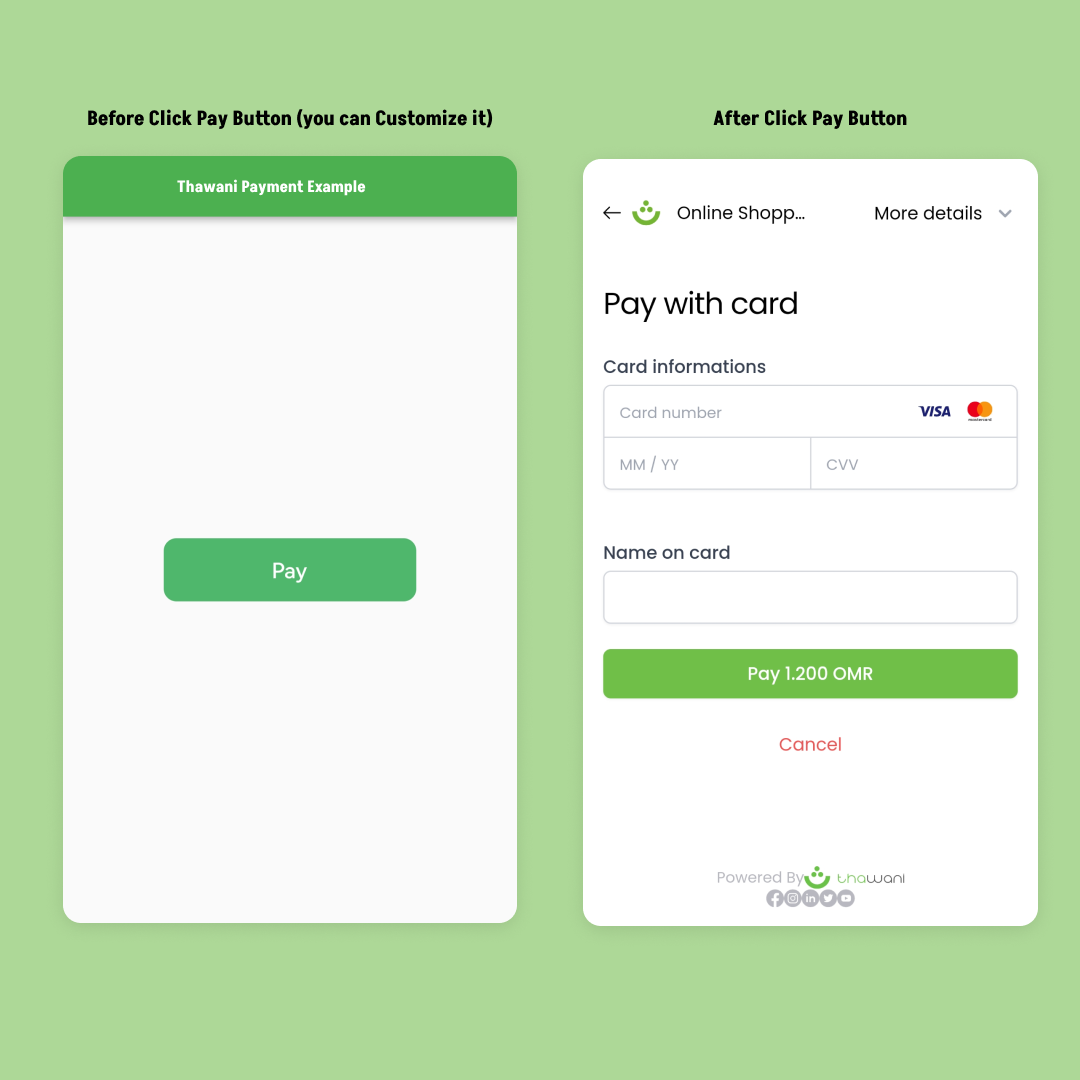
Sample example to add pay button :
import 'package:thawani_payment/thawani_payment.dart';

ThawaniPayBtn(
  api: 'API Key',
          pKey: 'Publishable Key',
          clintID: 'String',
          onError: (e){},
          products:[],
          onCreate: (v) {},
          onCancelled: (v){},
          onPaid: (v){},
          );
Sample example to add pay function :
import 'package:thawani_payment/thawani_payment.dart';

Thawani.pay(
  api: 'API Key',
          pKey: 'Publishable Key',
          clintID: 'String',
          onError: (e){},
          products:[],
          onCreate: (v) {},
          onCancelled: (v){},
          onPaid: (v){},
          );
The official API Document From Thawani in https://docs.thawani.om/.
First You Should have Keys From Thawani Thawani Checkout
And ensure to enable billing for the project.
minSdkVersion in android/app/build.gradle if it was previously lower than 19:android {
defaultConfig {
minSdkVersion 19
}
}
See the example directory for a complete sample app.
  ///  API Code From Thawani Company
  ///  For Test Mode: rRQ26GcsZzoEhbrP2HZvLYDbn9C9et

  final String api;

/// The Publishable Key From Thawani Company
/// For Test Mode: HGvTMLDssJghr9tlN9gr4DVYt0qyBy

  final String pKey;

  /// The Widget  Shown In The Button , By Default it have Text
  /// Text("Pay",style: TextStyle(color: Colors.white,fontSize: 17),)

  final Widget? child;


  /// Button Style
  /// ButtonStyle(
  ///     elevation: MaterialStateProperty.all(0),
  ///     shape: MaterialStateProperty.all(RoundedRectangleBorder(borderRadius: BorderRadius.circular(10))),
  ///    backgroundColor: MaterialStateProperty.all(const Color(0xff4FB76C)),
  ///   )

  final ButtonStyle? buttonStyle;


  /// The Clint Id to be generated by merchant to identify the session (From Thawani API Doc).
  /// You can use The User ID As Clint ID

  final String clintID;


  /// The customer would be redirected to successUrl if payment processed successfully (From Thawani API Doc).
  /// In This Package , The URL Unuseful

  final String?  successUrl;


  /// The customer would be redirected to successUrl if he decides to cancel the payment (From Thawani API Doc).
  /// In This Package , The URL Unuseful

  final String? cancelUrl;


  /// A list of products the customer is purchasing. maximum  100 products (From Thawani API Doc).
  /// [
  ///      {
  ///        "name": "product Name",
  ///         "unit_amount": the price by Baisa, >=100 <=5000000000
  ///        "quantity": the quantity of the line product,  >=1 <=100
  ///       }
  ///     ]

  final List<Map> products;


  /// Useful for storing additional information about your products, customers (From Thawani API Doc).
  /// storing Any Data about your products, customers(users)
  /// EX:
  /// { "userName":"Nasr Al-Rahbi", "Twitter":"abom_me"}

  final Map? metadata;


  /// Make It true If You Want Test The Package Or The Api
  /// By Default It's false
  /// testMode: false

  final bool? testMode;


  ///The Function And The Result Of Data After Create Session.

  final void Function(Create create) onCreate;

  ///The Function And The Result Of Data If The User  Cancelled The Payment.

  final void Function(StatusClass payStatus) onCancelled;

  ///The Function And The Result Of Data If The User  Cancelled The Payment.

  final void Function(StatusClass payStatus) onPaid;

  ///The Function And The Reason Of The Error,  If Any Error Happen.

  final  Function(Map error)? onError;

Lista de dependências 7 itens
^1.1.0^4.3.0^3.12.0^3.9.0{"sdk":"flutter"}{"sdk":"flutter"}^2.0.0Filtre pelo caso de uso, compare a atividade e confira o projeto original antes de adotá-lo.
“A repository is the most basic element of GitHub.”
GitHub Docs — About repositories ↗