

 v0.0.4
arc_sidebar
Um Sidebar/Drawer para flutter pps
14Curtidas 60Downloads em 30 dias145Pontos Pub
AndroidiOSWebmacOSWindowsLinux
Menu de Navegação para aplicativos Flutter

Texto original em inglês. Visite o GitHub para a versão atual.
by: Eliezer António

 |
 |
|---|
Add arc_sidebar: ^0.0.4 to your pubspec.yaml dependencies. And import it:
import 'package:arc_sidebar/arc_sidebar.dart';
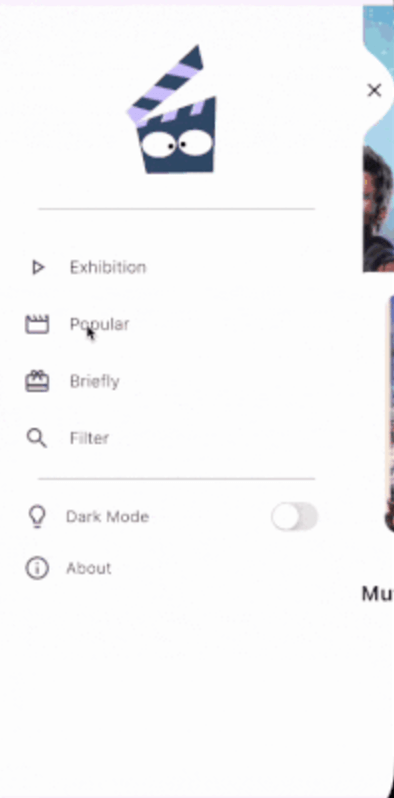
 ArcSideBar(
            body: [
              SideBarItem(
                icon: Icons.play_arrow_outlined,
                title: 'Exhibition Screen',
                onTap: (){

                },
              ),
              SideBarItem(
                title: 'Popular Screen',
                icon: Icons.movie_outlined,
               onTap: (){

                },
              ),
              SideBarItem(
                title: 'Briefly Screen',
                icon: Icons.card_giftcard,
               onTap: (){

                },
              ),
            ],

          );
  Key? key,
  IconData? icon,
  TextStyle? style,
  Color? iconColor,
  String title,
  void Function()? onTap,
class Home extends StatefulWidget {
  const Home({super.key});

  @override
  State<Home> createState() => _HomeState();
}

class _HomeState extends State<Home> {
  int _currentIndex = 0;
  final List<Widget> _currentScreen = [
    Container(color: Colors.red, width: 500, height: 1000),
    Container(color: Colors.purpleAccent, width: 500, height: 1000),
    Container(color: Colors.orange, width: 500, height: 1000),
    Container(color: Colors.greenAccent, width: 500, height: 1000),
  ];
  void onIconPressed(int index) async {
       if (_currentIndex == index) return; //* Prevent reconstruction of the current screen
    setState(() {
      _currentIndex = index;
    });
  }

  @override
  Widget build(BuildContext context) {
    return Scaffold(
      body: Stack(
        children: [
          _currentScreen[_currentIndex],
          ArcSideBar(
            background: Colors.white,
            header: Center(
              child: Column(
                mainAxisAlignment: MainAxisAlignment.center,
                crossAxisAlignment: CrossAxisAlignment.center,
                children: [
                  SizedBox(height: 50),
                  Icon(
                    Icons.flutter_dash,
                    size: 100,
                    color: Colors.blueAccent,
                  ),
                ],
              ),
            ),
            body: [
              SideBarItem(
                icon: Icons.play_arrow_outlined,
                title: 'Exhibition Screen',
                onTap: () => onIconPressed(0),
              ),
              SideBarItem(
                title: 'Popular Screen',
                icon: Icons.movie_outlined,
                onTap: () => onIconPressed(1),
              ),
              SideBarItem(
                title: 'Briefly Screen',
                icon: Icons.card_giftcard,
                onTap: () => onIconPressed(2),
              ),
            ],
            footer: Column(
              children: [
                ListTile(
                  title: Text("Dark Mode", style: TextStyle(fontWeight: FontWeight.w300, fontSize: 17)),
                  leading: Icon(Icons.lightbulb_outline, size: 30),
                  trailing: Switch.adaptive(
                    value: false,
                    onChanged: (value) {},
                  ),
                ),
              ],
            ),
          ),
        ],
      ),
    );
  }
}
Fork the Repository: Create your copy.
Create a Branch:
git checkout -b my-feature-branch
Make Changes: Implement your feature or fix.
Commit Changes:
git commit -m "Add a new feature"
Push to Your Fork:
git push origin my-feature-branch
Create a Pull Request: Submit your changes for review.
Lista de dependências 4 itens
{"sdk":"flutter"}^0.28.0{"sdk":"flutter"}^5.0.0Filtre pelo caso de uso, compare a atividade e confira o projeto original antes de adotá-lo.
“A repository is the most basic element of GitHub.”
GitHub Docs — About repositories ↗