ANSI / Xterm 256 color library for Dart
Feel like you're missing some color in your terminal programs? Use AnsiPen to add ANSI color codes to your log messages.
Easy to disable for production, just set color_disabled = true and all codes will be empty - no re-writing debug messages.
Note: color_disabled is a global variable for all pen colors.
Example
Note: Be mindful of contrasting colors. If you set "bright white" foreground and don't adjust the background, you'll have a bad time with lighter terminals.
Foreground to bright white with default background:
AnsiPen pen = AnsiPen()..white(bold: true);
print(pen("Bright white foreground") + " this text is default fg/bg");
Background as a peach, foreground as white:
AnsiPen pen = AnsiPen()..white()..rgb(r: 1.0, g: 0.8, b: 0.2, bg: true);
print(pen("White foreground with a peach background"));
Note
If color isn't working for you; try setting ansiColorDisabled = false;. We're relying on the stdio object to inform us of ANSI terminal support. Sometimes this is wrong.
Prior versions of this library just turned on color by default.
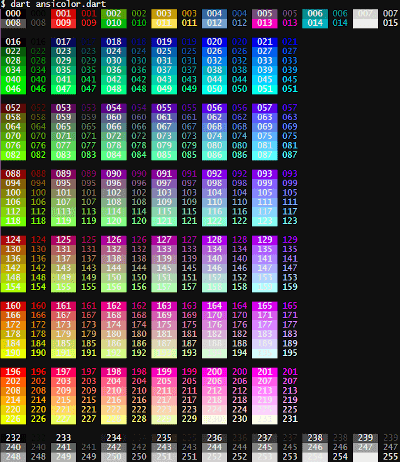
Rainbow Demo
If you want a specific color, you can call the xterm() with the index listed in the rainbow below. To show the rainbow on your own terminal, pub run examples/ansicolor.dart
alt tag


 v2.0.3