
css_text_for_flutter
Esta biblioteca Flutter permite usar CSS para estilizar seu texto
- Estrelas
- 56
- Forks
- 16
- Último push (UTC)
- 26 de mai. de 2023
- Status do projeto
- Ativo
README original
Texto original em inglês. Visite o GitHub para a versão atual.
CSS Text
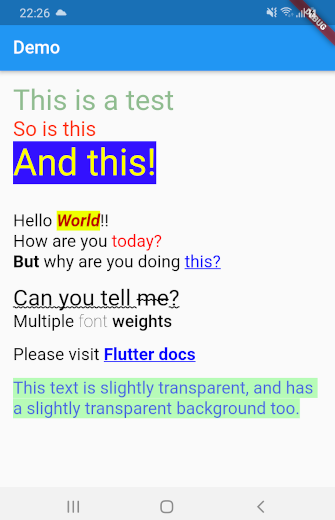
This library makes it easy for you to convert HTML and CSS content into RichText widgets. It supports most CSS properties that are relevant to text content, except those related to text alignment.
Here's some sample HTML content with inline CSS styles:
<body>
<p style="font-size:2.5em;color:darkseagreen">This is a test</p>
<p style="font-size:1.8em;color:#ff3311">So is this</p>
<p style="font-size:45px;background:#3311ff;color:yellow">And this!</p>
<br/>
<br/>
<p style="font-size:1.5em">
Hello <b style="font-style:italic;color:#bb0000;background:#eeff00">World</b>!!
<br/>
How are you <span style="font-family:RobotoBlack;color:#ff0000;">today?</span>
<br/>
<b>But</b> why are you doing <a href="https://google.com">this?</a><br/>
<br/>
<span style="text-decoration: underline wavy; font-size:2em">Can you tell <del>me</del>?</span>
<br/>
Multiple <span style="font-weight:100">font</span>
<span style="font-weight:600">weights</span><br/><br/>
Please visit <a style="font-weight:bold;" href="https://docs.flutter.io">Flutter docs</a>
<br/>
<br/>
<span style="color:#990000ff;background:#4400ff00">
This text is slightly transparent, and has a slightly transparent background too.
</span>
</p>
</body>
This library can automatically convert all the HTML content above into a TextSpan object or a RichText widget. Here's what the rendered HTML will look like:
Getting Started
Using css_text is extremely easy. First import the library in your Dart code:
import 'package:css_text/css_text.dart';
You can then create RichText widget from any HTML content by calling the HTML.toTextSpan() method.
String htmlContent = """
<p style="font-size:1.5em;color:#99ff0011">Hello <b>World</b>
""";

var myRichText = RichText(text: HTML.toTextSpan(context, htmlContent));
As a shortcut, you can also use the HTML.toRichText() method.
myRichText = HTML.toRichText(context, htmlContent);
Handling Links
Your HTML content can have links. To handle them, you must use the linksCallback optional parameter.
String htmlContent = """<span style="font-size:2em">
Please click <a href="https://pub.dartlang.org">here</a> or
<a href="https://old.reddit.com">here</a>.<br/>
<br/>
Go ahead! Try it.
</span>""";

var myRichText = HTML.toRichText(context, htmlContent, linksCallback: (link) {
    // You can now use the url_launcher library to open the link.
    // Or you can handle the link in your app itself. This gives you
    // complete control over your links.
    // For now, let's just print it
    print(link);
});

Ashraff Hathibelagal ↗
Categorias
Dependências usadas
Lista de dependências 2 itens
- flutter
{"sdk":"flutter"} - xml
^6.3.0
Como escolher um repositório para seu projeto?
Filtre pelo caso de uso, compare a atividade e confira o projeto original antes de adotá-lo.
- Busque por nome, autor ou descrição e filtre por tema.
- Compare estrelas, forks e envios recentes. Estrelas indicam interesse, mas não garantem qualidade.
- Confira o README, a licença e as issues no GitHub antes de usar o projeto.
Fontes e manutenção
“A repository is the most basic element of GitHub.”
GitHub Docs — About repositories ↗