Buscar pacotes, repositórios e categorias de apps

Repositório GitHubjulvo/flutter_page_slider

flutter_page_slider

Um widget do Flutter que desliza pelas páginas horizontalmente

Capa do projeto flutter_page_slider
Estrelas
18
Forks
12
Último push (UTC)
5 de jun. de 2019
Status do projeto
Ativo

README original

Texto original em inglês. Visite o GitHub para a versão atual.

flutter_page_slider

Pub

A simple Flutter widget that slides through pages horizontally. Use-cases could be wizards or onboarding flows similar to the Material Stepper widget, but without a particular UI - any widget can be a page to slide through.

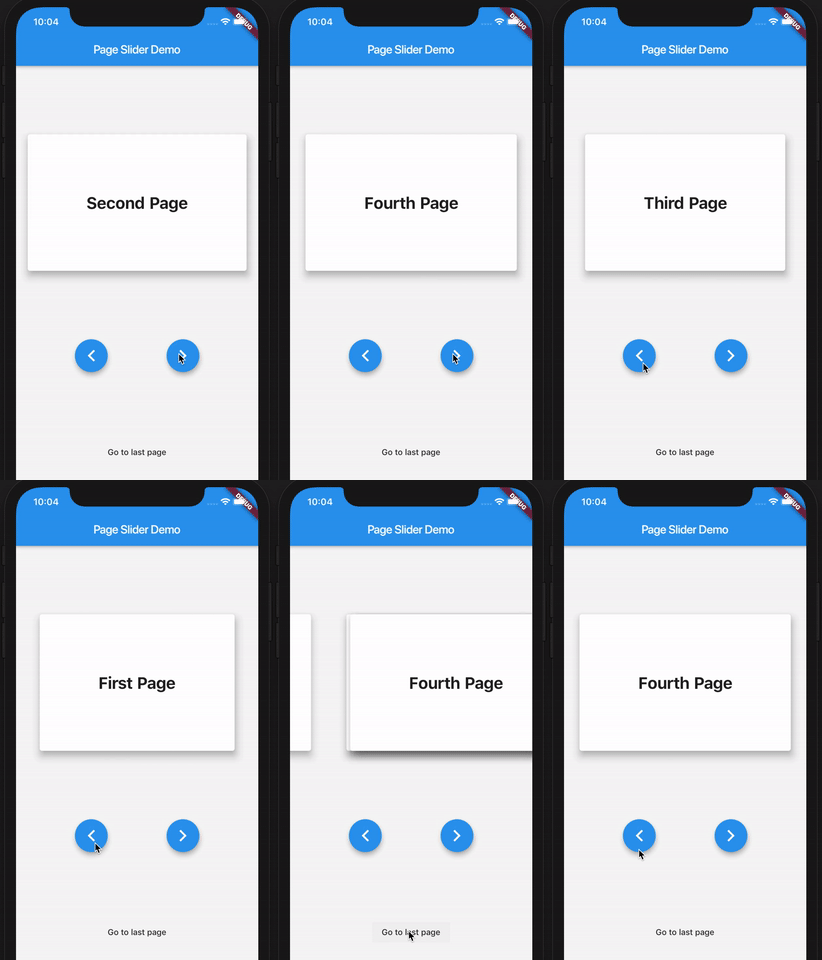
Here's a demo of the example app:

PageSlider demo app

How to use

First, create the PageSlider widget with a GlobalKey<PageSliderState> and the child widgets which you want to slide through. Then, control the active page using the global key to address the page slider state like so:

class Demo extends StatefulWidget {
  Demo({Key key}) : super(key: key);
  _DemoState createState() => _DemoState();
}

class _DemoState extends State<Demo> {
  GlobalKey<PageSliderState> _sliderKey = GlobalKey();

  @override
  Widget build(BuildContext context) {
    return Column(
      children: [
        PageSlider(
          key: _sliderKey,
          pages: [
            Text('Page 0'),
            Text('Page 1'),
            Text('Page 2'),
          ]
        ),
        RaisedButton(
          onPressed: _sliderKey.currentState.next,
          child: Text('Next')
        ),
        RaisedButton(
          onPressed: _sliderKey.currentState.previous,
          child: Text('Previous')
        ),
      ]
    );
  }
}
Julian Vossen GitHub avatar
Autor no GitHub

Julian Vossen ↗

LinguagensDart

Pacotes publicados por este repositório

Dependências usadas

Lista de dependências 2 itens

  • flutter{"sdk":"flutter"}
  • flutter_testDesenvolvimento{"sdk":"flutter"}

Como escolher um repositório para seu projeto?

Filtre pelo caso de uso, compare a atividade e confira o projeto original antes de adotá-lo.

  1. Busque por nome, autor ou descrição e filtre por tema.
  2. Compare estrelas, forks e envios recentes. Estrelas indicam interesse, mas não garantem qualidade.
  3. Confira o README, a licença e as issues no GitHub antes de usar o projeto.

Fontes e manutenção

“A repository is the most basic element of GitHub.”

GitHub Docs — About repositories ↗