
AwesomeButton
Este é um botão pré-construído para o flutter com uma aparência incrível.

- Estrelas
- 8
- Forks
- 2
- Último push (UTC)
- 21 de ago. de 2019
- Status do projeto
- Ativo
README original
Texto original em inglês. Visite o GitHub para a versão atual.
AwesomeButton
This is a pre-built button for flutter with an awesome look.
Installation
Add the awesome_button to your dependencies in your pubspec.yaml.
awesome_button: ^1.0.2
Usage
Import the AwesomeButton.dart using this line below.
import 'package:awesome_button/awesome_button.dart';
Add the AwesomeButton widget to your widget tree and provide your parameter to it, like examples below.
Example
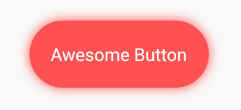
AwesomeButton(
  blurRadius: 10.0,
  splashColor: Color.fromRGBO(255, 255, 255, .4),
  borderRadius: BorderRadius.circular(37.5),
  height: 75.0,
  width: 200.0,
  onTap: () => print("tapped"),
  color: Colors.redAccent,
  child: Text(
    "Awesome Button",
    style: TextStyle(
      color: Colors.white,
      fontSize: 20.0,
    ),
  ),
),

AwesomeButton(
  blurRadius: 10.0,
  splashColor: Color.fromRGBO(255, 255, 255, .4),
  borderRadius: BorderRadius.circular(50.0),
  height: 100.0,
  width: 100.0,
  onTap: () => print("tapped"),
  color: Colors.greenAccent,
  child: Icon(
    Icons.account_circle,
    color: Colors.white,
    size: 50.0,
  ),
),
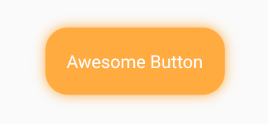
AwesomeButton(
  blurRadius: 10.0,
  splashColor: Color.fromRGBO(255, 255, 255, .4),
  borderRadius: BorderRadius.circular(25.0),
  height: 75.0,
  width: 200.0,
  onTap: () => print("tapped"),
  color: Colors.orangeAccent,
  child: Text(
    "Awesome Button",
    style: TextStyle(
      color: Colors.white,
      fontSize: 20.0,
    ),
   ),
),

Autor no GitHub
Millian ↗
LinguagensDart
Como escolher um repositório para seu projeto?
Filtre pelo caso de uso, compare a atividade e confira o projeto original antes de adotá-lo.
- Busque por nome, autor ou descrição e filtre por tema.
- Compare estrelas, forks e envios recentes. Estrelas indicam interesse, mas não garantem qualidade.
- Confira o README, a licença e as issues no GitHub antes de usar o projeto.
Fontes e manutenção
“A repository is the most basic element of GitHub.”
GitHub Docs — About repositories ↗