
 v0.0.2
widget_marker_google_map
Mapa do Google personalizado com marcadores de widget. Permite exibir marcadores com código de widget.
23Curtidas 67Downloads em 30 dias140Pontos Pub
AndroidiOSWeb
Mapa do Google personalizado com marcadores de widget.

{"sdk":"flutter"}^2.1.0^2.1.3{"sdk":"flutter"}^1.0.0Texto original em inglês. Visite o GitHub para a versão atual.
Google map with widget markers.
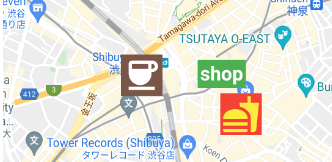
https://user-images.githubusercontent.com/43510799/142984717-853a7686-503e-4e2c-b090-9767e25fb8d3.pngFollow the steps on google_maps_flutter document.
Same as google_maps_flutter except for widgetMarkers.
 WidgetMarkerGoogleMap(
    initialCameraPosition: shibuya,
    mapType: MapType.normal,
    widgetMarkers: [
      WidgetMarker(
        position: cafePosition,
        markerId: 'cafe',
        widget: Container(
          color: Colors.brown,
          padding: const EdgeInsets.all(2),
          child: const Icon(
            Icons.coffee,
            color: Colors.white,
            size: 64,
          ),
        ),
      ),
      WidgetMarker(
        position: clothesShopPosition,
        markerId: 'clothes',
        widget: Container(
          color: Colors.green,
          padding: const EdgeInsets.all(4),
          child: const Text(
            'shop',
            style: TextStyle(
              color: Colors.white,
              fontWeight: FontWeight.bold,
              fontSize: 32,
            ),
          ),
        ),
      ),
      WidgetMarker(
        position: hamburgerShopPosition,
        markerId: 'hamburger',
        widget: Container(
          color: Colors.red,
          padding: const EdgeInsets.all(2),
          child: const Icon(
            Icons.fastfood,
            color: Colors.yellow,
            size: 64,
          ),
        ),
      ),
    ],
  ),
You need to insert the list of WidgetMarker to use widget markers.
Make sure that you still need to use onTap method when you use gestures.
class WidgetMarker {
  WidgetMarker({
    required this.position,
    required this.markerId,
    required this.widget,
    this.onTap,
  }) : assert(markerId.isNotEmpty);

  final LatLng position;

  /// Keep this unique, otherwise it will not appear.
  final String markerId;

  /// Gestures of widget is disabled.
  /// Use this callback instead.
  final VoidCallback? onTap;

  final Widget widget;
}
If you have any requests or questions, feel free to ask on github.
Thanks goes to these wonderful people (emoji key):
| Devin Devin 💻 |
Santa Takahashi Santa Takahashi 💻 |
This project follows the all-contributors specification. Contributions of any kind welcome!