
 v0.5.0
round_spot
Biblioteca de análise de interface de mapa de calor personalizável e fácil de usar
90Curtidas 28Downloads em 30 dias130Pontos Pub
AndroidiOSWebmacOSWindowsLinux
Biblioteca de análise de interface de mapa de calor personalizável

{"sdk":"flutter"}^7.1.0^1.0.0^0.3.0^2.0.0^1.0.0^1.3.0^2.0.0^2.0.1{"sdk":"flutter"}^0.1.2^1.15.0^2.0.0+1^1.2.0^1.3.1^1.11.0Texto original em inglês. Visite o GitHub para a versão atual.
Pub likes build style: effective dart License: MIT
Banner
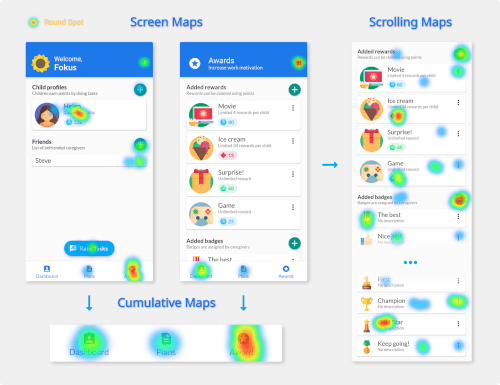
Round Spot simplifies the UI accessibility and behaviour analysis for Flutter applications by handling the data gathering and processing. It produces beautiful heat map visualizations that aim to make the UI improvement and troubleshooting easy and intuitive.
⚠️ Note: This tool still in its development and currently only offers local on device heat map generation. This limits the number of interactions that can be included in a single image and therefore can be considered as a preview.
Import the package in your main file:
import 'package:round_spot/round_spot.dart';
Wrap your MaterialApp widget to initialize the library:
void main() {
  runApp(initialize(
    child: Application()
  ));
}
Add an observer for monitoring the navigator:
MaterialApp(
  navigatorObservers: [ Observer() ]
)
Provide the callbacks for saving the processed output:
initialize(
  localRenderCallback: (data, info) => sendHeatMapImage(data)
)
Configure the tool to better fit your needs:
initialize(
  config: Config(
    minSessionEventCount: 5,
    uiElementSize: 15,
    heatMapPixelRatio: 2.0,
  )
)
Route names are used to differentiate between pages. Make sure you are consistently specifying them both when using named routes and pushing PageRoutes (inside RouteSetting)
To correctly monitor interactions with any scrollable space a Detector
has to be placed as a direct parent of that widget:
Detector(
  areaID: id,
  child: ListView(
    children: /* children */,
  ),
)
Created by Stanisław Góra
This tool is licenced under MIT License