
floating_frosted_bottom_bar
thejitenpatel/floating_frosted_bottom_bar open-source repository details.

- Estrelas
- 5
- Forks
- 2
- Último push (UTC)
- 13 de fev. de 2022
- Status do projeto
- Ativo
README original
Texto original em inglês. Visite o GitHub para a versão atual.
Floating Frosted Bottom Bar


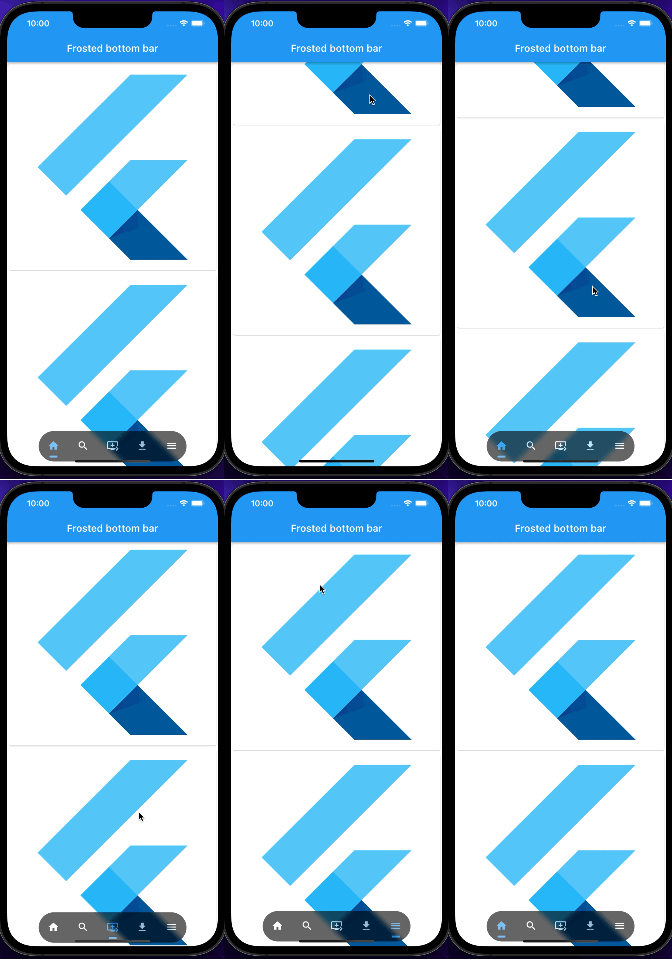
A Flutter package that helps you to create a frosted floating bottom navigation bar that also reacts to scrolling events.
Demo 👀
Usage 🎨
Wrap any child widget with FrostedBottomBar to convert it into frosted bottom bar.
Basic example,
FrostedBottomBar(
        opacity: 0.6,
        sigmaX: 5,
        sigmaY: 5,
        child: Text(
              "Frosted Bottom Bar Example",
              textAlign: TextAlign.center,
              style: TextStyle(color: Colors.white),
            ),
        body: (context, controller) =>
              ListView.builder(
                  controller: controller,
                  itemBuilder: (context, index) {
                    return const Card(child: FittedBox(child: FlutterLogo()));
                  },
                ),
    )
Detail Usage
Following are the optional properties that can be used inside FrostedBottomBar
| Parameter | Example | Action |
|---|---|---|
| sgimaX | sgimaX: 5 |
Creates an image filter that applies a Gaussian blur |
| sgimaY | sgimaY: 5 |
Creates an image filter that applies a Gaussian blur |
| opacity | opacity: 0.6 |
An opacity of 1.0 is fully opaque. An opacity of 0.0 is fully transparent (i.e., invisible). |
| hideOnScroll | hideOnScroll: false |
On true it will hide bottom bar on scroll |
| bottomBarColor | bottomBarColor: Colors.grey |
Change the bottom bar color |
| start | start: 2 |
The start position in y-axis of the SlideTransition of the FrostedBottomBar |
| end | end: 0 |
The end position in y-axis of the SlideTransition of the FrostedBottomBar |
| duration | duration: const Duration(seconds: 1) |
Set the duration of the FrostedBottomBar |
| width | width: MediaQuery.of(context).size.width * 0.6 |
Set the width for FrostedBottomBar |
| borderRadius | borderRadius: BorderRadius.circular(500) |
Set the radius of FrostedBottomBar |
| reverse | reverse: true |
Reverse the direction of scrolling of FrostedBottomBar i.e. if you want to make the bar visible when you scroll down and hide it when you scroll up, set this to true |
| alignment | alignment: Alignment.bottomCenter |
Set the alignment of FrostedBottomBar |
| fit | fit: StackFit.loose |
The fit property of the Stack in which the FrostedBottomBar is placed |
| alignment | alignment: Alignment.bottomCenter |
Set the alignment of FrostedBottomBar |

Autor no GitHub
Jiten Patel ↗
LinguagensC++DartCMakeHTMLSwiftCKotlinObjective-C
Dependências usadas
Lista de dependências 3 itens
- flutter
{"sdk":"flutter"} - flutter_testDesenvolvimento
{"sdk":"flutter"} - flutter_lintsDesenvolvimento
^1.0.0
Como escolher um repositório para seu projeto?
Filtre pelo caso de uso, compare a atividade e confira o projeto original antes de adotá-lo.
- Busque por nome, autor ou descrição e filtre por tema.
- Compare estrelas, forks e envios recentes. Estrelas indicam interesse, mas não garantem qualidade.
- Confira o README, a licença e as issues no GitHub antes de usar o projeto.
Fontes e manutenção
“A repository is the most basic element of GitHub.”
GitHub Docs — About repositories ↗