flutter_update_dialog
Version
Build Status
Issue
Star
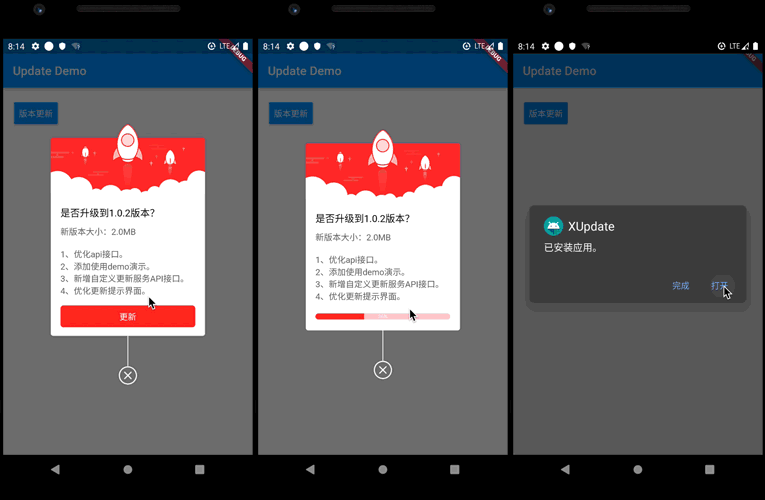
Application version update dialog. With it, you can customize the logic of version update.
You can refer to the following project:
https://github.com/xuexiangjys/flutter_app_update_example
Getting Started
You should ensure that you add the flutter_update_dialog as a dependency in your flutter project.
// pub 集成
dependencies:
  flutter_update_dialog: ^2.0.0

//github  集成
dependencies:
  flutter_update_dialog:
    git:
      url: git://github.com/xuexiangjys/flutter_update_dialog.git
      ref: master
UseCase
Default Style
  void defaultStyle() {
    if (dialog != null && dialog.isShowing()) {
      return;
    }
    dialog = UpdateDialog.showUpdate(context,
        title: "是否升级到4.1.4版本?",
        updateContent: "新版本大小:2.0M\n1.xxxxxxx\n2.xxxxxxx\n3.xxxxxxx",
        onUpdate: onUpdate);
  }
Custom Style
  void customStyle() {
    if (dialog != null && dialog.isShowing()) {
      return;
    }
    dialog = UpdateDialog.showUpdate(context,
        width: 250,
        title: "是否升级到4.1.4版本?",
        updateContent: "新版本大小:2.0M\n1.xxxxxxx\n2.xxxxxxx\n3.xxxxxxx",
        titleTextSize: 14,
        contentTextSize: 12,
        buttonTextSize: 12,
        topImage: Image.asset('assets/bg_update_top.png'),
        extraHeight: 5,
        radius: 8,
        themeColor: Color(0xFFFFAC5D),
        progressBackgroundColor: Color(0x5AFFAC5D),
        isForce: true,
        updateButtonTxt: '升级',
        ignoreButtonTxt: '忽略此版本',
        enableIgnore: true, onIgnore: () {
          ToastUtils.waring("忽略");
          dialog.dismiss();
        },
        onUpdate: onUpdate);
  }
Property value
| Name |
Type |
Default |
Description |
| width |
double |
0.618 * screenWidth |
dialog width |
| title |
String |
/ |
dialog title |
| updateContent |
String |
/ |
Update the modified content |
| onUpdate |
VoidCallback |
/ |
Click on the update button event |
| titleTextSize |
double |
16.0 |
The size of the title text |
| contentTextSize |
double |
14.0 |
The size of the update content text |
| buttonTextSize |
double |
14.0 |
The size of the button text |
| themeColor |
Color |
Colors.red |
Theme color |
| progressBackgroundColor |
Color |
0xFFFFCDD2 |
The background color of the progress bar |
| topImage |
Image |
/ |
Picture at the top |
| extraHeight |
double |
5.0 |
Extra height from top image |
| radius |
double |
4.0 |
Angle of corner |
| enableIgnore |
bool |
false |
Whether to enable the ignore version button |
| updateButtonText |
String |
'更新' |
Update button text |
| ignoreButtonText |
String |
'忽略此版本' |
Ignore button text |
| isForce |
bool |
false |
Whether to force update |
| onIgnore |
VoidCallback |
/ |
Click on the ignore button event |


 v2.0.0