
zahra-ai-chatbot
Chatbot de IA do Flutter multiplataforma com integração ao Groq e Gemini, autenticação Firebase e streaming em tempo real
- Estrelas
- 1
- Forks
- 0
- Último push (UTC)
- 2 de jul. de 2026
- Status do projeto
- Ativo
README original
Texto original em inglês. Visite o GitHub para a versão atual.
✨ Zahra AI — Cross-Platform Flutter AI Chat Assistant
A production-grade, multi-model AI chatbot built with Flutter, Firebase, and Groq/Gemini APIs — featuring real-time streaming responses, persona switching, file intelligence, and full authentication.







Features • Architecture • Screenshots • Getting Started • Tech Stack • Roadmap • Contributing
📖 About The Project
Zahra AI is a full-stack, cross-platform AI chat assistant built with Flutter and Clean Architecture principles. It integrates multiple large language model providers (Groq — Llama 3.3 70B, Llama 3.1 8B, Mixtral, Qwen 2.5 and Google Gemini Vision) into a single, polished chat experience with real-time token streaming, persistent chat history via Cloud Firestore, and secure authentication through Firebase Auth (Email/Password + Google Sign-In).
Unlike a typical "wrapper" chatbot demo, this project is structured the way production Flutter apps are built: feature-first folder structure, Riverpod for reactive state management, a dedicated service layer for API/network calls, and platform-ready builds for Android, iOS, Web, Windows, macOS, and Linux from a single codebase.
Built as a portfolio-grade demonstration of scalable Flutter architecture, multi-LLM integration, and real-time streaming UX.
🚀 Key Features
| Category | Feature |
|---|---|
| 🔐 Authentication | Firebase Auth with Email/Password + Google Sign-In, persistent session handling |
| ⚡ Real-Time Streaming | Token-by-token AI response streaming with an instant Stop Generation control |
| 🧠 Multi-Model AI Engine | Hot-swap between Groq models (llama-3.3-70b-versatile, llama-3.1-8b-instant, mixtral-8x7b, qwen-2.5-32b) and Gemini Vision |
| 🎭 AI Personas | Switchable personality modes — Helpful, Creative, Technical, Poetic — each with tuned system prompts |
| 💬 Persistent Chat History | Multi-session chat storage and retrieval via Cloud Firestore, with live search across past conversations |
| 📎 File Intelligence | Upload and parse images, PDFs, and DOCX files directly into the conversation context |
| 🎙️ Voice Input | Native speech-to-text dictation for hands-free prompting |
| 📤 Export & Share | Export any conversation to .txt and share instantly via WhatsApp, Gmail, Bluetooth, etc. |
| 🌗 Adaptive Theming | Fully reactive Light/Dark theme toggle powered by Riverpod StateNotifier |
| 📝 Markdown Rendering | Rich Markdown rendering for AI responses (code blocks, lists, headings) |
| 👤 Profile Management | Dedicated profile screen for account and session management |
| 🌍 Cross-Platform | Single codebase deployed to Android, iOS, Web, Windows, macOS, and Linux |
🏗️ Architecture Overview
This project follows a feature-first, Clean Architecture-inspired structure, separating UI, state, and data concerns for scalability and testability.
lib/
├── core/                     # App-wide config, theming, constants
│   ├── config.dart           # Environment & API configuration (.env driven)
│   ├── theme.dart             # Light/Dark ThemeData definitions
│   └── theme_provider.dart    # Riverpod ThemeMode state notifier
│
├── features/                 # Feature-first modules
│   ├── auth/
│   │   ├── providers/         # Auth state (Riverpod StreamProvider on FirebaseAuth)
│   │   └── views/             # Login / Sign-up screens
│   ├── chat/
│   │   ├── providers/         # Chat + persona state notifiers, streaming logic
│   │   ├── views/             # Main chat UI
│   │   └── widgets/           # Message bubble & reusable chat widgets
│   └── profile/
│       └── views/             # User profile screen
│
├── shared/
│   ├── models/                 # Msg, ChatSession — Firestore-serializable data models
│   └── services/               # AIService (Groq/Gemini), FirebaseService (Auth/Firestore/Storage)
│
├── firebase_options.dart       # Auto-generated FlutterFire config
└── main.dart                   # App entry point & provider scope
Data flow at a glance:
User Input → ChatNotifier (Riverpod) → AIService → Groq/Gemini API
                                              ↓
                                     Streamed tokens → UI (live)
                                              ↓
                                  FirebaseService → Cloud Firestore (persisted)
Why this architecture?
- Separation of concerns — UI never talks to Firebase or the AI API directly; everything routes through providers and services.
- Testability — Services and notifiers are decoupled from widgets, making unit testing straightforward.
- Scalability — Adding a new LLM provider or feature module doesn't require touching unrelated code.
📱 Screenshots
| Login | Sign Up | Chat (Streaming) |
|---|---|---|
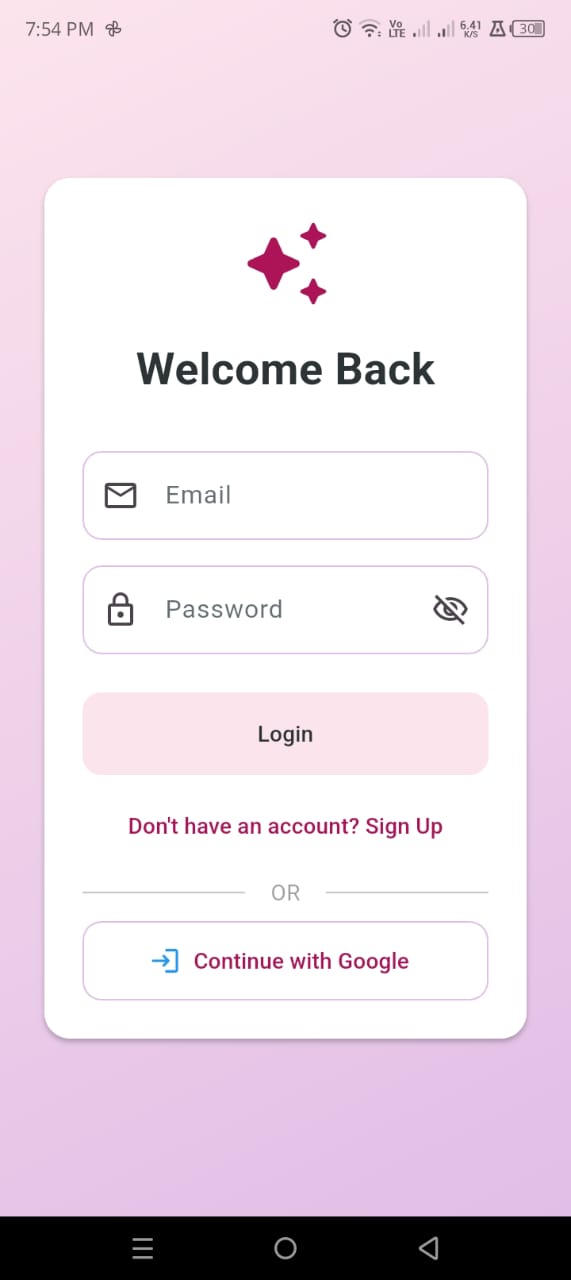 |
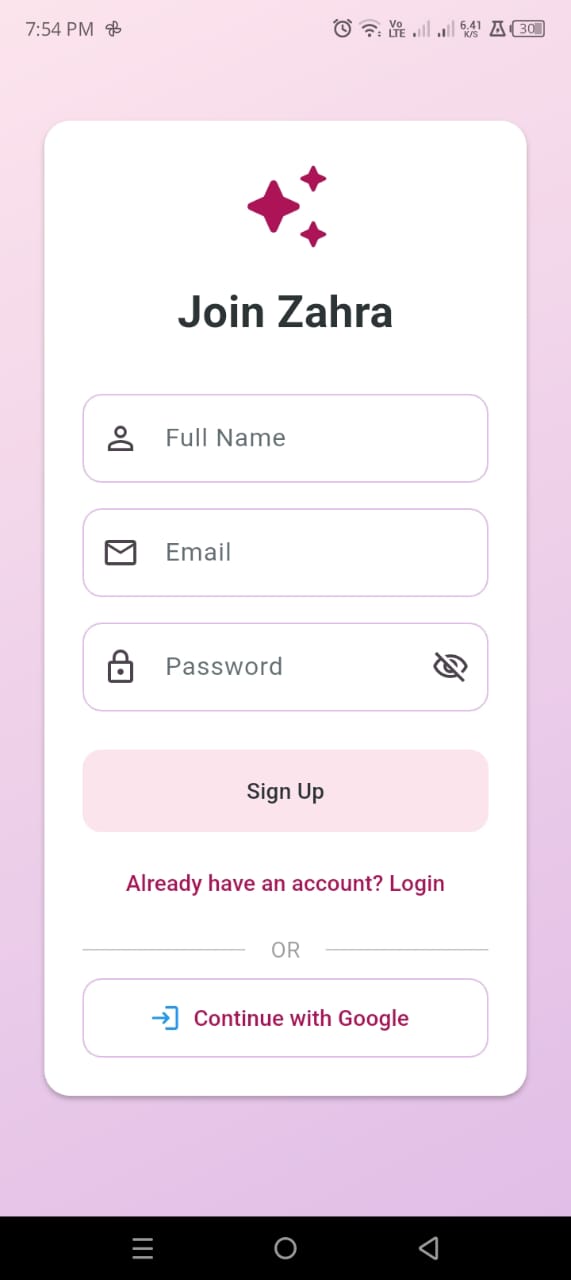 |
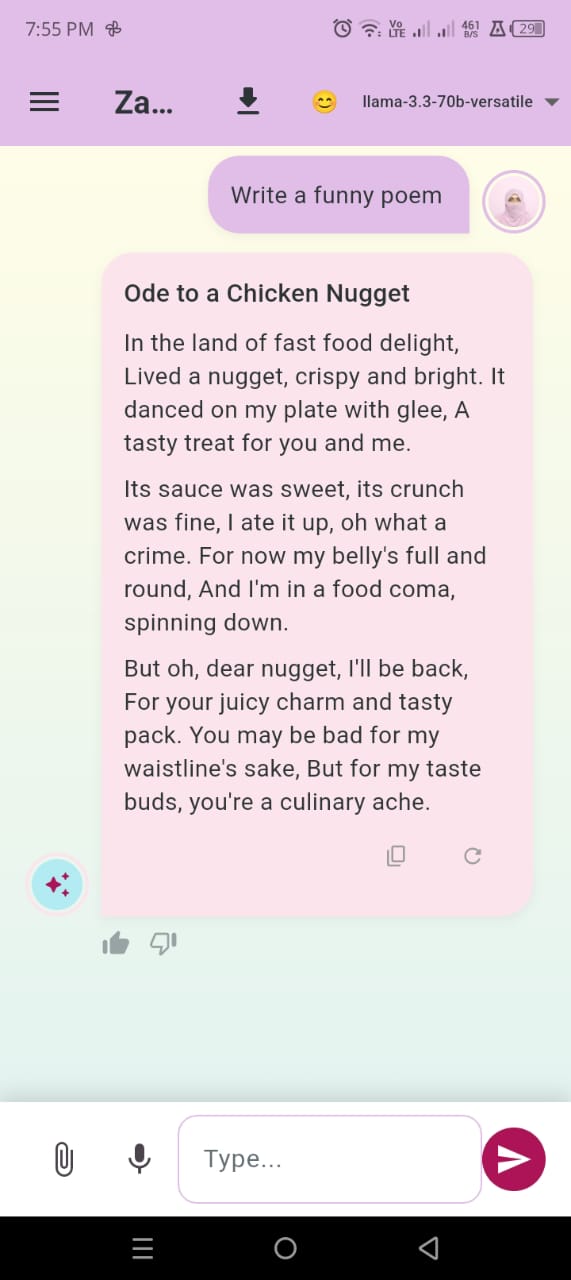 |
| Chat History & Search | Attach Files | Export & Share |
|---|---|---|
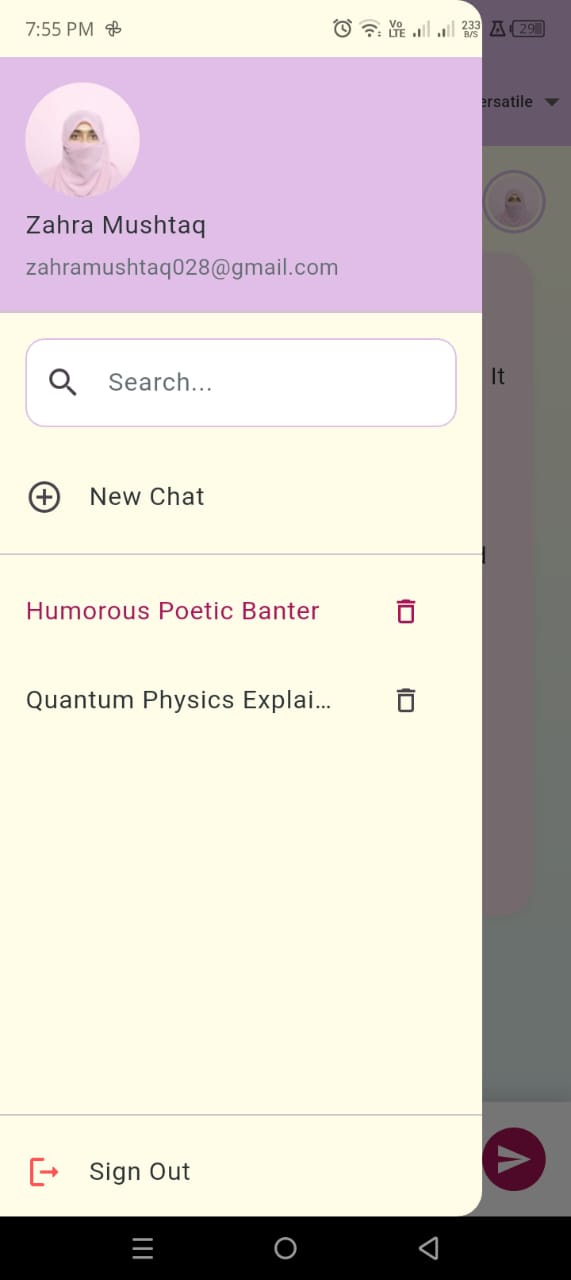 |
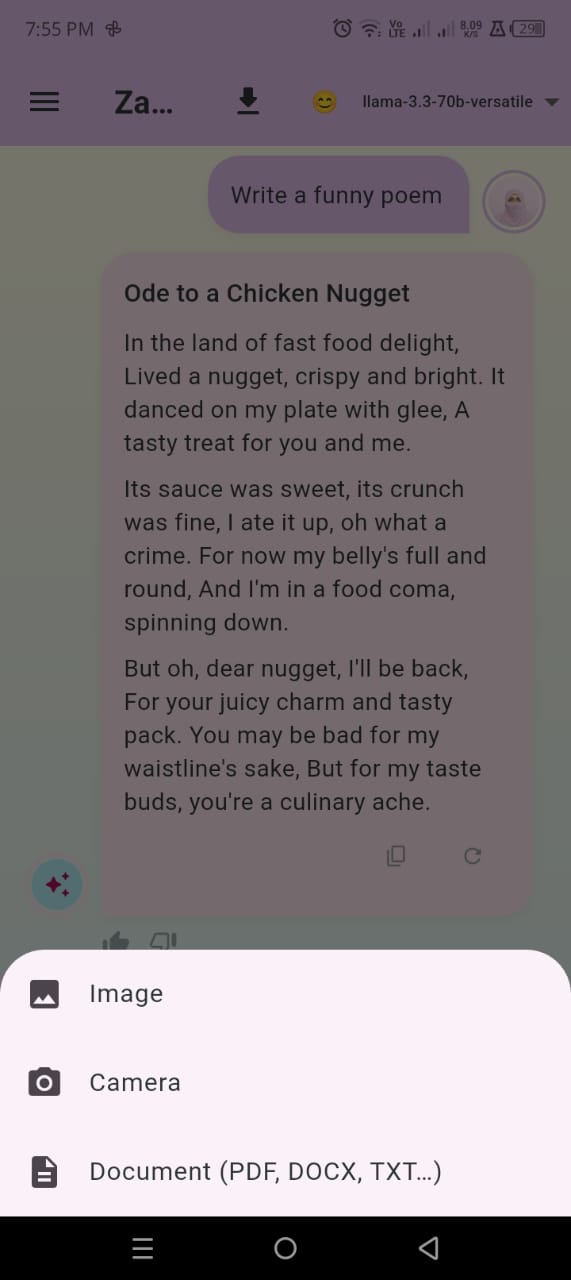 |
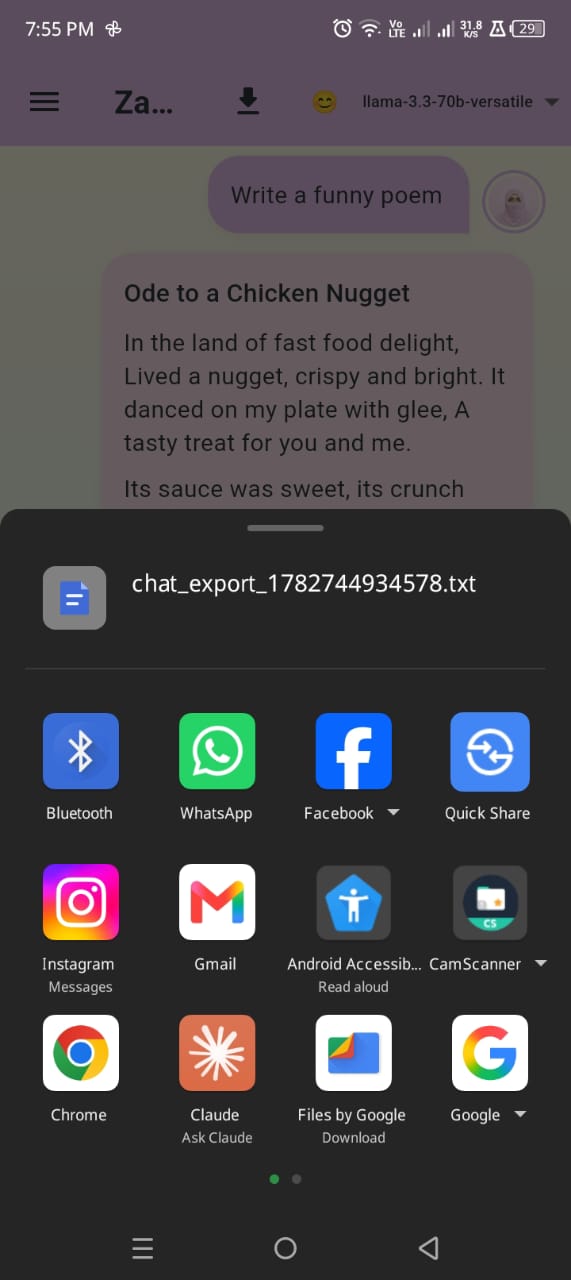 |
📸 Replace these with your latest build screenshots any time — just drop new images into
/screenshotsusing the same filenames, or update the paths above.
🧰 Tech Stack
Frontend / Framework
State Management
- flutter_riverpod 2.6 ·
riverpod_annotation
Backend / Cloud
- Firebase Auth · Cloud Firestore · Firebase Storage · Google Sign-In
AI / LLM Providers
- Groq API — Llama 3.3 70B, Llama 3.1 8B, Mixtral 8x7B, Qwen 2.5 32B
- Google Gemini — Gemini Vision
File & Media Handling
file_picker·image_picker·syncfusion_flutter_pdf·archive(DOCX/ZIP parsing) ·speech_to_text·share_plus
Utilities
flutter_dotenv(secure env config) ·flutter_markdown·connectivity_plus·path_provider·uuid·intl
🖥️ Supported Platforms
| Android | iOS | Web | Windows | macOS | Linux |
|---|---|---|---|---|---|
| ✅ | ✅ | ✅ | ✅ | ✅ | ✅ |
⚙️ Getting Started
Prerequisites
- Flutter SDK
>= 3.11 - A Firebase project (Auth + Firestore enabled)
- A free Groq API key
- A Google Gemini API key (optional, for vision features)
1. Clone the repository
git clone https://github.com/zahra01-m/zahra-ai-chatbot.git
cd zahra-ai-chatbot
2. Install dependencies
flutter pub get
3. Configure environment variables
Create a .env file in the project root (this file is git-ignored and never committed):
GROQ_KEY=your_groq_api_key_here
GEMINI_KEY=your_gemini_api_key_here
GOOGLE_CLIENT_ID=your_google_oauth_client_id_here
4. Connect Firebase
Install the FlutterFire CLI and run:
dart pub global activate flutterfire_cli
flutterfire configure
This regenerates lib/firebase_options.dart for your own Firebase project.
5. Run the app
flutter run
To target a specific platform:
flutter run -d chrome      # Web
flutter run -d windows     # Windows
flutter run -d macos       # macOS
6. Build a release
flutter build apk --release        # Android
flutter build ios --release        # iOS
flutter build web --release        # Web
🔒 Security Notes
- API keys are loaded via
flutter_dotenvand never hard-coded in source. .envis included in.gitignore— always double-check it isn't tracked before pushing.- Firebase security rules should restrict Firestore reads/writes to authenticated users only (see
firestore.rulesif included, or configure via the Firebase Console).
🗺️ Roadmap
- [ ] Group/shared chat sessions
- [ ] Offline response caching
- [ ] In-app model usage analytics dashboard
- [ ] Custom persona builder (user-defined system prompts)
- [ ] Push notifications for async AI replies
🤝 Contributing
Contributions, issues, and feature requests are welcome!
- Fork the project
- Create your feature branch (
git checkout -b feature/AmazingFeature) - Commit your changes (
git commit -m 'Add some AmazingFeature') - Push to the branch (
git push origin feature/AmazingFeature) - Open a Pull Request
Please open an issue first for major changes to discuss what you'd like to change.
📄 License
Distributed under the MIT License. See LICENSE for more information.
👩💻 Author
Zahra Mushtaq Flutter Developer · BS Computer Science, COMSATS University Islamabad
- GitHub: @zahra01-m
- LinkedIn: zahra-mushtaq-
⭐ If you found this project useful, consider giving it a star!
Keywords: Flutter Developer Portfolio · Flutter AI Chatbot · Firebase Flutter App · Riverpod State Management · Groq API Integration · Cross-Platform Mobile App · Clean Architecture Flutter · LLM Chat Application · Flutter Firebase Authentication

ZAHRA_MUSHTAQ ↗
Categorias
Dependências usadas
Lista de dependências 26 itens
- flutter
{"sdk":"flutter"} - cupertino_icons
^1.0.8 - flutter_riverpod
^2.6.1 - riverpod_annotation
^2.6.1 - firebase_core
^3.1.0 - firebase_auth
^5.1.0 - cloud_firestore
^5.1.0 - firebase_storage
^12.1.0 - google_sign_in
^6.2.0 - http
^1.2.0 - flutter_markdown
^0.7.3+2 - file_picker
^11.0.2 - image_picker
^1.1.0 - syncfusion_flutter_pdf
^28.1.33 - speech_to_text
^7.0.0 - archive
^3.6.1 - path_provider
^2.1.0 - share_plus
^12.0.2 - connectivity_plus
^6.1.1 - uuid
^4.5.1 - intl
^0.20.2 - flutter_dotenv
^6.0.1 - flutter_testDesenvolvimento
{"sdk":"flutter"} - flutter_lintsDesenvolvimento
^5.0.0 - riverpod_generatorDesenvolvimento
^2.6.3 - build_runnerDesenvolvimento
^2.4.15
Como escolher um repositório para seu projeto?
Filtre pelo caso de uso, compare a atividade e confira o projeto original antes de adotá-lo.
- Busque por nome, autor ou descrição e filtre por tema.
- Compare estrelas, forks e envios recentes. Estrelas indicam interesse, mas não garantem qualidade.
- Confira o README, a licença e as issues no GitHub antes de usar o projeto.
Fontes e manutenção
“A repository is the most basic element of GitHub.”
GitHub Docs — About repositories ↗