
v0.0.1+1
paymob_payment
使用 Paymob 在您的 Flutter 應用中輕鬆透過線上信用卡接受付款。
39喜歡 3近 30 天下載150Pub 分數
AndroidiOSmacOS
Paymob 支付外掛程式。
以下為英文專案原文快照,最新內容請造訪 GitHub。
Easily accept payments through Online Cards in your Flutter app with Paymob.
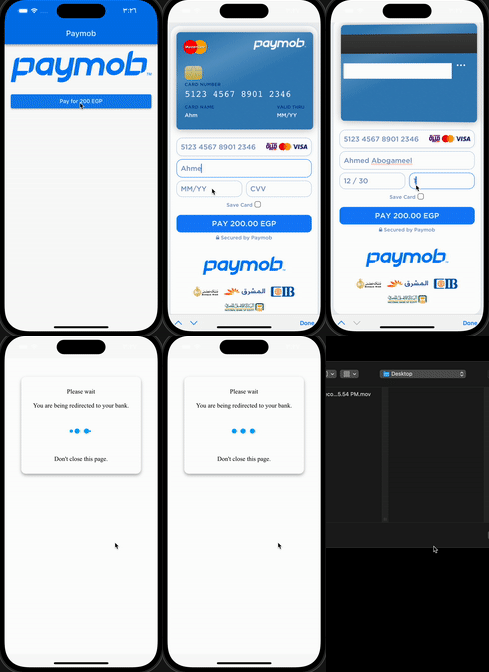
Add this to dependencies in your app's pubspec.yaml
paymob_payment : latest_version
PaymobPayment.instance.initialize(
  apiKey: "", // from dashboard Select Settings -> Account Info -> API Key
  integrationID: 123456, // from dashboard Select Developers -> Payment Integrations -> Online Card ID
  iFrameID: 123456, // from paymob Select Developers -> iframes
);
:pushpin: Note :
You can use this singleton (instance) or Create your own
if you want to create different iFrames or integrations
final PaymobPayment paymobPayment = PaymobPayment();
  paymobPayment.initialize(
  apiKey: "",
  integrationID: 123456,
  iFrameID: 123456,
);
final PaymobResponse? response = await PaymobPayment.instance.pay(
  context: context,
  currency: "EGP",
  amountInCents: "20000", // 200 EGP
  onPayment: (response) => setState(() => this.response = response), // Optional
)
| Variable | Type | Description |
|---|---|---|
| success | bool | Indicates if the transaction was successful or not |
| transactionID | String? | The ID of the transaction |
| responseCode | String? | The response code for the transaction |
| message | String? | A brief message describing the transaction |
| Variable | Description |
|---|---|
| Card Number | 5123456789012346 |
| Expiry Month | 12 |
| Expiry Year | 30 |
| CVV | 123 |
Change cvv to 111 or expiry year to 20
:pushpin: Note :
May be you have to contact paymob support to activate your test card

依賴清單 5 項
^5.2.1+1^4.2.2{"sdk":"flutter"}{"sdk":"flutter"}^2.0.2先依使用情境篩選,再比較專案活躍情況,最後到原始儲存庫確認使用要求。
“A repository is the most basic element of GitHub.”
GitHub Docs — About repositories ↗