
flutter-pdf-text
一個用於 Flutter 的外掛,可讓您讀取 PDF 文件的文本內容並轉換為字串。

- 星標
- 21
- 分支
- 68
- 最近推送(UTC)
- 2024年8月4日
- 專案狀態
- 未封存
原始 README
以下為英文專案原文快照,最新內容請造訪 GitHub。
PDF Text Plugin


This plugin for Flutter allows you to read the text content of PDF documents and convert it into strings. It works on iOS and Android. On iOS it uses Apple's PDFKit. On Android it uses Apache's PdfBox Android porting.
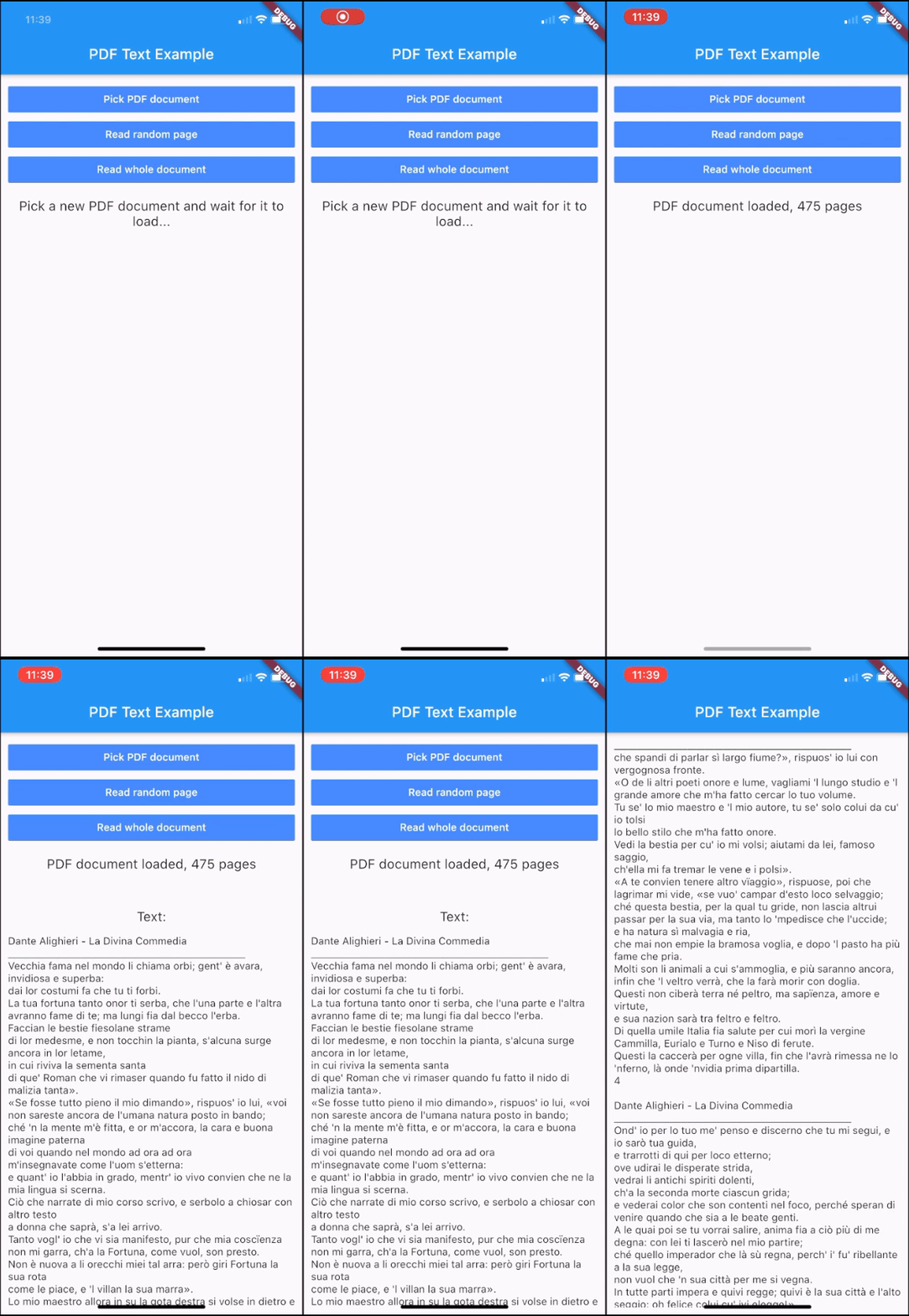
Getting Started
Add this to your package's pubspec.yaml file:
dependencies:
  pdf_text: ^0.5.0
Usage
Import the package with:
import 'package:pdf_text/pdf_text.dart';
Create a PDF document instance using a File object:
PDFDoc doc = await PDFDoc.fromFile(file);
or using a path string:
PDFDoc doc = await PDFDoc.fromPath(path);
or using a URL string:
PDFDoc doc = await PDFDoc.fromURL(url);
Pass a password for encrypted PDF documents:
PDFDoc doc = await PDFDoc.fromFile(file, password: password);
Read the text of the entire document:
String docText = await doc.text;
Retrieve the number of pages of the document:
int numPages = doc.length;
Access a page of the document:
PDFPage page = doc.pageAt(pageNumber);
Read the text of a page of the document:
String pageText = await page.text;
Read the information of the document:
PDFDocInfo info = doc.info;
Optionally, you can delete the file of a document when you no longer need it. This can be useful when you import a PDF document from outside the local file system (e.g using a URL), since it is automatically stored in the temporary directory of the app.
Delete the file of a single document:
doc.deleteFile();
or delete all the files of all the documents imported from outside the local file system:
PDFDoc.deleteAllExternalFiles();
Functioning
This plugin applies lazy loading for the text contents of the pages. The text is cached page per page. When you request the text of a page for the first time, it is parsed and stored in memory, so that the second access will be faster. Anyway, the text of pages that are not requested is not loaded. This mechanism allows you not to waste time loading text that you will probably not use. When you request the text content of the entire document, only the pages that have not been loaded yet are then loaded.
Public Methods
PDFDoc
| Return | Description |
|---|---|
| PDFPage | pageAt(int pageNumber) Gets the page of the document at the given page number. |
| static Future<PDFDoc> | fromFile(File file, {String password = ""}) Creates a PDFDoc object with a File instance. Optionally, takes a password for encrypted PDF documents. |
| static Future<PDFDoc> | fromPath(String path, {String password = ""}) Creates a PDFDoc object with a file path. Optionally, takes a password for encrypted PDF documents. |
| static Future<PDFDoc> | fromURL(String url, {String password = ""}) Creates a PDFDoc object with a url. Optionally, takes a password for encrypted PDF documents. |
| void | deleteFile() Deletes the file related to this PDFDoc. Throws an exception if the FileSystemEntity cannot be deleted. |
| static Future | deleteAllExternalFiles() Deletes all the files of the documents that have been imported from outside the local file system (e.g. using fromURL). |
Objects
class PDFDoc {
  int length; // Number of pages of the document
  List<PDFPage> pages; // Pages of the document
  PDFDocInfo info; // Info of the document
  Future<String> text; // Text of the document
}

class PDFPage {
  int number; // Number of the page in the document
  Future<String> text; // Text of the page
}

class PDFDocInfo {
  String author; // Author string of the document
  List<String> authors; // Authors of the document
  DateTime creationDate; // Creation date of the document
  DateTime modificationDate; // Modification date of the document
  String creator; // Creator of the document
  String producer; // Producer of the document
  List<String> keywords; // Keywords of the document
  String title; // Title of the document
  String subject; // Subject of the document
}
Contribute
If you have any suggestions, improvements or issues, feel free to contribute to this project. You can either submit a new issue or propose a pull request. Direct your pull requests into the dev branch.

Alessio Luciani ↗
分類
使用的依賴
依賴清單 5 項
- flutter
{"sdk":"flutter"} - path
^1.8.0 - path_provider
^2.0.1 - http
^0.13.0 - flutter_test開發依賴
{"sdk":"flutter"}
如何選擇適合專案的儲存庫?
先依使用情境篩選,再比較專案活躍情況,最後到原始儲存庫確認使用要求。
- 透過儲存庫名稱、作者或描述搜尋,再依技術分類縮小範圍。
- 綜合星標、分支與最近推送比較專案;星標反映社群關注,不保證品質。
- 使用前在 GitHub 確認 README、授權條款與 Issues。
來源與維護
“A repository is the most basic element of GitHub.”
GitHub Docs — About repositories ↗