
 v1.0.1
screenshot_modes
輕鬆自動為您的應用程式截圖,截圖模式作為 device_preview 套件的外掛模組運作
30喜歡 28近 30 天下載60Pub 分數
平台暫無資料
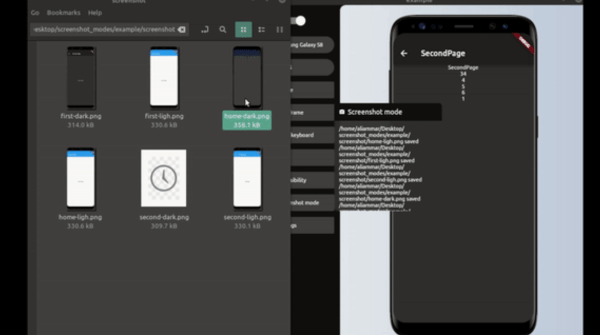
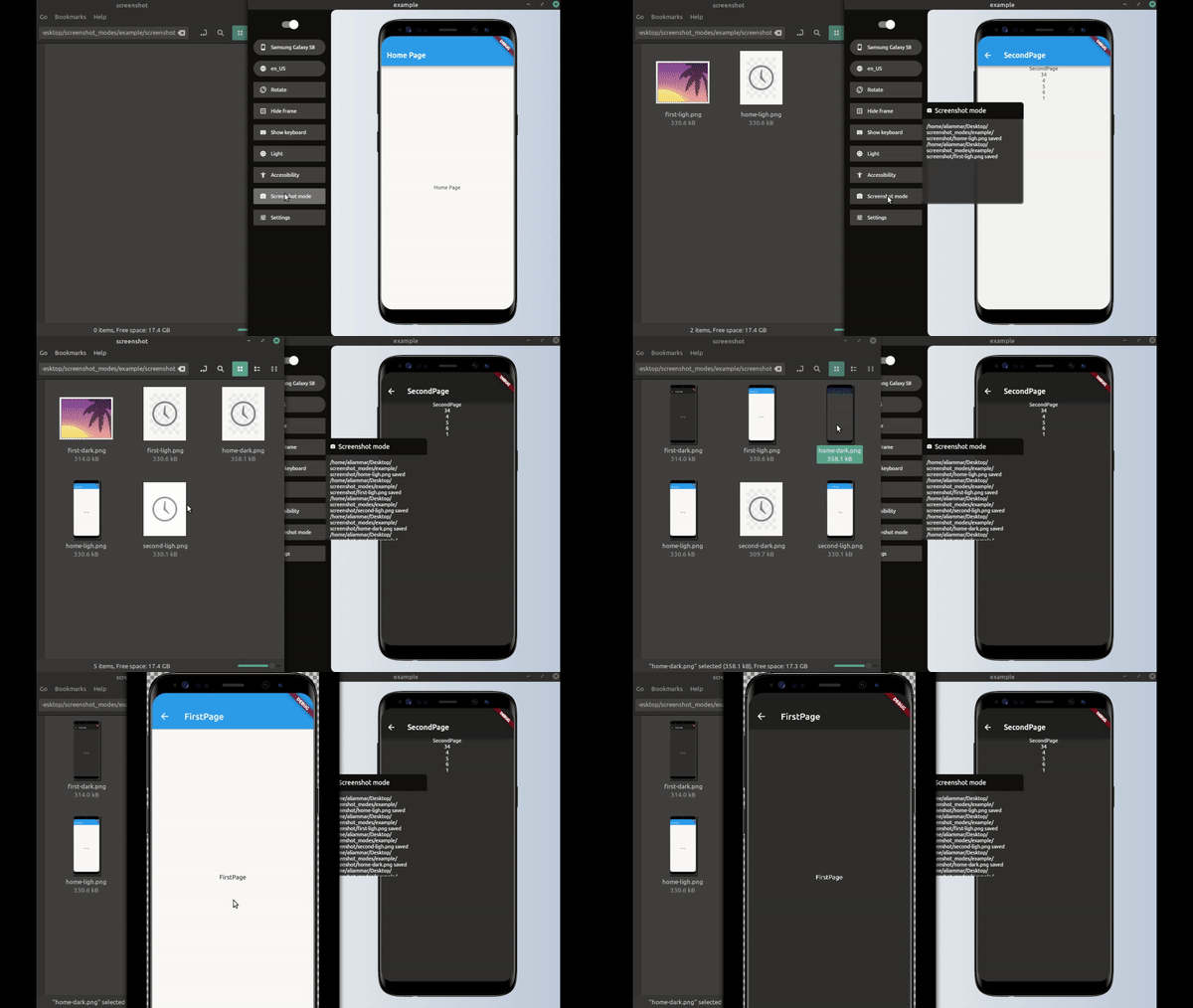
screenshot_modes 是一個 Flutter 套件,作為裝置預覽套件的外掛程式,自動為應用程式頁面截取螢幕畫面
以下為英文專案原文快照,最新內容請造訪 GitHub。
final simpleScreenShotModesPlugin = SimpleScreenShot(
  processor: saveScreenShot,
  pages: listPush,
  devices: [
    Devices.android.samsungGalaxyNote20.identifier,
    Devices.ios.iPhone13ProMax.identifier,
    Devices.ios.iPadAir4.identifier,
  ],
  lang: [Locale('ar') , Locale('en') ] ,
  useToggleDarkMode: true,
);

final listPush = [
  ItemScreenMode(function: pushHome, label: 'home'),
  ItemScreenMode(function: pushFirst, label: 'first'),
  ItemScreenMode(function: pushSecond, label: 'second'),
];
  runApp(DevicePreview(
    builder: (_) => MyApp(),
    tools: [
      ...DevicePreview.defaultTools,
      simpleScreenShotModesPlugin
    ],
  ));
Future pushHome(BuildContext context) async {
  Navigator.of(navigatorKey.currentContext)
      .push(DirectPageRouteBuilder(builder: (_) => HomePage()));
}

Future pushFirst(BuildContext context) async {
  Navigator.of(navigatorKey.currentContext)
      .push(DirectPageRouteBuilder(builder: (_) => FirstPage()));
}

Future pushSecond(BuildContext context) async {
  // we could get data from server;
  final data = await ApiService.getData();
  Navigator.of(navigatorKey.currentContext).push(DirectPageRouteBuilder(
      builder: (_) => SecondPage(
            nums: data,
          )));
}
it could be just Navigator or maybe call some api get data before Navigate like in pushSecond
this response for saving the image or upload it to some server or that ever you want to do with the image example to save the image in desktop folder
Future<String> saveScreenShot(DeviceScreenshotWithLabel screen) async {
  String name = screen.label.join('/');
  final path = join(Directory.current.path, 'screenshot', '$name.png');
  final imageFile = File(path);
  await imageFile.create(recursive: true);
  await imageFile.writeAsBytes(screen.deviceScreenshot.bytes);
  return '$path saved'; // message printed to device preview plugins windows;
}
______
final screenShotModesPlugin = ScreenShotModesPlugin(processor: saveScreenShot, modes: _modes );
void main() {
  runApp(DevicePreview(
    builder: (_) => MyApp(),
    tools: [
      ...DevicePreview.defaultTools,
      screenShotModesPlugin,
    ],
  ));
}
Future<String> saveScreenShot(DeviceScreenshotWithLabel screen) async {
  String name = screen.label.join('/');
  final path = join(Directory.current.path, 'screenshot', '$name.png');
  final imageFile = File(path);
  await imageFile.create(recursive: true);
  await imageFile.writeAsBytes(screen.deviceScreenshot.bytes);
  return '$path saved'; // message printed to device preview plugins windows;
}
final _modes_ = [
 ItemScreenMode(function: pushHome, label: 'home'),
 ItemScreenMode(function: pushFirst, label: 'first'),
 ItemScreenMode(function: pushSecond, label: 'second'),
];
final listPush = [
  ItemScreenMode(function: pushHome, label: 'home'),
  ItemScreenMode(function: pushFirst, label: 'first'),
  ItemScreenMode(function: pushSecond, label: 'second'),
];

final _modes = [
  ItemScreenMode(
      function: (context) async {
        await setModeTo(context, ThemeMode.light);
      },
      label: "light",
      modes: listPush),
  ItemScreenMode(
      function: (context) async {
        await setModeTo(context, ThemeMode.dark);
      },
      label: "dark",
      modes: listPush),
];
final _mode = [
  ItemScreenMode(
    function: setDeviceToIphone,
    label: "iphone",
    modes: listLightDark,
  ),
  ItemScreenMode(
      function: setDeviceToNote, label: "note", modes: listLightDark),
];
final listLightDark = [
  ItemScreenMode(
      function: (context) async {
        await setModeTo(context, ThemeMode.light);
      },
      label: "light",
      modes: listPush),
  ItemScreenMode(
      function: (context) async {
        await setModeTo(context, ThemeMode.dark);
      },
      label: "dark",
      modes: listPush),
];
final listPush = [
  ItemScreenMode(function: pushHome, label: 'home'),
  ItemScreenMode(function: pushFirst, label: 'first'),
  ItemScreenMode(function: pushSecond, label: 'second'),
];

Future<void> setDeviceToNote(BuildContext context) async {
  DevicePreviewHelper.changeDevice(
      context, Devices.android.samsungGalaxyNote20Ultra.identifier);
}

Future<void> setDeviceToIphone(BuildContext context) async {
  DevicePreviewHelper.changeDevice(context, Devices.ios.iPhone13.identifier)
}
you could benefid from DevicePreviewHelper class to change device , theme and other helper function
_______
yes when you don't need to do any things before first shot taken maybe when you already inside home page (defalut page) and in right themes mode
tips : don't do that if you have multi nested page
you must use DirectPageRouteBuilder for navigation like this
Future pushFirst() async {
  Navigator.of(navigatorKey.currentContext)
      .push(DirectPageRouteBuilder(builder: (_) => FirstPage()));

}
because the MaterialPageRoute have 500ms Duration for animations
this will cause as a problem with screenshot
so we must either use DirectPageRouteBuilder or await 500ms Duration after Navigation inside ItemScreenMode function

依賴清單 5 項
{"sdk":"flutter"}^1.2.0^6.1.2^3.1.5{"sdk":"flutter"}先依使用情境篩選,再比較專案活躍情況,最後到原始儲存庫確認使用要求。
“A repository is the most basic element of GitHub.”
GitHub Docs — About repositories ↗