
 v1.1.3
multi_state_button
一個提供按鈕多種狀態且可無限自訂的套件。
34喜歡 625近 30 天下載150Pub 分數
AndroidiOSWebmacOSWindowsLinux
一個 Flutter 套件,為按鈕提供多種狀態,並具有無限的可自訂性。
以下為英文專案原文快照,最新內容請造訪 GitHub。



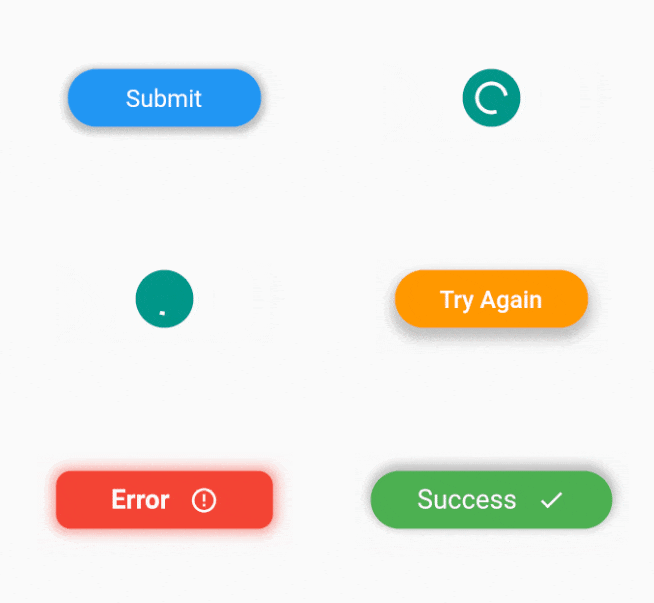
A package which provides multiple states for a button with endless customizability.

dependencies:
  multi_state_button: ^1.1.3
import 'package:multi_state_button/multi_state_button.dart';
class MyApp extends StatelessWidget {
    static const String _submit = "Submit";
    static const String _loading = "Loading";
    static const String _success = "Success";
    final MultiStateButtonController multiStateButtonController =  MultiStateButtonController(initialStateName: _submit);
    @override
    Widget build(BuildContext context) {
        return MultiStateButton(
            multiStateButtonController: multiStateButtonController,
            buttonStates:[
                ButtonState(
                  stateName: _submit,
                  child: Text(
                    _submit,
                  ),
                  textStyle: TextStyle(color: Colors.white, fontSize: 20),
                  size: Size(160, 48),
                  color: Colors.blue,
                  onPressed:() => multiStateButtonController.setButtonState = _loading,
                  ),
                  ButtonState(
                  stateName: _loading,
                  alignment: Alignment.center,
                  child: Padding(
                    padding: const EdgeInsets.all(8.0),
                    child: CircularProgressIndicator(
                        strokeWidth: 3,
                        color: Colors.white,
                    ),
                  ),
                  decoration: BoxDecoration(
                    color: Colors.teal,
                    borderRadius: BorderRadius.all(Radius.circular(48)),
                  ),
                  size: Size(48, 48),
                  onPressed: () => multiStateButtonController.setButtonState = _success,
                  ),
                  ButtonState(
                  stateName: _success,
                  child: Row(
                    mainAxisAlignment: MainAxisAlignment.center,
                    children: [
                      Text(
                        _success,
                      ),
                      const SizedBox(
                        width: 16,
                      ),
                      Icon(
                        Icons.check,
                        color: Colors.white,
                      )
                    ],
                  ),
                  textStyle: TextStyle(color: Colors.white, fontSize: 22),
                  color: Colors.green,
                  size: Size(200, 48),
                  onPressed: ()=> multiStateButtonController.setButtonState = _submit,
                  ),
            ],
        );
    }
}
class MultiStateButton extends StatefulWidget {
  /// List of button states.
  /// Note: Default initial State is the first button state.
  /// Can override this behaviour with [initialStateName] constructor parameter of [MultiStateButtonController].
  final List<ButtonState> buttonStates;

  /// Used to change the current state of the button
  final MultiStateButtonController multiStateButtonController;

  /// Transition duration between button state transition.
  /// Defaults to 500 milliseconds
  final Duration transitionDuration;

  /// Transition curve between button state transition.
  /// Defaults to [Curves.easeIn]
  final Curve transitionCurve;
}
class SingleStateButton extends StatelessWidget {
  /// State for single state button
  final ButtonState buttonState;
}
class ButtonState {
  /// This is the name used to identify the state of the button.
  /// This name is used to change the state using [MultiStateButtonController]
  final String stateName;
  final Widget child;
  final VoidCallback? onPressed;

  /// Size of the button
  final Size? size;

  /// Color of the button.
  /// This should be null if boxDecoration is not null.
  final Color color;

  /// Decorate the button with color, border radius, box shadow, gradient etc...
  final BoxDecoration? decoration;

  /// Used to align the child.
  /// Defaults to [Alignment.center]
  final AlignmentGeometry alignment;

  /// If descendant of the button is a Text child, this textStle is used to enable transition animtation between two states.
  final TextStyle? textStyle;

  /// The transformation matrix to apply before painting the button.
  final Matrix4? transform;

  /// The clip behavior when [decoration] is not null.
  final Clip clipBehavior;

  /// The decoration to paint in front of the child.
  final Decoration? foregroundDecoration;

  /// SubRoutine to run on transition animation ends.
  final VoidCallback? onAnimationEnd;

  /// The alignment of the child, relative to the size of the button, if [transform] is specified.
  /// When [transform] is null, the value of this property is ignored.
  final AlignmentGeometry? transformAlignment;
}
Please file feature requests and bugs at the issue tracker.

依賴清單 2 項
{"sdk":"flutter"}{"sdk":"flutter"}先依使用情境篩選,再比較專案活躍情況,最後到原始儲存庫確認使用要求。
“A repository is the most basic element of GitHub.”
GitHub Docs — About repositories ↗