

 v0.3.0
loading_gifs
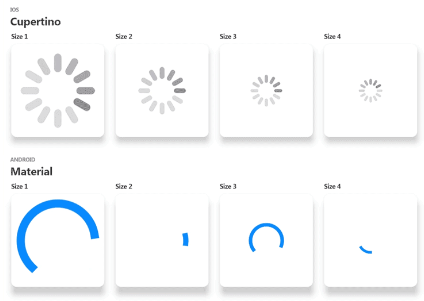
載入指示器 GIF。各種尺寸的 Material 與 Cupertino(Android 與 iOS)載入指示器。用作載入遠端影像資源的佔位符。
84喜歡 686近 30 天下載150Pub 分數
AndroidiOSWebmacOSWindowsLinux
載入指示器 GIF。各種尺寸的 Material 和 Cupertino(Android 和 iOS)載入指示器。用作遠端影像資源的佔位符。示範:https://gallery.codelessly.com/flutterwebsites/loadinggifs/

以下為英文專案原文快照,最新內容請造訪 GitHub。









High quality Android and iOS loading spinners.
Loading GIFs is a collection of high fidelity loading animations in GIF format. Included are Android "Material Design" and iOS "Cupertino" default loading indicators.
Import this library into your project:
loading_gifs: ^latest_version
Use cupertinoActivityIndicator or circularProgressIndicator where ever a loading image is needed.
FadeInImage.assetNetwork(placeholder: cupertinoActivityIndicator, image: "image.png");
That's it!

This library is optimized for size so it only includes the base asset sizes. Change the size of the loading spinners using scale and placeholderScale.
FadeInImage.assetNetwork(placeholder: cupertinoActivityIndicator, image: "image.png", placeholderScale: 5);

Image.asset(circularProgressIndicator, scale: 10);
When loading images whose dimensions are unknown ahead of time, use cupertinoActivityIndicatorSmall instead of cupertinoActivityIndicator. cupertinoActivityIndicatorSmall is a min height variant of cupertinoActivityIndicator which allows Flutter to correctly expand the loaded image into the layout.
The small variant should be used when loading a list of images or compositing an image from multiple images.
  ListView(
    children: <Widget>[
      FadeInImage.assetNetwork(
          placeholder: cupertinoActivityIndicatorSmall,
          image: "image_1.png"),
      FadeInImage.assetNetwork(
          placeholder: cupertinoActivityIndicatorSmall,
          image: "image_2.png"),
      FadeInImage.assetNetwork(
          placeholder: cupertinoActivityIndicatorSmall,
          image: "image_3.png"),
    ],
  )
FadeInImage requires a valid placeholder image to avoid "Asset not found" errors. Use placeholderEmpty, a 1x1 pixel transparent PNG, when an empty placeholder is needed.
FadeInImage.assetNetwork(placeholder: placeholderEmpty, image: "image.png");
 |
 |
|---|---|
| Full (159KB) | Optimized (78KB) |
 |
 |
 |
|---|---|---|
| Large Square (36KB) | Medium Square (14KB) | Small Square (7KB) |
 |
 |
 |
|---|---|---|
| Large (16KB) | Medium (16KB) | Small (16KB) |
 |
 |
|---|---|
| Full (1.13MB) | Optimized (263KB) |
 |
 |
 |
|---|---|---|
| Large Square (225KB) | Medium Square (148KB) | Small Square (100KB) |
 |
 |
 |
|---|---|---|
| Large (129KB) | Medium (149KB) | Small (186KB) |
Here at Codelessly, we're building a Flutter app UI and website builder, development tools, and UI templates to increase productivity. If that sounds interesting, you'll want to subscribe to updates below 😎
Loading GIFs is licensed under Zero-Clause BSD and released as Emailware. If you like this project or it helped you, please subscribe to updates. Although it is not required, you might miss the goodies we share!

Design:
Development:
Sponsor: Codelessly - Flutter App UI and Website Builder



BSD Zero Clause License

Copyright © 2020 Codelessly

Permission to use, copy, modify, and/or distribute this software for any
purpose with or without fee is hereby granted.

THE SOFTWARE IS PROVIDED "AS IS" AND THE AUTHOR DISCLAIMS ALL WARRANTIES WITH
REGARD TO THIS SOFTWARE INCLUDING ALL IMPLIED WARRANTIES OF MERCHANTABILITY
AND FITNESS. IN NO EVENT SHALL THE AUTHOR BE LIABLE FOR ANY SPECIAL, DIRECT,
INDIRECT, OR CONSEQUENTIAL DAMAGES OR ANY DAMAGES WHATSOEVER RESULTING FROM
LOSS OF USE, DATA OR PROFITS, WHETHER IN AN ACTION OF CONTRACT, NEGLIGENCE OR
OTHER TORTIOUS ACTION, ARISING OUT OF OR IN CONNECTION WITH THE USE OR
PERFORMANCE OF THIS SOFTWARE.
依賴清單 2 項
{"sdk":"flutter"}{"sdk":"flutter"}先依使用情境篩選,再比較專案活躍情況,最後到原始儲存庫確認使用要求。
“A repository is the most basic element of GitHub.”
GitHub Docs — About repositories ↗