

v1.0.8
drag_and_drop_gridview
拖曳與放置 GridView 擴展了 Flutter 中 GridView 小部件的功能,讓您可透過拖曳與放置輕鬆重新排序 GridViewItem。
99喜歡 81近 30 天下載40Pub 分數
平台暫無資料
拖曳與放置 GridView 擴展了 Flutter 中 GridView 小工具的功能,讓您能透過拖曳與放置輕鬆重新排序 GridViewItems。它非常容易實作且使用起來非常美觀。

以下為英文專案原文快照,最新內容請造訪 GitHub。



Drag And Drop GridView extends the functionality of the GridView widget in Flutter and gives you the freedom of creating a reorder the GridViewItems simple by Drag And Drop. It is super easy to implement and beautiful to use.
If you appreciate the content 📖, support projects visibility, give 👍| ⭐| 👏
To use this package, add drag_and_drop_gridview as a dependency in your pubspec.yaml file.
dependencies:
  drag_and_drop_gridview: ^1.0.8
And import the package in your code.
import 'package:drag_and_drop_gridview/devdrag.dart';
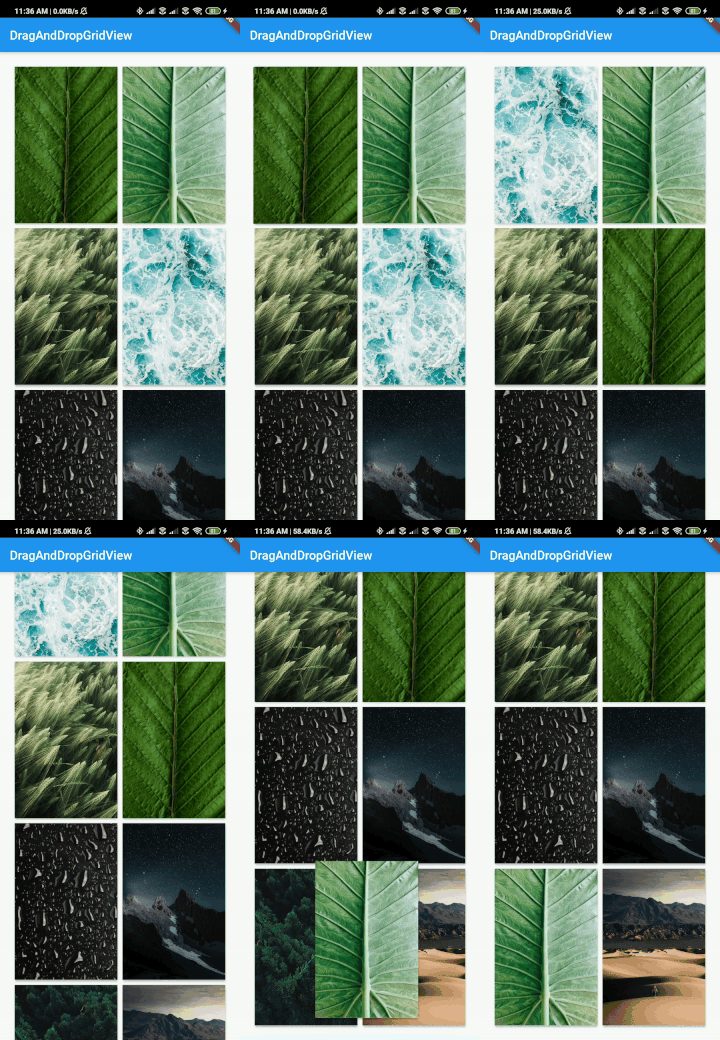
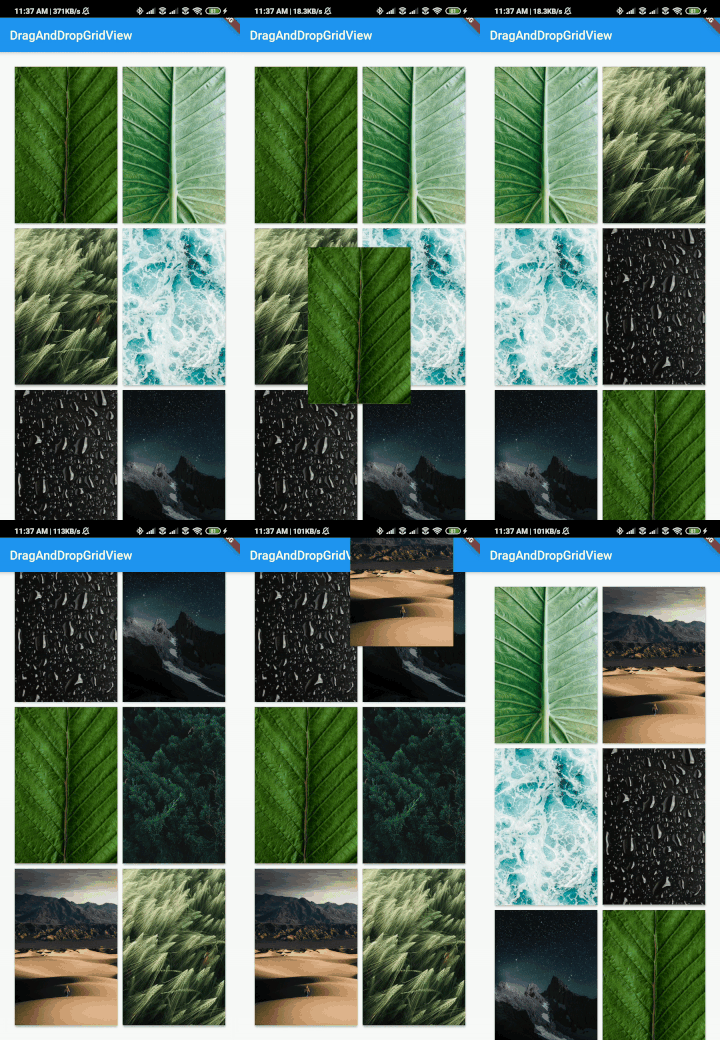
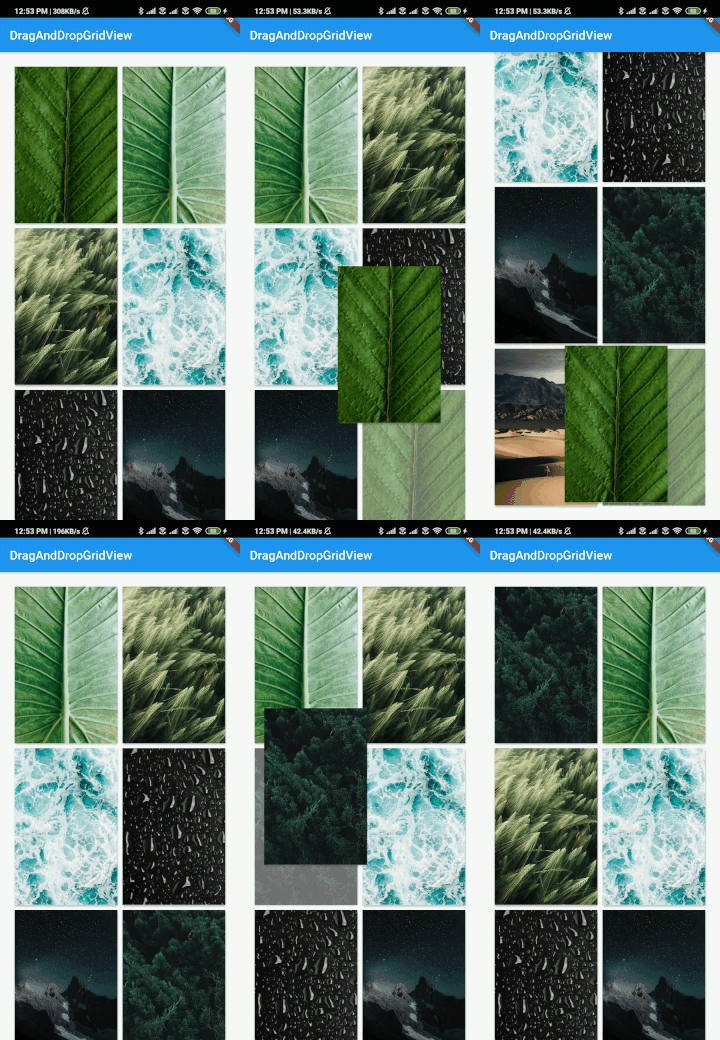
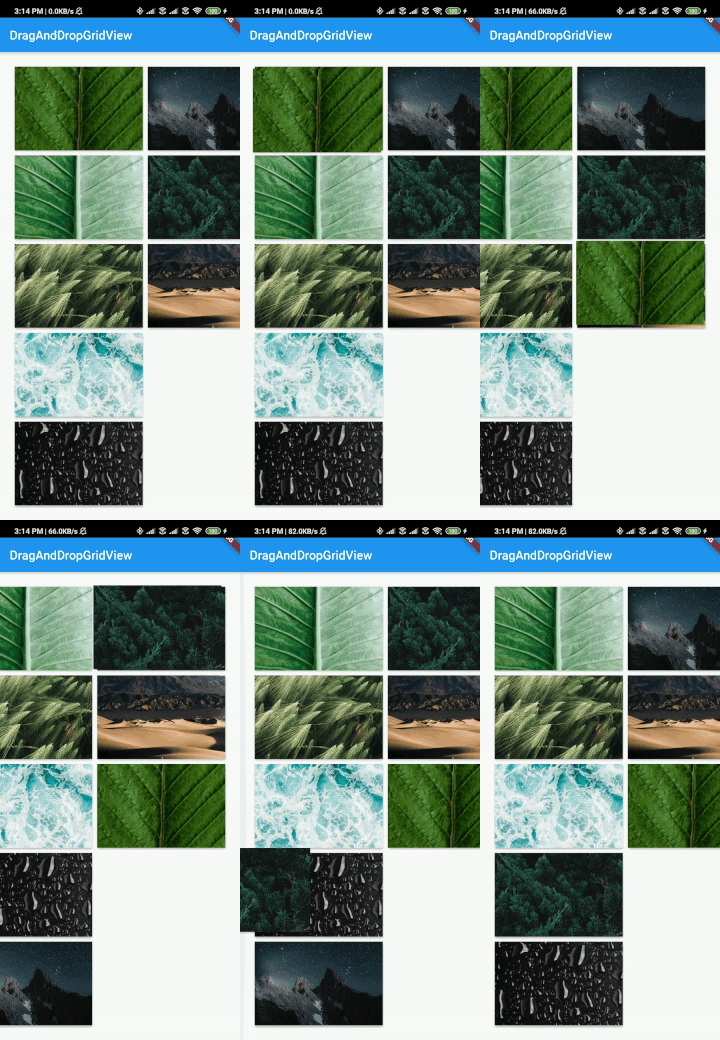
DragAndDropGridView has the all same parameters (except shrinkWrap and scrollDirection) that GridView.builder constructor has.
But in DragAndDropGridView there are some required params gridDelegate, itemBuilder, onWillAccept, and onReorder.
This is the same as we find it in the official gridview of Flutter. Learn More
gridDelegate: SliverGridDelegateWithFixedCrossAxisCount(
        crossAxisCount: 2,
        childAspectRatio: 3 / 4.5,
     ),
This is the same as we find it in the official gridview of Flutter. Learn More
itemBuilder: (context, index) => Card(
       elevation: 2,
       child: Text(_animals[index]),
),
This funciton allows you to validate if you want to accept the change in the order of the gridViewItems. If you always want to accept the change simply return true
// _animals = ['cat','dog','kitten','puppy']

onWillAccept: (oldIndex, newIndex) {
// Implement you own logic

// Example reject the reorder if the moving item's value is "kitten"
if (_animals[newIndex] == "cat"){
	return false;
}
return true, // If you want to accept the child return true or else return false
},
This function deals with changing the index of the newly arranged gridItems.
onReorder: (oldIndex, newIndex) {
	    _temp = _animals[newIndex];
        _animals[newIndex] = _animals[oldIndex];
        _animals[oldIndex] = _temp;
        setState(() {});
},
 _animals = ['cat','dog','kitten','puppy']

DragAndDropGridView(
    gridDelegate: SliverGridDelegateWithFixedCrossAxisCount(
        crossAxisCount: 2,
        childAspectRatio: 3 / 4.5,
    ),
    padding: EdgeInsets.all(20),
    itemBuilder: (context, index) => Card(
        elevation: 2,
        child: Text(_animals[index]),
		),
    ),
    itemCount: _animals.length,
    onWillAccept: (oldIndex, newIndex) {
		// Implement you own logic

		// Example reject the reorder if the moving item's destination value is cat"
		if (_animals[newIndex] == "cat"){
			return false;
		}
		return true, // If you want to accept the child return true or else return false
	},
    onReorder: (oldIndex, newIndex) {
	    _temp = _animals[newIndex];
        _animals[newIndex] = _animals[oldIndex];
        _animals[oldIndex] = _temp;
        setState(() {});
    },
)
Below example shows you how to implement DragAndDropGridView easily.
import 'package:drag_and_drop_gridview/devdrag.dart';
import 'package:flutter/material.dart';
import 'package:flutter/rendering.dart';
import 'dart:async';

import 'package:flutter/services.dart';

void main() {
  runApp(MyApp());
}

class MyApp extends StatefulWidget {
  @override
  _MyAppState createState() => _MyAppState();
}

class _MyAppState extends State<MyApp> {
  List<String> _imageUris = [
    "https://images.pexels.com/photos/4466054/pexels-photo-4466054.jpeg?auto=compress&cs=tinysrgb&dpr=2&h=650&w=940",
    "https://images.pexels.com/photos/4561739/pexels-photo-4561739.jpeg?auto=compress&cs=tinysrgb&dpr=1&w=500",
    "https://images.pexels.com/photos/4507967/pexels-photo-4507967.jpeg?auto=compress&cs=tinysrgb&dpr=1&w=500",
    "https://images.pexels.com/photos/4321194/pexels-photo-4321194.jpeg?auto=compress&cs=tinysrgb&dpr=1&w=500",
    "https://images.pexels.com/photos/1053924/pexels-photo-1053924.jpeg?auto=compress&cs=tinysrgb&dpr=1&w=500",
    "https://images.pexels.com/photos/1624438/pexels-photo-1624438.jpeg?auto=compress&cs=tinysrgb&dpr=2&h=750&w=1260",
    "https://images.pexels.com/photos/1144687/pexels-photo-1144687.jpeg?auto=compress&cs=tinysrgb&dpr=2&h=750&w=1260",
    "https://images.pexels.com/photos/2589010/pexels-photo-2589010.jpeg?auto=compress&cs=tinysrgb&dpr=2&h=750&w=1260"
  ];

  int variableSet = 0;
  ScrollController _scrollController;
  double width;
  double height;

  @override
  void initState() {
    super.initState();
  }

  @override
  Widget build(BuildContext context) {
    return MaterialApp(
      home: Scaffold(
        appBar: AppBar(
          title: const Text('Drag And drop Plugin'),
        ),
        body: Center(
          child: DragAndDropGridView(
            controller: _scrollController,
            gridDelegate: SliverGridDelegateWithFixedCrossAxisCount(
              crossAxisCount: 2,
              childAspectRatio: 3 / 4.5,
            ),
            padding: EdgeInsets.all(20),
            itemBuilder: (context, index) => Card(
              elevation: 2,
              child: LayoutBuilder(
                builder: (context, costrains) {
                  if (variableSet == 0) {
                    height = costrains.maxHeight;
                    width = costrains.maxWidth;
                    variableSet++;
                  }
                  return GridTile(
                    child: Image.network(
                      _imageUris[index],
                      fit: BoxFit.cover,
                      height: height,
                      width: width,
                    ),
                  );
                },
              ),
            ),
            itemCount: _imageUris.length,
            onWillAccept: (oldIndex, newIndex) {
              // Implement you own logic

              // Example reject the reorder if the moving item's value is something specific
              if (_imageUris[newIndex] == "something") {
                return false;
              }
              return true; // If you want to accept the child return true or else return false
            },
            onReorder: (oldIndex, newIndex) {
              final temp = _imageUris[oldIndex];
              _imageUris[oldIndex] = _imageUris[newIndex];
              _imageUris[newIndex] = temp;

              setState(() {});
            },
          ),
        ),
      ),
    );
  }
}
This is the example of how you can achive the Horizontal Reorderable / Re-Indexing feature in DragAndDropGridView. Just use horizontal constructor.
import 'package:drag_and_drop_gridview/devdrag.dart';
import 'package:drag_and_drop_gridview/drag.dart';
import 'package:flutter/material.dart';
import 'package:flutter/rendering.dart';
import 'dart:async';

import 'package:flutter/services.dart';

void main() {
  runApp(MyApp());
}

class MyApp extends StatefulWidget {
  @override
  _MyAppState createState() => _MyAppState();
}

class _MyAppState extends State<MyApp> {
  List<String> _imageUris = [
    "https://images.pexels.com/photos/4466054/pexels-photo-4466054.jpeg?auto=compress&cs=tinysrgb&dpr=2&h=650&w=940",
    "https://images.pexels.com/photos/4561739/pexels-photo-4561739.jpeg?auto=compress&cs=tinysrgb&dpr=1&w=500",
    "https://images.pexels.com/photos/4507967/pexels-photo-4507967.jpeg?auto=compress&cs=tinysrgb&dpr=1&w=500",
    "https://images.pexels.com/photos/4321194/pexels-photo-4321194.jpeg?auto=compress&cs=tinysrgb&dpr=1&w=500",
    "https://images.pexels.com/photos/1053924/pexels-photo-1053924.jpeg?auto=compress&cs=tinysrgb&dpr=1&w=500",
    "https://images.pexels.com/photos/1624438/pexels-photo-1624438.jpeg?auto=compress&cs=tinysrgb&dpr=2&h=750&w=1260",
    "https://images.pexels.com/photos/1144687/pexels-photo-1144687.jpeg?auto=compress&cs=tinysrgb&dpr=2&h=750&w=1260",
    "https://images.pexels.com/photos/2589010/pexels-photo-2589010.jpeg?auto=compress&cs=tinysrgb&dpr=2&h=750&w=1260"
  ];

  int variableSet = 0, variableSetHeader = 0;
  ScrollController _scrollController;
  double width;
  double height;

  @override
  void initState() {
    super.initState();
  }

  @override
  Widget build(BuildContext context) {
    return MaterialApp(
      home: Scaffold(
        appBar: AppBar(
          title: const Text('Horizontal DragAndDropGridView'),
        ),
        body: Center(
          child: DragAndDropGridView.horizontal(
            controller: _scrollController,
            gridDelegate: SliverGridDelegateWithFixedCrossAxisCount(
              crossAxisCount: 5,
              childAspectRatio: 3 / 4.5,
            ),
            padding: EdgeInsets.all(20),
            itemBuilder: (context, index) => Card(
              elevation: 2,
              child: LayoutBuilder(builder: (context, costrains) {
                if (variableSet == 0) {
                  height = costrains.maxHeight;
                  width = costrains.maxWidth;
                  variableSet++;
                }
                return GridTile(
                  key: index == 4 ? Key("12") : null,
                  child: Image.network(
                    _imageUris[index],
                    fit: BoxFit.cover,
                    height: height,
                    width: width,
                  ),
                );
              }),
            ),
            itemCount: _imageUris.length,
            onWillAccept: (oldIndex, newIndex) => true,
            onReorder: (oldIndex, newIndex) {
              int indexOfFirstItem = _imageUris.indexOf(_imageUris[oldIndex]);
              int indexOfSecondItem = _imageUris.indexOf(_imageUris[newIndex]);

              if (indexOfFirstItem > indexOfSecondItem) {
                for (int i = _imageUris.indexOf(_imageUris[oldIndex]);
                    i > _imageUris.indexOf(_imageUris[newIndex]);
                    i--) {
                  var tmp = _imageUris[i - 1];
                  _imageUris[i - 1] = _imageUris[i];
                  _imageUris[i] = tmp;
                }
              } else {
                for (int i = _imageUris.indexOf(_imageUris[oldIndex]);
                    i < _imageUris.indexOf(_imageUris[newIndex]);
                    i++) {
                  var tmp = _imageUris[i + 1];
                  _imageUris[i + 1] = _imageUris[i];
                  _imageUris[i] = tmp;
                }
              }
              setState(() {});
            },
          ),
        ),
      ),
    );
  }
}
This is the example of how you can achive the Vertical Reorderable / Re-Indexing feature in DragAndDropGridView.
import 'package:drag_and_drop_gridview/devdrag.dart';
import 'package:flutter/material.dart';
import 'package:flutter/rendering.dart';
import 'dart:async';

import 'package:flutter/services.dart';

void main() {
  runApp(MyApp());
}

class MyApp extends StatefulWidget {
  @override
  _MyAppState createState() => _MyAppState();
}

class _MyAppState extends State<MyApp> {
  List<String> _imageUris = [
    "https://images.pexels.com/photos/4466054/pexels-photo-4466054.jpeg?auto=compress&cs=tinysrgb&dpr=2&h=650&w=940",
    "https://images.pexels.com/photos/4561739/pexels-photo-4561739.jpeg?auto=compress&cs=tinysrgb&dpr=1&w=500",
    "https://images.pexels.com/photos/4507967/pexels-photo-4507967.jpeg?auto=compress&cs=tinysrgb&dpr=1&w=500",
    "https://images.pexels.com/photos/4321194/pexels-photo-4321194.jpeg?auto=compress&cs=tinysrgb&dpr=1&w=500",
    "https://images.pexels.com/photos/1053924/pexels-photo-1053924.jpeg?auto=compress&cs=tinysrgb&dpr=1&w=500",
    "https://images.pexels.com/photos/1624438/pexels-photo-1624438.jpeg?auto=compress&cs=tinysrgb&dpr=2&h=750&w=1260",
    "https://images.pexels.com/photos/1144687/pexels-photo-1144687.jpeg?auto=compress&cs=tinysrgb&dpr=2&h=750&w=1260",
    "https://images.pexels.com/photos/2589010/pexels-photo-2589010.jpeg?auto=compress&cs=tinysrgb&dpr=2&h=750&w=1260"
  ];

  int variableSet = 0;
  ScrollController _scrollController;
  double width;
  double height;

  @override
  void initState() {
    super.initState();
  }

  @override
  Widget build(BuildContext context) {
    return MaterialApp(
      home: Scaffold(
        appBar: AppBar(
          title: const Text('Vertical Drag And drop Plugin'),
        ),
        body: Center(
          child: DragAndDropGridView(
            controller: _scrollController,
            gridDelegate: SliverGridDelegateWithFixedCrossAxisCount(
              crossAxisCount: 2,
              childAspectRatio: 3 / 4.5,
            ),
            padding: EdgeInsets.all(20),
            itemBuilder: (context, index) => Card(
              elevation: 2,
              child: LayoutBuilder(builder: (context, costrains) {
                if (variableSet == 0) {
                  height = costrains.maxHeight;
                  width = costrains.maxWidth;
                  variableSet++;
                }
                return GridTile(
                  child: Image.network(
                    _imageUris[index],
                    fit: BoxFit.cover,
                    height: height,
                    width: width,
                  ),
                );
              }),
            ),
            itemCount: _imageUris.length,
            onWillAccept: (oldIndex, newIndex) => true,
            onReorder: (oldIndex, newIndex) {

              // You can also implement on your own logic on reorderable

              int indexOfFirstItem = _imageUris.indexOf(_imageUris[oldIndex]);
              int indexOfSecondItem = _imageUris.indexOf(_imageUris[newIndex]);

              if (indexOfFirstItem > indexOfSecondItem) {
                for (int i = _imageUris.indexOf(_imageUris[oldIndex]);
                    i > _imageUris.indexOf(_imageUris[newIndex]);
                    i--) {
                  var tmp = _imageUris[i - 1];
                  _imageUris[i - 1] = _imageUris[i];
                  _imageUris[i] = tmp;
                }
              } else {
                for (int i = _imageUris.indexOf(_imageUris[oldIndex]);
                    i < _imageUris.indexOf(_imageUris[newIndex]);
                    i++) {
                  var tmp = _imageUris[i + 1];
                  _imageUris[i + 1] = _imageUris[i];
                  _imageUris[i] = tmp;
                }
              }
              setState(() {});
            },
          ),
        ),
      ),
    );
  }
}
This is the example of how you can achive the Reordering Effect While Hovering Over A Specific Index feature in DragAndDropGridView.
import 'package:drag_and_drop_gridview/devdrag.dart';
import 'package:flutter/material.dart';
import 'package:flutter/rendering.dart';
import 'dart:async';

import 'package:flutter/services.dart';

void main() {
 runApp(MyApp());
}

class MyApp extends StatefulWidget {
 @override
 _MyAppState createState() => _MyAppState();
}

class _MyAppState extends State<MyApp> {
 List<String> _imageUris = [
   "https://images.pexels.com/photos/4466054/pexels-photo-4466054.jpeg?auto=compress&cs=tinysrgb&dpr=2&h=650&w=940",
   "https://images.pexels.com/photos/4561739/pexels-photo-4561739.jpeg?auto=compress&cs=tinysrgb&dpr=1&w=500",
   "https://images.pexels.com/photos/4507967/pexels-photo-4507967.jpeg?auto=compress&cs=tinysrgb&dpr=1&w=500",
   "https://images.pexels.com/photos/4321194/pexels-photo-4321194.jpeg?auto=compress&cs=tinysrgb&dpr=1&w=500",
   "https://images.pexels.com/photos/1053924/pexels-photo-1053924.jpeg?auto=compress&cs=tinysrgb&dpr=1&w=500",
   "https://images.pexels.com/photos/1624438/pexels-photo-1624438.jpeg?auto=compress&cs=tinysrgb&dpr=2&h=750&w=1260",
   "https://images.pexels.com/photos/1144687/pexels-photo-1144687.jpeg?auto=compress&cs=tinysrgb&dpr=2&h=750&w=1260",
   "https://images.pexels.com/photos/2589010/pexels-photo-2589010.jpeg?auto=compress&cs=tinysrgb&dpr=2&h=750&w=1260"
 ];

 int pos;

 List<String> tmpList;
 int variableSet = 0;
 ScrollController _scrollController;
 double width;
 double height;

 @override
 void initState() {
   tmpList = [..._imageUris];
   super.initState();
 }

 @override
 Widget build(BuildContext context) {
   return MaterialApp(
     home: Scaffold(
       appBar: AppBar(
         title: const Text('Vertical DragAndDropGridView Hover Effect'),
       ),
       body: Center(
         child: DragAndDropGridView(
           controller: _scrollController,
           gridDelegate: SliverGridDelegateWithFixedCrossAxisCount(
             crossAxisCount: 2,
             childAspectRatio: 3 / 4.5,
           ),
           padding: EdgeInsets.all(20),
           itemBuilder: (context, index) => Opacity(
             opacity: pos != null ? pos == index ? 0.6 : 1 : 1,
             child: Card(
               elevation: 2,
               child: LayoutBuilder(builder: (context, costrains) {
                 if (variableSet == 0) {
                   height = costrains.maxHeight;
                   width = costrains.maxWidth;
                   variableSet++;
                 }
                 return GridTile(
                   child: Image.network(
                     _imageUris[index],
                     fit: BoxFit.cover,
                     height: height,
                     width: width,
                   ),
                 );
               }),
             ),
           ),
           itemCount: _imageUris.length,
           onWillAccept: (oldIndex, newIndex) {
             _imageUris = [...tmpList];
             int indexOfFirstItem = _imageUris.indexOf(_imageUris[oldIndex]);
             int indexOfSecondItem = _imageUris.indexOf(_imageUris[newIndex]);

             if (indexOfFirstItem > indexOfSecondItem) {
               for (int i = _imageUris.indexOf(_imageUris[oldIndex]);
                   i > _imageUris.indexOf(_imageUris[newIndex]);
                   i--) {
                 var tmp = _imageUris[i - 1];
                 _imageUris[i - 1] = _imageUris[i];
                 _imageUris[i] = tmp;
               }
             } else {
               for (int i = _imageUris.indexOf(_imageUris[oldIndex]);
                   i < _imageUris.indexOf(_imageUris[newIndex]);
                   i++) {
                 var tmp = _imageUris[i + 1];
                 _imageUris[i + 1] = _imageUris[i];
                 _imageUris[i] = tmp;
               }
             }

             setState(
               () {
                 pos = newIndex;
               },
             );
             return true;
           },
           onReorder: (oldIndex, newIndex) {
             _imageUris = [...tmpList];
             int indexOfFirstItem = _imageUris.indexOf(_imageUris[oldIndex]);
             int indexOfSecondItem = _imageUris.indexOf(_imageUris[newIndex]);

             if (indexOfFirstItem > indexOfSecondItem) {
               for (int i = _imageUris.indexOf(_imageUris[oldIndex]);
                   i > _imageUris.indexOf(_imageUris[newIndex]);
                   i--) {
                 var tmp = _imageUris[i - 1];
                 _imageUris[i - 1] = _imageUris[i];
                 _imageUris[i] = tmp;
               }
             } else {
               for (int i = _imageUris.indexOf(_imageUris[oldIndex]);
                   i < _imageUris.indexOf(_imageUris[newIndex]);
                   i++) {
                 var tmp = _imageUris[i + 1];
                 _imageUris[i + 1] = _imageUris[i];
                 _imageUris[i] = tmp;
               }
             }
             tmpList = [..._imageUris];
             setState(
               () {
                 pos = null;
               },
             );
           },
         ),
       ),
     ),
   );
 }
}
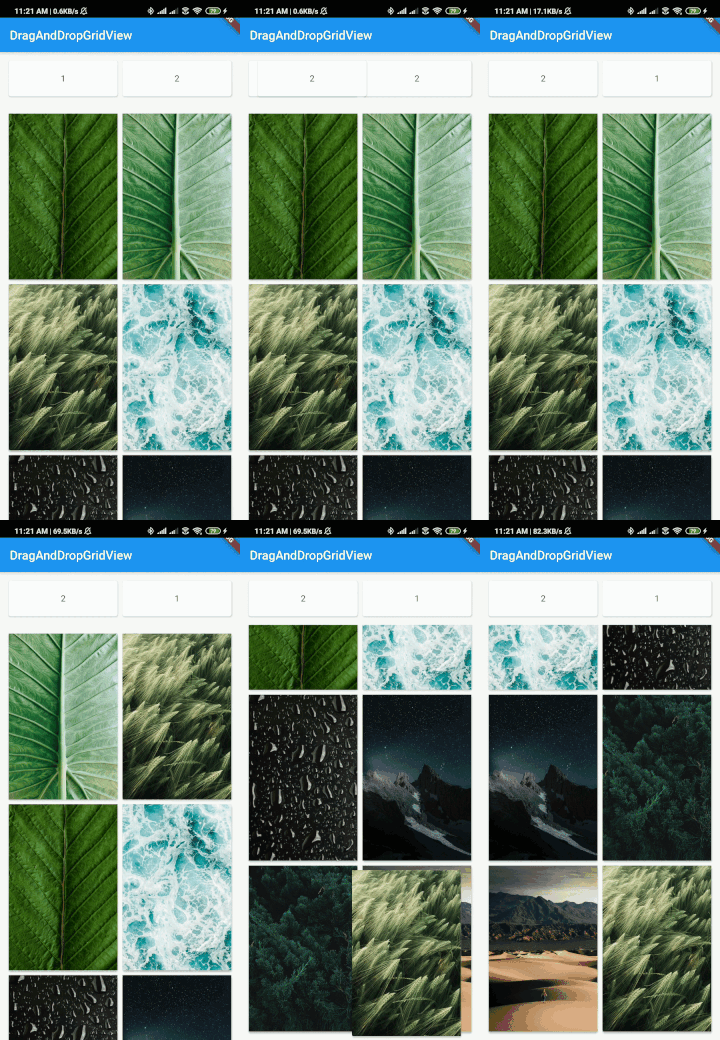
In this example you can add a non sticky header.
But if you pass any vertical scrollview don't forgot to add shrinkwrap or wrap the widget in expanded to avoid error.
import 'package:drag_and_drop_gridview/devdrag.dart';
import 'package:drag_and_drop_gridview/drag.dart';
import 'package:flutter/material.dart';
import 'package:flutter/rendering.dart';
import 'dart:async';

import 'package:flutter/services.dart';

void main() {
  runApp(MyApp());
}

class MyApp extends StatefulWidget {
  @override
  _MyAppState createState() => _MyAppState();
}

class _MyAppState extends State<MyApp> {
  List<String> _imageUris = [
    "https://images.pexels.com/photos/4466054/pexels-photo-4466054.jpeg?auto=compress&cs=tinysrgb&dpr=2&h=650&w=940",
    "https://images.pexels.com/photos/4561739/pexels-photo-4561739.jpeg?auto=compress&cs=tinysrgb&dpr=1&w=500",
    "https://images.pexels.com/photos/4507967/pexels-photo-4507967.jpeg?auto=compress&cs=tinysrgb&dpr=1&w=500",
    "https://images.pexels.com/photos/4321194/pexels-photo-4321194.jpeg?auto=compress&cs=tinysrgb&dpr=1&w=500",
    "https://images.pexels.com/photos/1053924/pexels-photo-1053924.jpeg?auto=compress&cs=tinysrgb&dpr=1&w=500",
    "https://images.pexels.com/photos/1624438/pexels-photo-1624438.jpeg?auto=compress&cs=tinysrgb&dpr=2&h=750&w=1260",
    "https://images.pexels.com/photos/1144687/pexels-photo-1144687.jpeg?auto=compress&cs=tinysrgb&dpr=2&h=750&w=1260",
    "https://images.pexels.com/photos/2589010/pexels-photo-2589010.jpeg?auto=compress&cs=tinysrgb&dpr=2&h=750&w=1260"
  ];

  int variableSet = 0, variableSetHeader = 0;
  ScrollController _scrollController;
  double width;
  double height;
  double widthHeader;
  double heightHeader;
  List<String> listOfHeader = ["1", "2"];

  @override
  void initState() {
    super.initState();
  }

  @override
  Widget build(BuildContext context) {
    return MaterialApp(
      home: Scaffold(
        appBar: AppBar(
          title: const Text('DragAndDropGridView'),
        ),
        body: Center(
          child: DragAndDropGridView(
            header: Container(
              height: 50,
              width: double.infinity,
              alignment: Alignment.center,
              color: Colors.amber,
              child: Text(
                "Header",
                style: TextStyle(
                  fontWeight: FontWeight.bold,
                ),
                textAlign: TextAlign.center,
              ),
            ),
            controller: _scrollController,
            gridDelegate: SliverGridDelegateWithFixedCrossAxisCount(
              crossAxisCount: 2,
              childAspectRatio: 3 / 4.5,
            ),
            padding: EdgeInsets.all(20),
            itemBuilder: (context, index) => Card(
                elevation: 2,
                child: LayoutBuilder(builder: (context, costrains) {
                  if (variableSet == 0) {
                    height = costrains.maxHeight;
                    width = costrains.maxWidth;
                    variableSet++;
                  }
                  return GridTile(
                    key: index == 4 ? Key("12") : null,
                    child: Image.network(
                      _imageUris[index],
                      fit: BoxFit.cover,
                      height: height,
                      width: width,
                    ),
                  );
                }),
              ),
            itemCount: _imageUris.length,
            onWillAccept: (oldIndex, newIndex) => true,
            onReorder: (oldIndex, newIndex) {
              final temp = _imageUris[oldIndex];
              _imageUris[oldIndex] = _imageUris[newIndex];
              _imageUris[newIndex] = temp;
              setState(() {});
            },
          ),
        ),
      ),
    );
  }
}

In the itembuilder just wrap your widget in DragItem and return isDraggable true or false acording to your condition.
And in isDropable if you pass false then this item will not accept any draggable child. By default it is set to true true.
import 'package:drag_and_drop_gridview/drag.dart'; // import this header

DragItem(
    isDraggable: true, // whether draggable or not (Default true)
    isDropable: false, // whether dropable or not (Default true)
    child: ..///, //and pass the child
);
To achive the sticky header in gridview just call this horizontalStickyHeader constructor.
By Default allHeaderChildNonDraggable is set to false making all header draggable.
onWillAcceptHeader (Implement your logic on accepting and rejecting the drop of an header element),
onReorderHeader (implement your logic for reodering and reindexing the elements)
And if you want the header to be non-draggable element simple set allHeaderChildNonDraggable to true.
and required parameters are:
onWillAccept, itemBuilderHeader, onReorder, gridDelegate, itemBuilder
import 'package:drag_and_drop_gridview/devdrag.dart';
import 'package:drag_and_drop_gridview/drag.dart';
import 'package:flutter/material.dart';
import 'package:flutter/rendering.dart';
import 'dart:async';

import 'package:flutter/services.dart';

void main() {
  runApp(MyApp());
}

class MyApp extends StatefulWidget {
  @override
  _MyAppState createState() => _MyAppState();
}

class _MyAppState extends State<MyApp> {
  List<String> _imageUris = [
    "https://images.pexels.com/photos/4466054/pexels-photo-4466054.jpeg?auto=compress&cs=tinysrgb&dpr=2&h=650&w=940",
    "https://images.pexels.com/photos/4561739/pexels-photo-4561739.jpeg?auto=compress&cs=tinysrgb&dpr=1&w=500",
    "https://images.pexels.com/photos/4507967/pexels-photo-4507967.jpeg?auto=compress&cs=tinysrgb&dpr=1&w=500",
    "https://images.pexels.com/photos/4321194/pexels-photo-4321194.jpeg?auto=compress&cs=tinysrgb&dpr=1&w=500",
    "https://images.pexels.com/photos/1053924/pexels-photo-1053924.jpeg?auto=compress&cs=tinysrgb&dpr=1&w=500",
    "https://images.pexels.com/photos/1624438/pexels-photo-1624438.jpeg?auto=compress&cs=tinysrgb&dpr=2&h=750&w=1260",
    "https://images.pexels.com/photos/1144687/pexels-photo-1144687.jpeg?auto=compress&cs=tinysrgb&dpr=2&h=750&w=1260",
    "https://images.pexels.com/photos/2589010/pexels-photo-2589010.jpeg?auto=compress&cs=tinysrgb&dpr=2&h=750&w=1260",


    "https://images.pexels.com/photos/443446/pexels-photo-443446.jpeg?auto=compress&cs=tinysrgb&dpr=1&w=500",
    "https://images.pexels.com/photos/2113566/pexels-photo-2113566.jpeg?auto=compress&cs=tinysrgb&dpr=1&w=500",
    "https://images.pexels.com/photos/3244513/pexels-photo-3244513.jpeg?auto=compress&cs=tinysrgb&dpr=1&w=500",
    "https://images.pexels.com/photos/1438761/pexels-photo-1438761.jpeg?auto=compress&cs=tinysrgb&dpr=1&w=500",
    "https://images.pexels.com/photos/2835562/pexels-photo-2835562.jpeg?auto=compress&cs=tinysrgb&dpr=1&w=500",
    "https://images.pexels.com/photos/2440021/pexels-photo-2440021.jpeg?auto=compress&cs=tinysrgb&dpr=1&w=500",
    "https://images.pexels.com/photos/572897/pexels-photo-572897.jpeg?auto=compress&cs=tinysrgb&dpr=1&w=500"
  ];

  int variableSet = 0, variableSetHeader = 0;
  ScrollController _scrollController;
  double width;
  double height;
  double widthHeader;
  double heightHeader;
  List<String> listOfHeader = ["1", "2", "3", "4", "5"];

  @override
  void initState() {
    super.initState();
  }

  @override
  Widget build(BuildContext context) {
    return MaterialApp(
      home: Scaffold(
        appBar: AppBar(
          title: const Text('DragAndDropGridView'),
        ),
        body: Center(
          child: DragAndDropGridView.horizontalStickyHeader(
            itemBuilderHeader: (context, pos) => Card(
              elevation: 2,
              child: LayoutBuilder(builder: (context, costrains) {
                if (variableSet == 0) {
                  heightHeader = costrains.maxHeight;
                  widthHeader = costrains.maxWidth;
                  variableSetHeader++;
                }
                return Container(
                  height: heightHeader,
                  width: widthHeader,
                  alignment: Alignment.center,
                  child: Text(
                    "${listOfHeader[pos]}",
                    textAlign: TextAlign.center,
                  ),
                );
              }),
            ),
            headerItemCount: 5,
            headerPadding: EdgeInsets.all(10),
            headerGridDelegate: SliverGridDelegateWithFixedCrossAxisCount(
              crossAxisCount: 5,
              childAspectRatio: 2.8,
            ),
            onReorderHeader: (oldIndex, newIndex) {
              var temp = listOfHeader[oldIndex];
              listOfHeader[oldIndex] = listOfHeader[newIndex];
              listOfHeader[newIndex] = temp;
              setState(() {});
            },
            onWillAcceptHeader: (oldIndex, newIndex) {
              return true;
            },
            controller: _scrollController,
            gridDelegate: SliverGridDelegateWithFixedCrossAxisCount(
              crossAxisCount: 5,
              childAspectRatio: 3 / 4.5,
            ),
            padding: EdgeInsets.all(20),
            itemBuilder: (context, index) => DragItem(
              child: Card(
                elevation: 2,
                child: LayoutBuilder(builder: (context, costrains) {
                  if (variableSet == 0) {
                    height = costrains.maxHeight;
                    width = costrains.maxWidth;
                    variableSet++;
                  }
                  return GridTile(
                    key: index == 4 ? Key("12") : null,
                    child: Image.network(
                      _imageUris[index],
                      fit: BoxFit.cover,
                      height: height,
                      width: width,
                    ),
                  );
                }),
              ),
            ),
            itemCount: _imageUris.length,
            onWillAccept: (oldIndex, newIndex) => true,
            onReorder: (oldIndex, newIndex) {
              int indexOfFirstItem = _imageUris.indexOf(_imageUris[oldIndex]);
              int indexOfSecondItem = _imageUris.indexOf(_imageUris[newIndex]);

              if (indexOfFirstItem > indexOfSecondItem) {
                for (int i = _imageUris.indexOf(_imageUris[oldIndex]);
                    i > _imageUris.indexOf(_imageUris[newIndex]);
                    i--) {
                  var tmp = _imageUris[i - 1];
                  _imageUris[i - 1] = _imageUris[i];
                  _imageUris[i] = tmp;
                }
              } else {
                for (int i = _imageUris.indexOf(_imageUris[oldIndex]);
                    i < _imageUris.indexOf(_imageUris[newIndex]);
                    i++) {
                  var tmp = _imageUris[i + 1];
                  _imageUris[i + 1] = _imageUris[i];
                  _imageUris[i] = tmp;
                }
              }
              setState(() {});
            },
          ),
        ),
      ),
    );
  }
}
To achive the sticky header in gridview just call this stickyHeader constructor.
By Default allHeaderChildNonDraggable is set to false making all header draggable.
onWillAcceptHeader (Implement your logic on accepting and rejecting the drop of an header element),
onReorderHeader (implement your logic for reodering and reindexing the elements)
And if you want the header to be non-draggable element simple set allHeaderChildNonDraggable to true.
and required parameters are:
onWillAccept, itemBuilderHeader, onReorder, gridDelegate, itemBuilder
import 'package:drag_and_drop_gridview/devdrag.dart';
import 'package:drag_and_drop_gridview/drag.dart';
import 'package:flutter/material.dart';
import 'package:flutter/rendering.dart';
import 'dart:async';

import 'package:flutter/services.dart';

void main() {
  runApp(MyApp());
}

class MyApp extends StatefulWidget {
  @override
  _MyAppState createState() => _MyAppState();
}

class _MyAppState extends State<MyApp> {
  List<String> _imageUris = [
    "https://images.pexels.com/photos/4466054/pexels-photo-4466054.jpeg?auto=compress&cs=tinysrgb&dpr=2&h=650&w=940",
    "https://images.pexels.com/photos/4561739/pexels-photo-4561739.jpeg?auto=compress&cs=tinysrgb&dpr=1&w=500",
    "https://images.pexels.com/photos/4507967/pexels-photo-4507967.jpeg?auto=compress&cs=tinysrgb&dpr=1&w=500",
    "https://images.pexels.com/photos/4321194/pexels-photo-4321194.jpeg?auto=compress&cs=tinysrgb&dpr=1&w=500",
    "https://images.pexels.com/photos/1053924/pexels-photo-1053924.jpeg?auto=compress&cs=tinysrgb&dpr=1&w=500",
    "https://images.pexels.com/photos/1624438/pexels-photo-1624438.jpeg?auto=compress&cs=tinysrgb&dpr=2&h=750&w=1260",
    "https://images.pexels.com/photos/1144687/pexels-photo-1144687.jpeg?auto=compress&cs=tinysrgb&dpr=2&h=750&w=1260",
    "https://images.pexels.com/photos/2589010/pexels-photo-2589010.jpeg?auto=compress&cs=tinysrgb&dpr=2&h=750&w=1260"
  ];

  int variableSet = 0, variableSetHeader = 0;
  ScrollController _scrollController;
  double width;
  double height;
  double widthHeader;
  double heightHeader;
  List<String> listOfHeader = ["1", "2"];

  @override
  void initState() {
    super.initState();
  }

  @override
  Widget build(BuildContext context) {
    return MaterialApp(
      home: Scaffold(
        appBar: AppBar(
          title: const Text('DragAndDropGridView'),
        ),
        body: Center(
          child: DragAndDropGridView.stickyHeader(
            itemBuilderHeader: (context, pos) => Card(
              elevation: 2,
              child: LayoutBuilder(builder: (context, costrains) {
                if (variableSet == 0) {
                  heightHeader = costrains.maxHeight;
                  widthHeader = costrains.maxWidth;
                  variableSetHeader++;
                }
                return Container(
                  height: heightHeader,
                  width: widthHeader,
                  alignment: Alignment.center,
                  child: Text(
                    "${listOfHeader[pos]}",
                    textAlign: TextAlign.center,
                  ),
                );
              }),
            ),
            headerItemCount: 2,
            headerPadding: EdgeInsets.all(10),
            headerGridDelegate: SliverGridDelegateWithFixedCrossAxisCount(
              crossAxisCount: 2,
              childAspectRatio: 2.8,
            ),
            onReorderHeader: (oldIndex, newIndex) {
              var temp = listOfHeader[oldIndex];
              listOfHeader[oldIndex] = listOfHeader[newIndex];
              listOfHeader[newIndex] = temp;
              setState(() {});
            },
            onWillAcceptHeader: (oldIndex, newIndex) {
              return true;
            },
            controller: _scrollController,
            gridDelegate: SliverGridDelegateWithFixedCrossAxisCount(
              crossAxisCount: 2,
              childAspectRatio: 3 / 4.5,
            ),
            padding: EdgeInsets.all(10),
            itemBuilder: (context, index) => Card(
              elevation: 2,
              child: LayoutBuilder(builder: (context, costrains) {
                if (variableSet == 0) {
                  height = costrains.maxHeight;
                  width = costrains.maxWidth;
                  variableSet++;
                }
                return GridTile(
                  key: index == 4 ? Key("12") : null,
                  child: Image.network(
                    _imageUris[index],
                    fit: BoxFit.cover,
                    height: height,
                    width: width,
                  ),
                );
              }),
            ),
            itemCount: _imageUris.length,
            onWillAccept: (oldIndex, newIndex) => true,
            onReorder: (oldIndex, newIndex) {
              int indexOfFirstItem = _imageUris.indexOf(_imageUris[oldIndex]);
              int indexOfSecondItem = _imageUris.indexOf(_imageUris[newIndex]);

              if (indexOfFirstItem > indexOfSecondItem) {
                for (int i = _imageUris.indexOf(_imageUris[oldIndex]);
                    i > _imageUris.indexOf(_imageUris[newIndex]);
                    i--) {
                  var tmp = _imageUris[i - 1];
                  _imageUris[i - 1] = _imageUris[i];
                  _imageUris[i] = tmp;
                }
              } else {
                for (int i = _imageUris.indexOf(_imageUris[oldIndex]);
                    i < _imageUris.indexOf(_imageUris[newIndex]);
                    i++) {
                  var tmp = _imageUris[i + 1];
                  _imageUris[i + 1] = _imageUris[i];
                  _imageUris[i] = tmp;
                }
              }
              setState(() {});
            },
          ),
        ),
      ),
    );
  }
}
You can change the child by set the isCustomChildWhenDragging to true and return your child to this parameter childWhenDragging.
import 'package:drag_and_drop_gridview/devdrag.dart';
import 'package:flutter/material.dart';
import 'package:flutter/rendering.dart';
import 'dart:async';

import 'package:flutter/services.dart';

void main() {
 runApp(MyApp());
}

class MyApp extends StatefulWidget {
 @override
 _MyAppState createState() => _MyAppState();
}

class _MyAppState extends State<MyApp> {
 List<String> _imageUris = [
   "https://images.pexels.com/photos/4466054/pexels-photo-4466054.jpeg?auto=compress&cs=tinysrgb&dpr=2&h=650&w=940",
   "https://images.pexels.com/photos/4561739/pexels-photo-4561739.jpeg?auto=compress&cs=tinysrgb&dpr=1&w=500",
   "https://images.pexels.com/photos/4507967/pexels-photo-4507967.jpeg?auto=compress&cs=tinysrgb&dpr=1&w=500",
   "https://images.pexels.com/photos/4321194/pexels-photo-4321194.jpeg?auto=compress&cs=tinysrgb&dpr=1&w=500",
   "https://images.pexels.com/photos/1053924/pexels-photo-1053924.jpeg?auto=compress&cs=tinysrgb&dpr=1&w=500",
   "https://images.pexels.com/photos/1624438/pexels-photo-1624438.jpeg?auto=compress&cs=tinysrgb&dpr=2&h=750&w=1260",
   "https://images.pexels.com/photos/1144687/pexels-photo-1144687.jpeg?auto=compress&cs=tinysrgb&dpr=2&h=750&w=1260",
   "https://images.pexels.com/photos/2589010/pexels-photo-2589010.jpeg?auto=compress&cs=tinysrgb&dpr=2&h=750&w=1260"
 ];

 int variableSet = 0;
 ScrollController _scrollController;
 double width;
 double height;

 @override
 void initState() {
   super.initState();
 }

 @override
 Widget build(BuildContext context) {
   return MaterialApp(
     home: Scaffold(
       appBar: AppBar(
         title: const Text('DragAndDropGridView'),
       ),
       body: Center(
         child: DragAndDropGridView(
           controller: _scrollController,
           gridDelegate: SliverGridDelegateWithFixedCrossAxisCount(
             crossAxisCount: 2,
             childAspectRatio: 3 / 4.5,
           ),
           padding: EdgeInsets.all(20),
           itemBuilder: (context, index) => Card(
             elevation: 2,
             child: LayoutBuilder(builder: (context, costrains) {
               if (variableSet == 0) {
                 height = costrains.maxHeight;
                 width = costrains.maxWidth;
                 variableSet++;
               }
               return GridTile(
                 child: Image.network(
                   _imageUris[index],
                   height: height,
                   width: width,
                 ),
               );
             }),
           ),
           isCustomChildWhenDragging: true,
           childWhenDragging: (pos) => Image.asset(
             "gifs/draganddropbg.jpg",
             height: height,
             width: width,
           ),
           itemCount: _imageUris.length,
           onWillAccept: (oldIndex, newIndex) => true,
           onReorder: (oldIndex, newIndex) {
             final temp = _imageUris[oldIndex];
             _imageUris[oldIndex] = _imageUris[newIndex];
             _imageUris[newIndex] = temp;

             setState(() {});
           },
         ),
       ),
     ),
   );
 }
}

You can change the child by set the isCustomFeedback to true and return your child to this parameter feedback.
import 'package:drag_and_drop_gridview/devdrag.dart';
import 'package:flutter/material.dart';
import 'package:flutter/rendering.dart';
import 'dart:async';

import 'package:flutter/services.dart';

void main() {
 runApp(MyApp());
}

class MyApp extends StatefulWidget {
 @override
 _MyAppState createState() => _MyAppState();
}

class _MyAppState extends State<MyApp> {
 List<String> _imageUris = [
   "https://images.pexels.com/photos/4466054/pexels-photo-4466054.jpeg?auto=compress&cs=tinysrgb&dpr=2&h=650&w=940",
   "https://images.pexels.com/photos/4561739/pexels-photo-4561739.jpeg?auto=compress&cs=tinysrgb&dpr=1&w=500",
   "https://images.pexels.com/photos/4507967/pexels-photo-4507967.jpeg?auto=compress&cs=tinysrgb&dpr=1&w=500",
   "https://images.pexels.com/photos/4321194/pexels-photo-4321194.jpeg?auto=compress&cs=tinysrgb&dpr=1&w=500",
   "https://images.pexels.com/photos/1053924/pexels-photo-1053924.jpeg?auto=compress&cs=tinysrgb&dpr=1&w=500",
   "https://images.pexels.com/photos/1624438/pexels-photo-1624438.jpeg?auto=compress&cs=tinysrgb&dpr=2&h=750&w=1260",
   "https://images.pexels.com/photos/1144687/pexels-photo-1144687.jpeg?auto=compress&cs=tinysrgb&dpr=2&h=750&w=1260",
   "https://images.pexels.com/photos/2589010/pexels-photo-2589010.jpeg?auto=compress&cs=tinysrgb&dpr=2&h=750&w=1260"
 ];

 int variableSet = 0;
 ScrollController _scrollController;
 double width;
 double height;

 @override
 void initState() {
   super.initState();
 }

 @override
 Widget build(BuildContext context) {
   return MaterialApp(
     home: Scaffold(
       appBar: AppBar(
         title: const Text('DragAndDropGridView'),
       ),
       body: Center(
         child: DragAndDropGridView(
           controller: _scrollController,
           gridDelegate: SliverGridDelegateWithFixedCrossAxisCount(
             crossAxisCount: 2,
             childAspectRatio: 3 / 4.5,
           ),
           padding: EdgeInsets.all(20),
           itemBuilder: (context, index) => Card(
             elevation: 2,
             child: LayoutBuilder(builder: (context, costrains) {
               if (variableSet == 0) {
                 height = costrains.maxHeight;
                 width = costrains.maxWidth;
                 variableSet++;
               }
               return GridTile(
                 child: Image.network(
                   _imageUris[index],
                   height: height,
                   width: width,
                 ),
               );
             }),
           ),
           isCustomFeedback: true,
           feedback: (pos) => Image.asset(
             "gifs/draganddropbg.jpg",
             height: height,
             width: width,
           ),
           itemCount: _imageUris.length,
           onWillAccept: (oldIndex, newIndex) => true,
           onReorder: (oldIndex, newIndex) {
             final temp = _imageUris[oldIndex];
             _imageUris[oldIndex] = _imageUris[newIndex];
             _imageUris[newIndex] = temp;

             setState(() {});
           },
         ),
       ),
     ),
   );
 }
}

You can also support us by buying coffee. Your support is very much appreciated. :)
依賴清單 2 項
{"sdk":"flutter"}{"sdk":"flutter"}先依使用情境篩選,再比較專案活躍情況,最後到原始儲存庫確認使用要求。
“A repository is the most basic element of GitHub.”
GitHub Docs — About repositories ↗