
 v1.2.1
chiclet
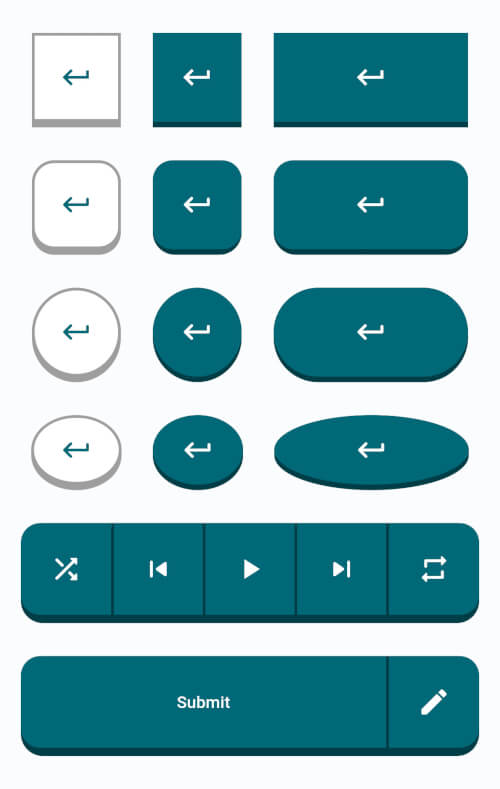
Chiclet 為您提供高度可自訂的島嶼風格按鈕,類似於流行的語言學習應用 Duolingo 和 Figma 課程中的樣式。
49喜歡 648近 30 天下載140Pub 分數
AndroidiOSWebmacOSWindowsLinux
一個包含高度可自訂的島嶼風格按鈕,稱為 Chiclet 的 Flutter 套件。

{"sdk":"flutter"}{"sdk":"flutter"}^6.0.0以下為英文專案原文快照,最新內容請造訪 GitHub。
Highly customizable island-style buttons known as Chiclet.
If you find this project useful and would like to support its development, you can donate using the following cryptocurrencies. We work on this project in our spare time alongside our full-time jobs, and even a small donation — as little as $1 — goes a long way in Iran and helps us dedicate more time to improving and maintaining it.
bc1qkxcvlvkrslx33g2kql45au438ua3qrvanangw20x575ef94aea4aa5bdf5c74c6b47311768118ad7c7TRXMXafCkQ1sND7f9rfUNVDWazR866GHwFTRXMXafCkQ1sND7f9rfUNVDWazR866GHwFUQBcgZhcrJ-Qd-MUol1SvCLSqZCWZ01efrJJh4SUsoBpGtJwChiclet provides you with highly customizable island-style buttons similar to those found in the popular language learning app Duolingo and Figma courses.
Chiclet
In the dependencies: section of your pubspec.yaml, add the following line:
dependencies:
  chiclet: <latest_version>
Chiclet in your main.dart.import 'package:chiclet/chiclet.dart';
ChicletOutlinedAnimatedButton(
onPressed: () {},
child: const Icon(Icons.download_rounded),
),
Chiclet
ChicletButtonTypes.roundedRectangle in front of the buttonType property. In either case, the result will be the same. Example:ChicletOutlinedAnimatedButton(
onPressed: () {},
child: const Icon(Icons.download_rounded),
),
ChicletOutlinedAnimatedButton(
  onPressed: () {},
  buttonType: ChicletButtonTypes.roundedRectangle,
  child: const Icon(Icons.download_rounded),
),
Chiclet
ChicletButtonTypes.circle in front of the buttonType property. Example:ChicletOutlinedAnimatedButton(
onPressed: () {},
buttonType: ChicletButtonTypes.circle,
child: const Icon(Icons.download_rounded),
),
Chiclet
ChicletButtonTypes.circle in front of the buttonType property. Example:ChicletOutlinedAnimatedButton(
onPressed: () {},
width: 65,
buttonType: ChicletButtonTypes.oval,
child: const Icon(Icons.download_rounded),
),
Chiclet
You can find more examples in the /example/lib/main.dart directory.
Chiclet
height),height),shade.900 of ThemeData's primarySwatch, unless you provide the backgroundColor property, then it will be shade.900 of the backgroundColor property),Colors.white),ThemeData's primarySwatch),NoSplash.splashFactory),ChicletButtonTypes.roundedRectangle),height),height),Colors.grey),Colors.grey),ThemeData's primarySwatch),Colors.white),Theme.colorScheme.onSurface(0.12)),NoSplash.splashFactory),ChicletButtonTypes.roundedRectangle),height),Colors.grey),ThemeData's primarySwatch),Colors.white),NoSplash.splashFactory),ChicletButtonTypes.roundedRectangle),Colors.grey),ThemeData's primarySwatch),Colors.white),[!NOTE] When using Material 3, providing the
primarySwatchdoesn't affect the color properties. You should consider providing eithercolorSchemeorColorSchemeSeed.
Suggestions, recommendations, bug reports, and issues: DevRedStone