
 v0.0.3
fp_bt_printer
在藍牙熱敏列印機上列印收據(僅支援 Android)。
23喜歡 34近 30 天下載125Pub 分數
Android
用於連接並列印資料至熱敏列印機的套件

{"sdk":"flutter"}^0.4.0{"sdk":"flutter"}以下為英文專案原文快照,最新內容請造訪 GitHub。
This library allows printing receipts on bluetooth thermal printers (android only). Support 58mm and 80mm printer.
It allows to print QR, BarCode, Images RasterImages with the esc_pos_utils package.
Get list of bluetooth devices, it supports any version of bluetooth, not just BLE.
    List<PrinterDevice> devices = [];
    FpBtPrinter printer = FpBtPrinter();

    Future<void> getDevices() async {
        final response = await printer.scanBondedDevices();
        setState(() {
        devices = response;
        });
    }
You can check that the connection with the device is correct.
    Future<void> setConnet(PrinterDevice d) async {
        final response = await printer.checkConnection(d.address);
        print(response.message);
    }
This method recibe address of the printer and List of the data;
    FpBtPrinter printer = FpBtPrinter();
    final resp = await printer.printData(bytes, address: address);
    if (resp.success) {
     //print ok
    } else {
    print(resp.message); //print error
    }
List<int> getTicket() {
  final List<int> bytes = [];
  // Using default profile
  final profile = await CapabilityProfile.load();
    final generator = Generator(PaperSize.mm80, profile);
    List<int> bytes = [];

    // //  Print image:
    final ByteData data = await rootBundle.load('assets/wz.png');
    final Uint8List bytesImg = data.buffer.asUint8List();
    var image = decodePng(bytesImg);

    // resize
    var thumbnail =
        copyResize(image!, interpolation: Interpolation.nearest, height: 200);

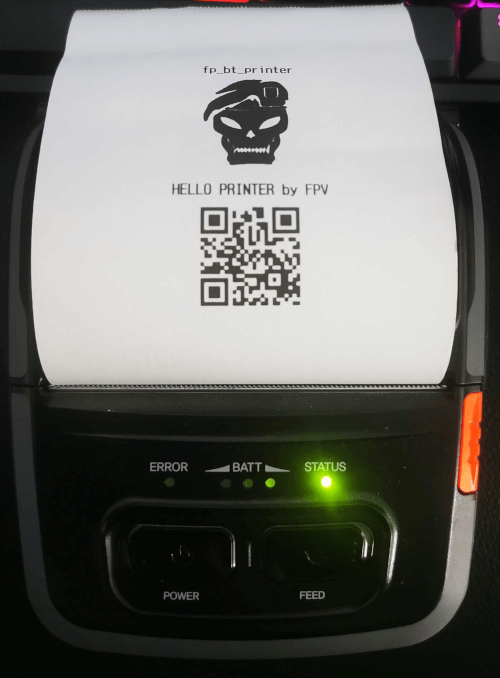
    bytes += generator.text("fp_bt_printer",
        styles: PosStyles(align: PosAlign.center, bold: true));

    bytes += generator.imageRaster(thumbnail, align: PosAlign.center);

    bytes += generator.reset();
    bytes += generator.setGlobalCodeTable('CP1252');
    bytes += generator.feed(1);
    bytes += generator.text("HELLO PRINTER by FPV",
        styles: PosStyles(align: PosAlign.center, bold: true));
    bytes += generator.qrcode("https://github.com/FranciscoPV94",
        size: QRSize.Size6);
    bytes += generator.feed(1);
    bytes += generator.feed(1);

    final resp = await printer.printData(bytes, address: address);
  return bytes;
}
Xprinter Portable Thermal Printer
Model: Bixolon SPP-R310
If you think that this project has helped you with your developments, you can support this project, any support is much appreciated. Paypal