v5.11.1
dio
一個強大的 HTTP 網路請求套件,支援攔截器、中止與取消請求、自訂適配器、轉換器等。
8370喜歡 549萬近 30 天下載160Pub 分數
AndroidiOSWebmacOSWindowsLinux
一款快速、現代的下載管理器,支援 HTTP、BitTorrent、磁力連結與 ed2k。跨平台,使用 Golang 與 Flutter 建構。

以下為英文專案原文快照,最新內容請造訪 GitHub。



English | 中文 | 日本語 | 正體中文 | Tiếng Việt
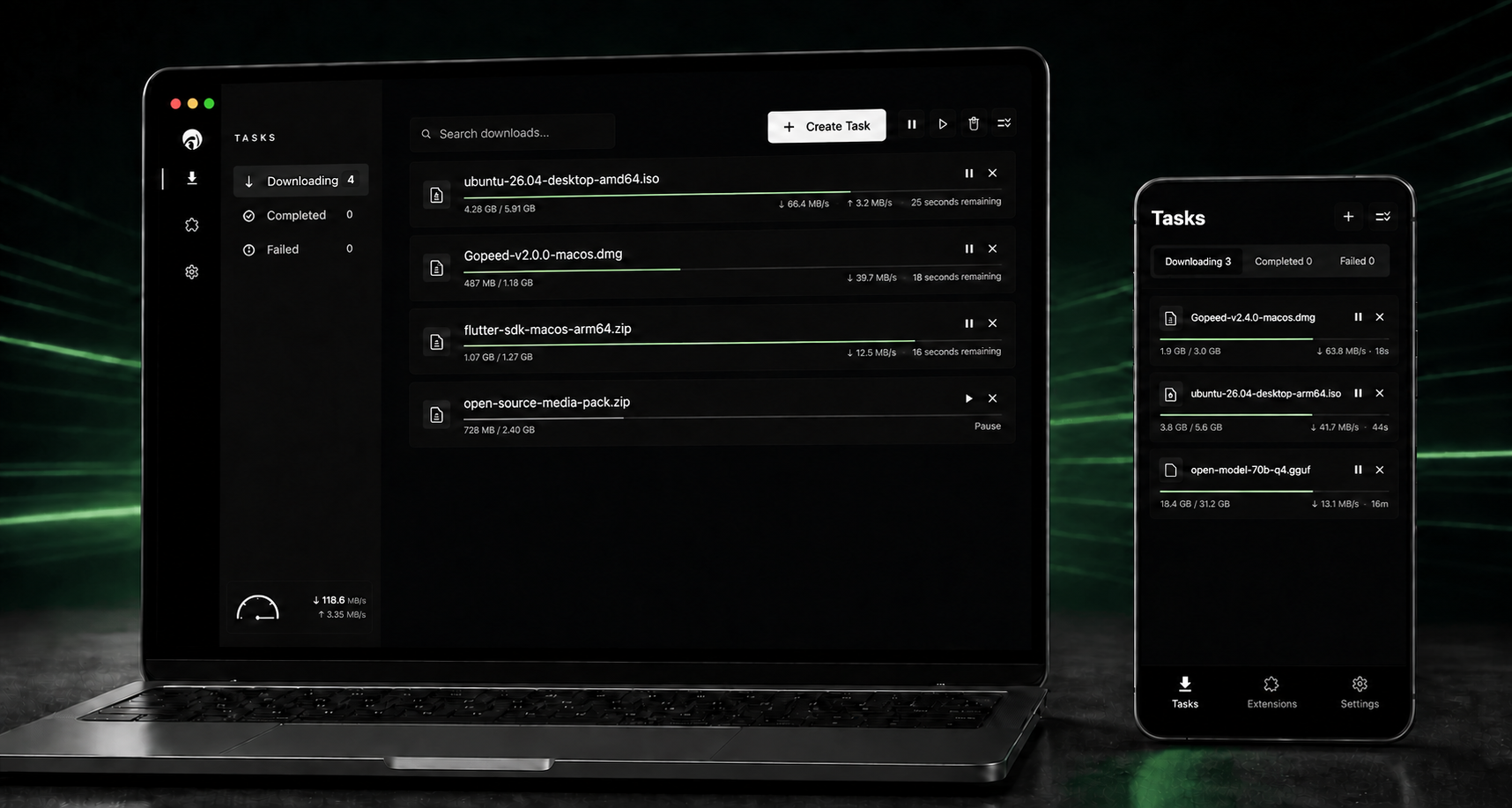
Gopeed (short for Go Speed) is a fast, modern, free, and open-source download manager built with Go and Flutter. It supports HTTP, HTTPS, BitTorrent, magnet links, and ed2k on desktop, mobile, and the web.
Beyond core download management, Gopeed offers browser integration, JavaScript extensions, a REST API, a CLI, and a self-hosted web UI for customization and automation.
Visit ✈ Official Website
Connect Gopeed to an AI agent and manage downloads with natural language. For example, you can say:
Download the latest Gopeed client for Windows.
| Tool | Description |
|---|---|
resolve_task |
Resolve a download URL or URI and return its resource metadata and files before creating a task. |
create_task |
Create and start a task from a resolved resource ID or a direct download request. |
list_tasks |
List tasks, optionally filtering them by ID or status. |
get_task |
Get the request, resource, options, and current progress for one task. |
get_task_status |
Get lightweight runtime status and per-file progress for one task. |
get_task_stats |
Get protocol-specific statistics, including HTTP connections or BitTorrent peers and seeding data. |
pause_task |
Pause a task. |
continue_task |
Continue a paused or failed task. |
delete_task |
Delete a task, optionally deleting its downloaded files. |
Gopeed 2.0.0 is currently in public beta, introducing a redesigned interface, a native communication architecture that connects desktop and mobile clients directly to the Go core through FFI, a more consistent cross-platform experience, improved task management, more flexible API support, and MCP-based AI agent integration. Some features may still be incomplete or unstable, so please try it and report any issues you encounter.
Once the features and stability meet our release standards, we will publish the official Gopeed 2.0.0 release. Beta users will be able to upgrade directly to the final release, while existing stable users will not be automatically moved onto the beta channel.
Install the CLI with go install:
go install github.com/GopeedLab/gopeed/cmd/gopeed@latest
Use the Gopeed browser extension to send downloads from Chrome, Edge, Firefox, and other compatible browsers directly to Gopeed: GopeedLab/browser-extension
Follow Gopeed's official WeChat account for updates and news.

If Gopeed is useful to you, please consider supporting its development. Thank you!
Gopeed consists of a Flutter front end and a Go back end. They communicate over HTTP, using Unix sockets on Unix-like systems and TCP on Windows.
The front-end source is located in the
ui/flutterdirectory.
git clone git@github.com:GopeedLab/gopeed.git
See CONTRIBUTING.md.
Set up Flutter desktop development using the official Flutter desktop guide, and make sure a working C toolchain is available for cgo. Then run the commands for your platform.
Commands:
go build -tags nosqlite -ldflags="-w -s" -buildmode=c-shared -o ui/flutter/windows/libgopeed.dll github.com/GopeedLab/gopeed/bind/desktop
cd ui/flutter
flutter build windows
go build -tags nosqlite -ldflags="-w -s" -buildmode=c-shared -o ui/flutter/macos/Frameworks/libgopeed.dylib github.com/GopeedLab/gopeed/bind/desktop
cd ui/flutter
flutter build macos
go build -tags nosqlite -ldflags="-w -s" -buildmode=c-shared -o ui/flutter/linux/bundle/lib/libgopeed.so github.com/GopeedLab/gopeed/bind/desktop
cd ui/flutter
flutter build linux
Mobile builds also require a working cgo toolchain. Install and initialize gomobile:
go install golang.org/x/mobile/cmd/gomobile@latest
go get golang.org/x/mobile/bind
gomobile init
Commands:
gomobile bind -tags nosqlite -ldflags="-w -s -checklinkname=0" -o ui/flutter/android/app/libs/libgopeed.aar -target=android -androidapi 21 -javapkg="com.gopeed" github.com/GopeedLab/gopeed/bind/mobile
cd ui/flutter
flutter build apk
gomobile bind -tags nosqlite -ldflags="-w -s" -o ui/flutter/ios/Frameworks/Libgopeed.xcframework -target=ios github.com/GopeedLab/gopeed/bind/mobile
cd ui/flutter
flutter build ios --no-codesign
Build the web app and server:
cd ui/flutter
flutter build web
cd ../../
rm -rf cmd/web/dist
cp -r ui/flutter/build/web cmd/web/dist
go build -tags nosqlite,web -ldflags="-s -w" -o bin/ github.com/GopeedLab/gopeed/cmd/web

一個強大的 HTTP 網路請求套件,支援攔截器、中止與取消請求、自訂適配器、轉換器等。
使用 GetX 可輕鬆在無 context 的情況下開啟螢幕、snackbars、對話框,輕鬆管理狀態並注入相依性。
基於蘋果風格圖標的Cupertino元件預設圖示資源
推薦用於 Flutter 應用程式、套件和外掛的程式碼檢查規則,以促進良好的程式設計習慣。
一個用於 Flutter 的 SVG 渲染和小部件庫,可讓您繪製和顯示可縮放向量圖形 1.1 檔案。
Flutter 插件,用於取得主機平台檔案系統中常見使用的目錄位置,例如暫存與應用程式資料目錄。
用於啟動 URL 的 Flutter 插件。支援網頁、電話、簡訊和電子郵件協定。
用純 Dart 編寫的輕量級且飛快的鍵值資料庫。使用 AES-256 強加密。
一個 Flutter 外掛程式,可讓您新增內嵌式 WebView、使用無頭 WebView,以及開啟應用程式內瀏覽器視窗。
一個跨平台插件,用於在 Flutter 應用中顯示和排程本機通知,並支援針對每個平台進行自訂。
Flutter 的權限外掛。此外掛提供跨平台(iOS、Android)API,用於請求和檢查權限。
一個簡化更新您的 Flutter 應用程式啟動圖示任務的套件。
先依使用情境篩選,再比較專案活躍情況,最後到原始儲存庫確認使用要求。
“A repository is the most basic element of GitHub.”
GitHub Docs — About repositories ↗