

 v1.1.2
colored_json
一個將 JSON 字符串轉換為可自訂的 Flutter 小部件的套件。
27喜歡 3510近 30 天下載160Pub 分數
AndroidiOSWebmacOSWindowsLinux
這是一個 Flutter 插件,可將 JSON 字符串轉換為可自訂的 Flutter 小部件。

以下為英文專案原文快照,最新內容請造訪 GitHub。
Convert JSON string into customizable widget.
ColoredJson is a stateless widget that produces a structured view of JSON string provided. It can be used like any other flutter widget.
It's fully customizable where you can set different colors to different datatypes including colon, comma and brackets. Set indent length. Use text style of your choice. You can also change the background color.
| Defaut View | Customised View 1 | Customised View 2 |
|---|---|---|
 |
 |
 |
data parameter of ColoredJson Widgetconst String responseBody = '''
{
'id' : 1,
'name' : 'Colored Json',
'isFlutterAwesome' : true,
}
''';
ColoredJson(
data: responseBody,
)
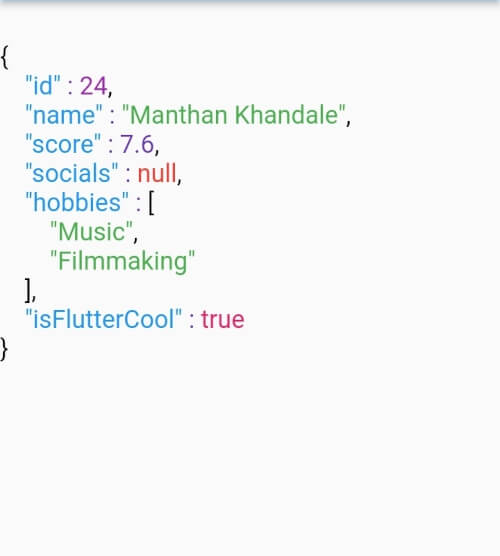
final dartMap = {
  "id": 24,
  "name": "Manthan Khandale",
  "score": 7.6,
  "socials": null,
  "hobbies": [
    "Music",
    "Filmmaking",
  ],
  "isFlutterCool": true,
};

ColoredJson(
 data: jsonEncode(dartMap),
 indentLength: 5,
 keyColor: Colors.green,
 backgroundColor: Colors.black,
 boolColor: Colors.white,
 nullColor: Colors.redAccent,
 stringColor: Colors.cyan,
 curlyBracketColor: Colors.yellow,
 doubleColor: Colors.deepOrange,
 squareBracketColor: Colors.amber,
 commaColor: Colors.yellow,
 colonColor: Colors.purple,
 intColor: Colors.lime,
 textStyle: const TextStyle(
  fontSize: 20,
  letterSpacing: 2,
  ),
 )
| Parameter | Info |
|---|---|
| data (required) | A JSON string to be formatted |
| keyColor | Color of Json Key |
| intColor | Color of integer type value |
| doubleColor | Color of decimal type value |
| stringColor | Color of string type value |
| boolColor | Color of boolean type value |
| nullColor | Color of null type value |
| curlyBracketColor | Color of curly brackets {} |
| squareBracketColor | Color of square brackets [] |
| commaColor | Color of comma ( , ) |
| colonColor | Color of colon ( : ) |
| backgroundColor | Background color of widget |
| textStyle | Textstyle of texts in the widget |
| indentLength | Indent length |
依賴清單 3 項
{"sdk":"flutter"}{"sdk":"flutter"}^1.0.0先依使用情境篩選,再比較專案活躍情況,最後到原始儲存庫確認使用要求。
“A repository is the most basic element of GitHub.”
GitHub Docs — About repositories ↗