
 v1.0.1
custom_pin_screen
一個 Flutter 套件,可為您的行動應用程式新增具有自訂鍵盤和密碼的畫面。
49喜歡 432近 30 天下載160Pub 分數
AndroidiOSWebmacOSWindowsLinux
一個用於新增具有自訂鍵盤和密碼的螢幕的 Flutter 套件。

{"sdk":"flutter"}^1.0.0{"sdk":"flutter"}以下為英文專案原文快照,最新內容請造訪 GitHub。
codecov CI license PRs Welcome GitHub contributors GitHub last commit
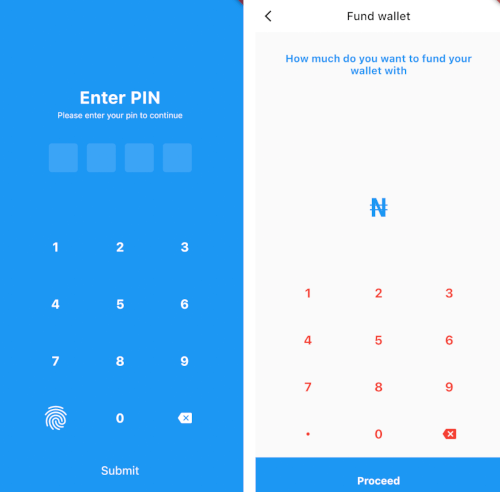
A flutter package to add screens with custom keyboards and pins to your mobile application.
dependencies:
  custom_pin_screen: "^1.0.0"
import 'package:custom_pin_screen/custom_pin_screen.dart';
onPressed: (){
    Navigator.push(
                  context,
                  MaterialPageRoute(
                    builder: (context) => PinAuthentication(
                      onChanged: (v) {
                        if (kDebugMode) {
                          print(v);
                        }
                      },
                      onSpecialKeyTap: () {},
                      specialKey: const SizedBox(),
                      useFingerprint: true,
                      onbuttonClick: () {},
                      submitLabel: const Text(
                        'Submit',
                        style: TextStyle(color: Colors.white, fontSize: 20),
                      ),
                    ),
                  ),
                );
    },
Column(
        children: [
          const Padding(
            padding: EdgeInsets.symmetric(
              horizontal: 35.0,
              vertical: 35.0,
            ),
            child: Text(
              "How much do you want to fund your wallet with",
              textAlign: TextAlign.center,
              style: TextStyle(
                color: Colors.blue,
                fontWeight: FontWeight.w700,
                fontSize: 18,
              ),
            ),
          ),
          Expanded(
              child: CustomAppKeyBoard(
            onChanged: (v) {
              if (kDebugMode) {
                print(v);
              }
            },
            onbuttonClick: () {
              if (kDebugMode) {
                print('clicked');
              }
            },
            maxLength: 4,
            submitLabel: const Text(
              'Proceed',
              style: TextStyle(
                color: Colors.white,
                fontWeight: FontWeight.w700,
                fontSize: 18,
              ),
            ),
            // ),
          ))
        ],
      )
For more info, please, refer to the main.dart in the example.
| https://github.com/Mastersam07/custom_pin_screen//raw/master/assets/1.png | https://github.com/Mastersam07/custom_pin_screen//raw/master/assets/2.png |
If you encounter any problems feel free to open an issue. If you feel the library is missing a feature, please raise a ticket on Github and I'll look into it. Pull request are also welcome.
This project is a starting point for a Flutter plug-in package, a specialized package that includes platform-specific implementation code for Android and/or iOS.
For help getting started with Flutter, view our online documentation, which offers tutorials, samples, guidance on mobile development, and a full API reference.
https://github.com/aritraroy/social-icons/blob/master/twitter-icon.png?raw=true https://github.com/aritraroy/social-icons/blob/master/linkedin-icon.png?raw=true https://github.com/aritraroy/social-icons/blob/master/medium-icon.png?raw=true https://github.com/aritraroy/social-icons/blob/master/facebook-icon.png?raw=true