
 v1.0.6
widget_to_marker
一個將任何 Flutter Widget 轉換為 BitmapDescriptor 的套件,可用於 google_maps_flutter 圖標標記。
133喜歡 1.5萬近 30 天下載155Pub 分數
AndroidiOSWeb
Mohamedfaroouk/widget_to_marker open-source repository details.

{"sdk":"flutter"}^2.7.0{"sdk":"flutter"}^2.0.0^2.0.1以下為英文專案原文快照,最新內容請造訪 GitHub。
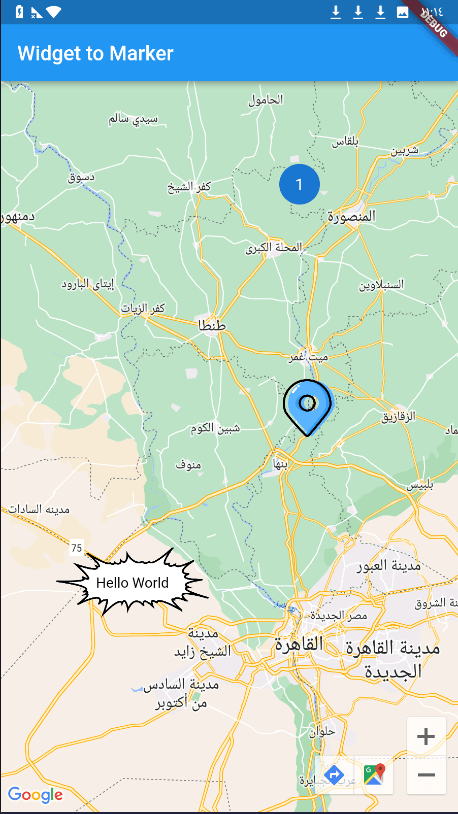
When using Google Maps, we always have a problem with adding a marker on the map, and the available tools were either drawing the marker through canvas path or using an image, but the problem is if we want to add words or data or add custom edit to this marker, but this package has solved the problem and now you can use any widget in flutter as a marker for google map ! using the .toBitmapDescriptor() function on the widget to use it as a marker icon!
dependencies:
  widget_to_marker: ^1.0.6
import 'package:widget_to_marker/widget_to_marker.dart';

class TextOnImage extends StatelessWidget {
  const TextOnImage({
    super.key,
    required this.text,
  });
  final String text;
  @override
  Widget build(BuildContext context) {
    return Stack(
      alignment: Alignment.center,
      children: [
        Image(
          image: const AssetImage(
            "assets/marker.png",
          ),
          height: 150,
          width: 150,
        ),
        Text(
          text,
          style: TextStyle(color: Colors.black),
        )
      ],
    );
  }
}
.toBitmapDescriptor():Marker(
markerId: const MarkerId("3"),
position: const LatLng(30.01124477440843, 30.78459296375513),
icon: await TextOnImage(
text: "Hello World",
).toBitmapDescriptor(
logicalSize: const Size(150, 150), imageSize: const Size(150, 150)
),
)
You Can Use waitToRender Attribute to set duration for rendering large network and asset images
image