
flutter_boom_menu
用於實現帶有圖示、標題、副標題、動畫 FAB 圖示以及滾動時隱藏的 Boom 菜單的 Flutter 插件。

- 星標
- 88
- 分支
- 29
- 最近推送(UTC)
- 2021年8月2日
- 專案狀態
- 未封存
原始 README
以下為英文專案原文快照,最新內容請造訪 GitHub。
Flutter Boom Menu
Usage
The BoomMenu widget is built to be placed in the Scaffold.floatingActionButton argument, replacing the FloatingActionButton widget.
It's not possible to set its position with the Scaffold.floatingActionButtonLocation argument, but it's possible to set right/bottom margin with the marginRight and marginBottom arguments (default to 16) to place the button anywhere in the screen.
Using the Scaffold.bottomNavigationBar the floating button will be always placed above the bar, so the BottomAppBar.hasNotch should be always false.
Title
Every child button can have a Icon,Title, SubTitle which can be customized providing by yourself. If the Title parameter is not provided the title will be not rendered.
The package will handle the animation by itself.
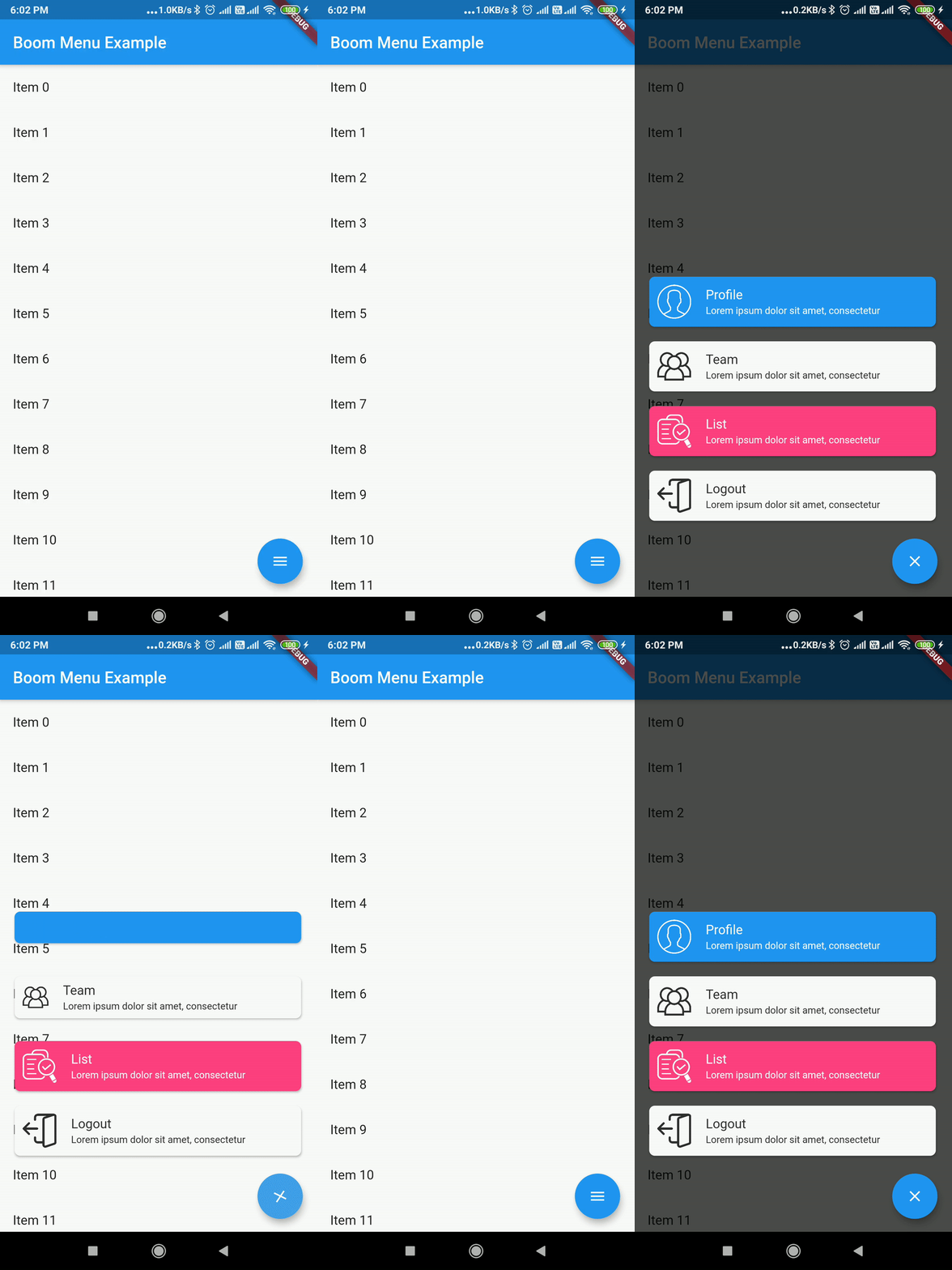
Example Usage ( complete with all params ):
Widget build(BuildContext context) {
    return Scaffold(
        floatingActionButton: BoomMenu(
      animatedIcon: AnimatedIcons.menu_close,
      animatedIconTheme: IconThemeData(size: 22.0),
      //child: Icon(Icons.add),
      onOpen: () => print('OPENING DIAL'),
      onClose: () => print('DIAL CLOSED'),
      scrollVisible: scrollVisible,
      overlayColor: Colors.black,
      overlayOpacity: 0.7,
      children: [
        MenuItem(
          child: Icon(Icons.accessibility, color: Colors.black),
          title: "Profiles",
          titleColor: Colors.white,
          subtitle: "You Can View the Noel Profile",
          subTitleColor: Colors.white,
          backgroundColor: Colors.deepOrange,
          onTap: () => print('FIRST CHILD'),
        ),
        MenuItem(
          child: Icon(Icons.brush, color: Colors.black),
          title: "Profiles",
          titleColor: Colors.white,
          subtitle: "You Can View the Noel Profile",
          subTitleColor: Colors.white,
          backgroundColor: Colors.green,
          onTap: () => print('SECOND CHILD'),
        ),
        MenuItem(
          child: Icon(Icons.keyboard_voice, color: Colors.black),
          title: "Profile",
          titleColor: Colors.white,
          subtitle: "You Can View the Noel Profile",
          subTitleColor: Colors.white,
          backgroundColor: Colors.blue,
          onTap: () => print('THIRD CHILD'),
        ),
        MenuItem(
          child: Icon(Icons.ac_unit, color: Colors.black),
          title: "Profiles",
          titleColor: Colors.white,
          subtitle: "You Can View the Noel Profile",
          subTitleColor: Colors.white,
          backgroundColor: Colors.blue,
          onTap: () => print('FOURTH CHILD'),
        )
      ],
    ),
    );
}
Issues & Feedback
Please file an issue to send feedback or report a bug. Thank you!
Contributing
Every pull request is welcome.

Mohanraj ↗
使用的依賴
依賴清單 2 項
- flutter
{"sdk":"flutter"} - flutter_test開發依賴
{"sdk":"flutter"}
如何選擇適合專案的儲存庫?
先依使用情境篩選,再比較專案活躍情況,最後到原始儲存庫確認使用要求。
- 透過儲存庫名稱、作者或描述搜尋,再依技術分類縮小範圍。
- 綜合星標、分支與最近推送比較專案;星標反映社群關注,不保證品質。
- 使用前在 GitHub 確認 README、授權條款與 Issues。
來源與維護
“A repository is the most basic element of GitHub.”
GitHub Docs — About repositories ↗