
 v5.5.3
quick_log
一個容易使用且可擴展的 Dart 日誌套件。特別適用於庫中使用,因為它允許應用程式控制導入庫的日誌記錄。
21喜歡 5050近 30 天下載150Pub 分數
AndroidiOSWebmacOSWindowsLinux
MohiuddinM/log open-source repository details.

以下為英文專案原文快照,最新內容請造訪 GitHub。
An easy to use and extendable logging package for Dart. Especially useful for use in libraries, as it allows application to control logging from the imported libraries.
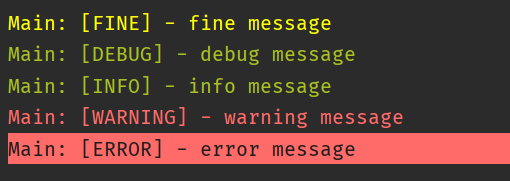
Console Printer Output
A simple usage example:
import 'package:quick_log/quick_log.dart';

void main() {
  const log = Logger('LogExample');

  log.debug('this is a debug message');
  log.info('this is an info message');
}
Configuring logger output:
import 'package:quick_log/quick_log.dart';

void main() {
  const log = Logger('LogExample');

  Logger.writer = ConsolePrinter(minLevel: LogLevel.info);

  log.d('this is a debug message');
  log.i('this is an info message');
}
Ignoring logs:
import 'package:quick_log/quick_log.dart';

class ExampleLogger extends Logger {
  const ExampleLogger(String name) : super(name, 'ExampleLogger');
}

void main() {
  const log = ExampleLogger('LogExample');

  Logger.writer = ConsolePrinter(onlyTags: []);
  // Or
  Logger.writer = ConsolePrinter(exceptTags: [log.name]);

  // These messages won't be printed
  log.d('this is a debug message');
  log.i('this is an info message');
}
Can be used in tests by using the LogStreamWriter:
import 'package:quick_log/quick_log.dart';

test('test', () {
  const log = Logger('LogExample');
  final writer = LogStreamWriter();
  Logger.writer = writer;

  log.i('this line was executed');

  expect(writer.pastMessages.length, 1);
  expect(writer.lastMessage.message, 'this is an info message');
});
Please file feature requests and bugs at the issue tracker.