
 v1.2.0
story_maker
一個用於建立類似 Instagram 故事的套件,您可使用此套件編輯圖片,並透過加入文字、貼紙與濾鏡等內容,讓圖片適合用於故事。
69喜歡 36近 30 天下載140Pub 分數
AndroidiOSmacOSWindowsLinux
一個用於建立類似 Instagram 故事的套件。您可使用此套件編輯圖片,並透過添加文字與漸變等其他內容,讓圖片適合製作故事。

{"sdk":"flutter"}^2.1.5^6.3.2^0.15.0{"sdk":"flutter"}以下為英文專案原文快照,最新內容請造訪 GitHub。
A package for creating instagram like story, you can use this package to edit images and make it story ready by adding other contents over it like text, stickers, gradients, and color filters.
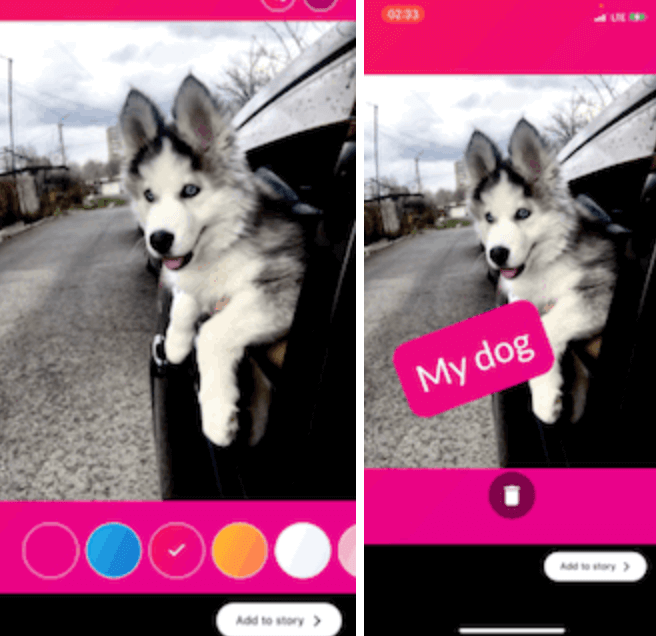
GIF 1 GIF 2
Add this to your package's pubspec.yaml file:
dependencies:
  story_maker: ^1.2.0
import 'package:story_maker/story_maker.dart';

class _MyAppState extends State<MyApp> {
  File? image;

  @override
  Widget build(BuildContext context) {
    return Scaffold(
      appBar: AppBar(
        title: const Text('Story Designer Example'),
      ),
      body: Center(
        child: Column(
          mainAxisAlignment: MainAxisAlignment.center,
          children: [
            ElevatedButton(
              onPressed: () async {
                await [
                  Permission.photos,
                  Permission.storage,
                ].request();
                final picker = ImagePicker();
                await picker
                    .pickImage(source: ImageSource.gallery)
                    .then((file) async {
                  final File editedFile = await Navigator.of(context).push(
                    MaterialPageRoute(
                      builder: (context) => StoryMaker(
                        filePath: file!.path,
                      ),
                    ),
                  );
                  setState(() {
                    image = editedFile;
                  });
                  print('editedFile: ${image!.path}');
                });
              },
              child: const Text('Pick Image'),
            ),
            if (image != null)
              Expanded(
                child: Image.file(image!),
              ),
          ],
        ),
      ),
    );
  }
}
import 'package:story_maker/story_maker.dart';

// Example with custom theme, stickers, and done button
StoryMaker(
  filePath: imagePath,
  theme: StoryMakerTheme.dark(), // or StoryMakerTheme.light()
  customStickers: [
    StickerItem.emoji('🎉'),
    StickerItem.emoji('🔥'),
    StickerItem.image('/path/to/sticker.png'),
  ],
  customFontList: ['Roboto', 'Open Sans', 'Lato'],
  customTextColors: [
    Colors.red,
    Colors.blue,
    Colors.green,
  ],
  customGradients: [
    [Colors.purple, Colors.pink],
    [Colors.blue, Colors.cyan],
  ],
  doneButtonBuilder: (theme, onDone, isLoading) {
    return ElevatedButton(
      onPressed: isLoading ? null : onDone,
      style: ButtonStyle(
        backgroundColor: WidgetStateProperty.all(theme.buttonColor),
      ),
      child: isLoading
          ? CircularProgressIndicator()
          : Text('Save Story', style: TextStyle(color: theme.buttonTextColor)),
    );
  },
)
[x] Image Editing:
[x] Text Editing:
google_fonts package)[x] Background Gradients:
customGradients parameter[x] Stickers Support:
StickerItem.image()customStickers parameter[x] Color Filters:
[x] Theme Customization:
StoryMakerTheme[x] Customization Options:
customFontList parametercustomTextColors parametercustomGradients parameteranimationsDuration parameter[x] User Experience:
[x] Developer Experience: