
v1.0.1
dynamic_theme
在執行時變更主題,同時在重新啟動之間保留亮度設定
136喜歡 875近 30 天下載40Pub 分數
平台暫無資料
輕鬆動態變更您的主題
以下為英文專案原文快照,最新內容請造訪 GitHub。
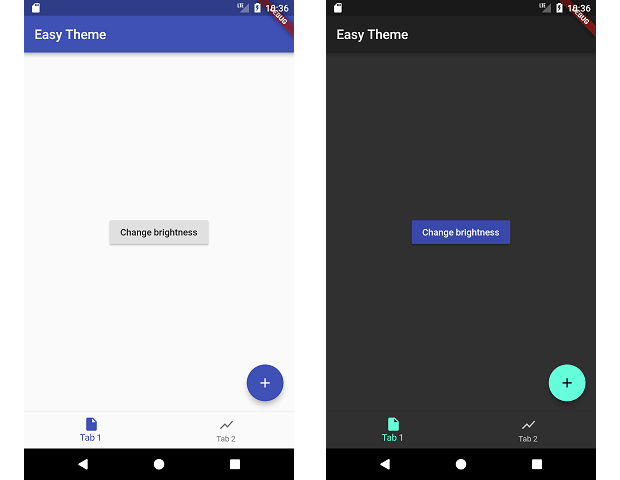
This packages manages changing your theme during runtime and persiting that theme.
dependencies:
  dynamic_theme: ^1.0.1
run packages get and import it
import 'package:dynamic_theme/dynamic_theme.dart';
if you want the dialog:
import 'package:dynamic_theme/theme_switcher_widgets.dart';
Wrap your material app like this:
class MyApp extends StatelessWidget {
  @override
  Widget build(BuildContext context) {
    return new DynamicTheme(
      defaultBrightness: Brightness.light,
      data: (brightness) => new ThemeData(
        primarySwatch: Colors.indigo,
        brightness: brightness,
      ),
      themedWidgetBuilder: (context, theme) {
        return new MaterialApp(
          title: 'Flutter Demo',
          theme: theme,
          home: new MyHomePage(title: 'Flutter Demo Home Page'),
        );
      }
    );
  }
}
Change the theme like this:
  void changeBrightness() {
    DynamicTheme.of(context).setBrightness(Theme.of(context).brightness == Brightness.dark? Brightness.light: Brightness.dark);
  }

  void changeColor() {
    DynamicTheme.of(context).setThemeData(new ThemeData(
        primaryColor: Theme.of(context).primaryColor == Colors.indigo? Colors.red: Colors.indigo
    ));
  }
When changing the brightness with setBrightness, it is additionally stored in the shared preferences.
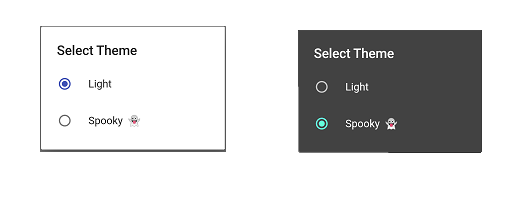
For help getting started with Flutter, view our online documentation.
For help on editing package code, view the documentation.

依賴清單 3 項
{"sdk":"flutter"}^2.0.5{"sdk":"flutter"}先依使用情境篩選,再比較專案活躍情況,最後到原始儲存庫確認使用要求。
“A repository is the most basic element of GitHub.”
GitHub Docs — About repositories ↗