
l
跨平台的 html/io [L]ogger,擁有簡單的 API。

- 星標
- 38
- 分支
- 4
- 最近推送(UTC)
- 2025年7月17日
- 專案狀態
- 未封存
原始 README
以下為英文專案原文快照,最新內容請造訪 GitHub。
[L]ogger


About
Cross-platform html/io logger with simple API. No need to create a logger object. Just import and use. Simple and w/o boilerplate. Work with native console.
Core API
Example of usage
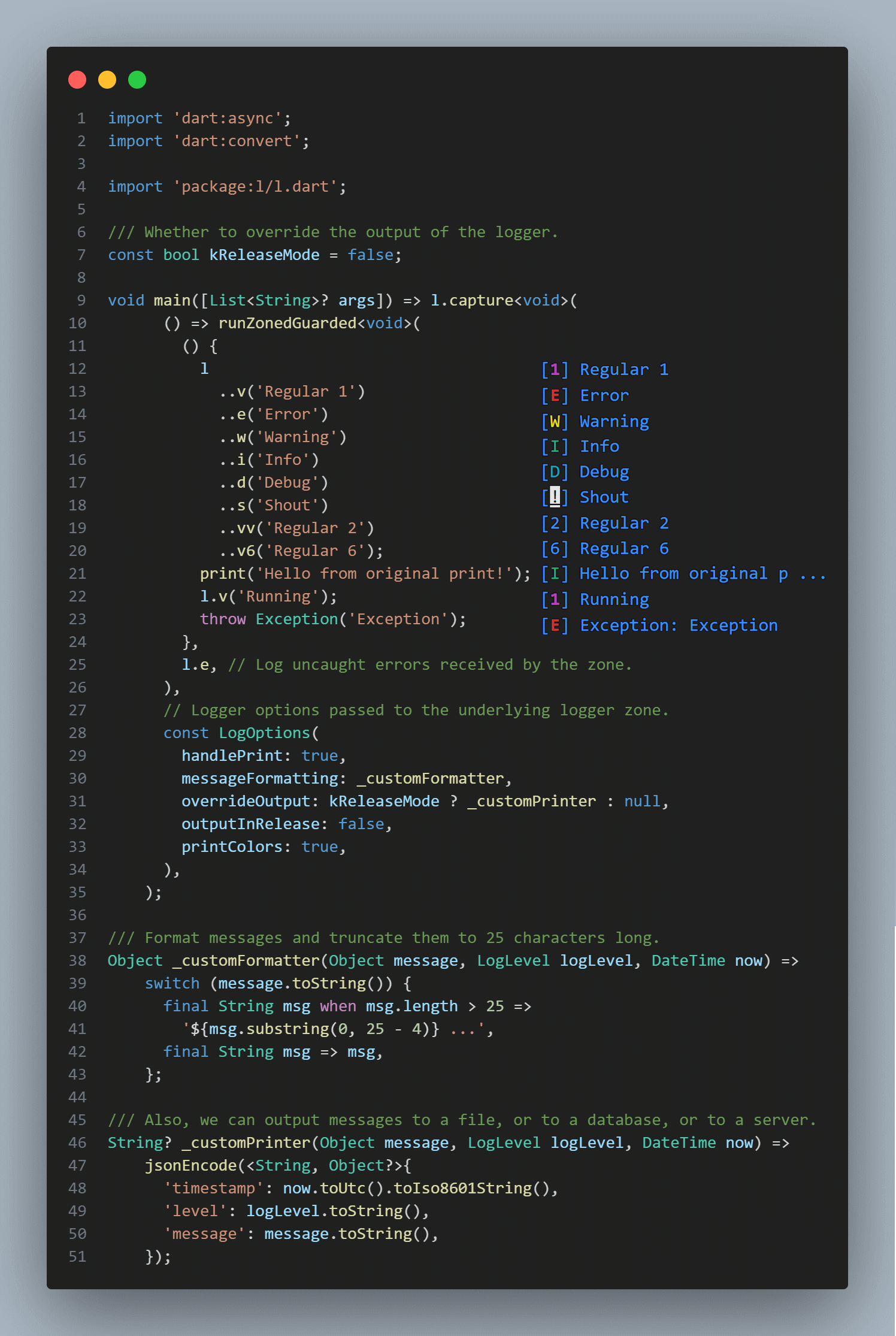 Example of using the library to display a message in the console.
Key features
| Method | Description |
|---|---|
| [s] | A shout is always displayed |
| [v1], [v] | Regular message with verbose level 1 |
| [e] | Error message with verbose level 1 |
| [v2], [vv] | Regular message with verbose level 2 |
| [w] | Warning message with verbose level 2 |
| [v3], [vvv] | Regular message with verbose level 3 |
| [i], [<] | Inform message with verbose level 3 |
| [v4], [vvvv] | Regular message with verbose level 4 |
| [d], [<<] | Debug message with verbose level 4 |
| [v5], [vvvvv] | Regular message with verbose level 5 |
| [v6], [vvvvvv] | Regular message with verbose level 6 |
l.s('shout me');
l.e('error msg');
l.w('warning msg');
l.i('info msg');
l < 'alt info msg';
l.d('debug msg');
l << 'alt debug msg';
l.v('verbose lvl #1');
l.vv('verbose lvl #2');
l.vvv('verbose lvl #3');
l.v4('verbose lvl #4');
l.v5('verbose lvl #5');
l.v6('verbose lvl #6');
Integration capabilities
| Method | Description |
|---|---|
| [listen] | Broadcast stream receiving logs. |
// Broadcast stream instantly receiving logs.
l.forEach((log) => print('* ${log.level} : ${log.message}'));
Print handling and customizing
Logger supports fine-tuning with the second argument LogOptions in a capture method.
Also, you can handle print and output with l on some function or in a whole app with this simple syntax:
import 'package:l/l.dart';

void main() => l.capture(
      someFunction,
      const LogOptions(
        handlePrint: true,
        printColors: true,
        outputInRelease: false,
        messageFormatting: _messageFormatting,
      ),
    );

Future<void> someFunction() async {
  print('Hello');
  await Future<void>.delayed(const Duration(milliseconds: 150));
  l.d('world');
  await Future<void>.delayed(const Duration(milliseconds: 150));
  l.e('!!!');
}

Object _messageFormatting(Object message, LogLevel logLevel, DateTime now) =>
    '${now.hour}:${now.minute.toString().padLeft(2, '0')} $message';
Handling errors
Flutter
final sourceFlutterError = FlutterError.onError;
FlutterError.onError = (details) {
  l.w(details.exceptionAsString(), details.stack);
  sourceFlutterError?.call(details);
};
Crashlytics
l.where((msg) => msg.level.maybeWhen(
      error: () => true,
      warning: () => true,
      orElse: () => false,
    ))
  .map<String>((msg) => msg.message.toString())
  .listen(FirebaseCrashlytics.instance.log);
Zoned Errors
runZonedGuarded(someFunction, l.e);
Handling uncaught errors
Isolate.current
       ..setErrorsFatal(false)
       ..addErrorListener(
         RawReceivePort(
           (List<dynamic> pair) => // ignore: avoid_types_on_closure_parameters
               l.e(pair.first as Object),
         ).sendPort,
       );
Limitations
- When there is no direct access to the terminal, it works through print.
- !!! PLEASE, DO NOT LOG SENSITIVE INFORMATION !!!
Changelog
Refer to the Changelog to get all release notes.
Maintainers
Funding
If you want to support the development of our library, there are several ways you can do it:
We appreciate any form of support, whether it's a financial donation or just a star on GitHub. It helps us to continue developing and improving our library. Thank you for your support!
License

Plague Fox ↗
分類
使用的依賴
如何選擇適合專案的儲存庫?
先依使用情境篩選,再比較專案活躍情況,最後到原始儲存庫確認使用要求。
- 透過儲存庫名稱、作者或描述搜尋,再依技術分類縮小範圍。
- 綜合星標、分支與最近推送比較專案;星標反映社群關注,不保證品質。
- 使用前在 GitHub 確認 README、授權條款與 Issues。
來源與維護
“A repository is the most basic element of GitHub.”
GitHub Docs — About repositories ↗