


 v1.0.2
flutter_gradient_animation_text
透過輸入文字、顏色和動畫持續時間,輕鬆創建動態漸變文字。
42喜歡 1050近 30 天下載140Pub 分數
AndroidiOSWebmacOSWindowsLinux
由Sahil Shah開發的用於漸變動畫文字的Flutter套件

以下為英文專案原文快照,最新內容請造訪 GitHub。



This package lets you make animated gradient texts without any hassle.
Just pass the text, colors, the duration of the animation and you're done!
Using the transform and reverse, you can achieve amazing effects.
For More info read the docs below.
Install the package using the following command:
flutter pub add flutter_gradient_animation_text
Import the package in your dart file using the following code:
import 'package:flutter_gradient_animation_text/flutter_gradient_animation_text.dart';
And you are good to go!
Create your animated gradient text. The 3 required arguments are:
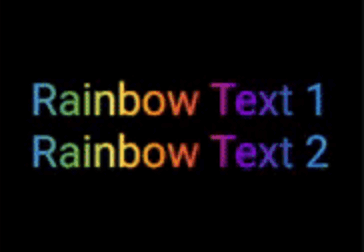
text(Text): The text.colors(List<Colors>): List of colors you want in your gradient.duration(Duration): Duration for which a single gradient animation runs.// rainbow text
GradientAnimationText(
text: Text(
'Rainbow Text 1',
style: TextStyle(
fontSize: 50,
),
),
colors: [
Color(0xff8f00ff), // violet
Colors.indigo,
Colors.blue,
Colors.green,
Colors.yellow,
Colors.orange,
Colors.red,
],
duration: Duration(seconds: 5),
),

Reverse the animation.
This plays the animation backwards when a single iteration of the forward animation is completed.
You set reverse to true to enable this.
// rainbow text with reverse
GradientAnimationText(
    text: Text(
        'Rainbow Text 1',
        style: TextStyle(
            fontSize: 50,
        ),
    ),
    colors: [
        Color(0xff8f00ff),  // violet
        Colors.indigo,
        Colors.blue,
        Colors.green,
        Colors.yellow,
        Colors.orange,
        Colors.red,
    ],
    duration: Duration(seconds: 5),
    reverse: true,  // reverse
),

Play with colors.
It is possible to use the same color more than once to increase the area it covers.
Gold Text Example:
The following 2 Gold Text animations have different number of Colors.amber color.
// gold text 1
GradientAnimationText(
    text: Text(
        'Gold Text 1',
        style: TextStyle(
            fontSize: 50,
            fontWeight: FontWeight.bold,
        ),
    ),
    colors: [
        Colors.amber,   // 1
        Colors.white,
    ],
    duration: Duration(seconds: 5),
    reverse: true,
),
// gold text 2
GradientAnimationText(
    text: Text(
        'Gold Text 2',
        style: TextStyle(
            fontSize: 50,
            fontWeight: FontWeight.bold,
        ),
    ),
    colors: [
        Colors.amber,   // 1
        Colors.amber,   // 2
        Colors.amber,   // 3
        Colors.white,
    ],
    duration: Duration(seconds: 5),
    reverse: true,
),

Transform your gradient.
You can transform your gradient using transform property.
Use GradientTranform classes such as SweepGradient, and GradientRotation to tranform.
// Tranform Text
GradientAnimationText(
    text: Text(
    'Tranform Text',
        style: TextStyle(
            fontSize: 90,
            fontWeight: FontWeight.bold,
        ),
    ),
    colors: [
        Color(0xFF061A9C),
        Color(0xff92effd),
    ],
    duration: Duration(seconds: 5),
    transform: GradientRotation(math.pi / 4),   // tranform
),

| Property | Type | Description |
|---|---|---|
text |
Text | The text to be used in the animation. |
colors |
List | Colors of the animation. |
duration |
Duration | Duration for which a single gradient animation runs. |
reverse |
bool? | If you want to reverse the animation. |
transform |
GradientTransform? | You can transform your gradient. |
This package is developed by Sahil Shah.
依賴清單 3 項
{"sdk":"flutter"}{"sdk":"flutter"}^2.0.0先依使用情境篩選,再比較專案活躍情況,最後到原始儲存庫確認使用要求。
“A repository is the most basic element of GitHub.”
GitHub Docs — About repositories ↗