


v0.0.6
flutter_paginator
一個可自訂的 Flutter 分頁套件。此套件可用來從 API 一頁一頁地取得並顯示資料。
27喜歡 52近 30 天下載40Pub 分數
平台暫無資料
一個可自訂的 Flutter 分頁套件

以下為英文專案原文快照,最新內容請造訪 GitHub。
A customizable pagination package for Flutter. This package can be used to fetch and display data from an API page by page.
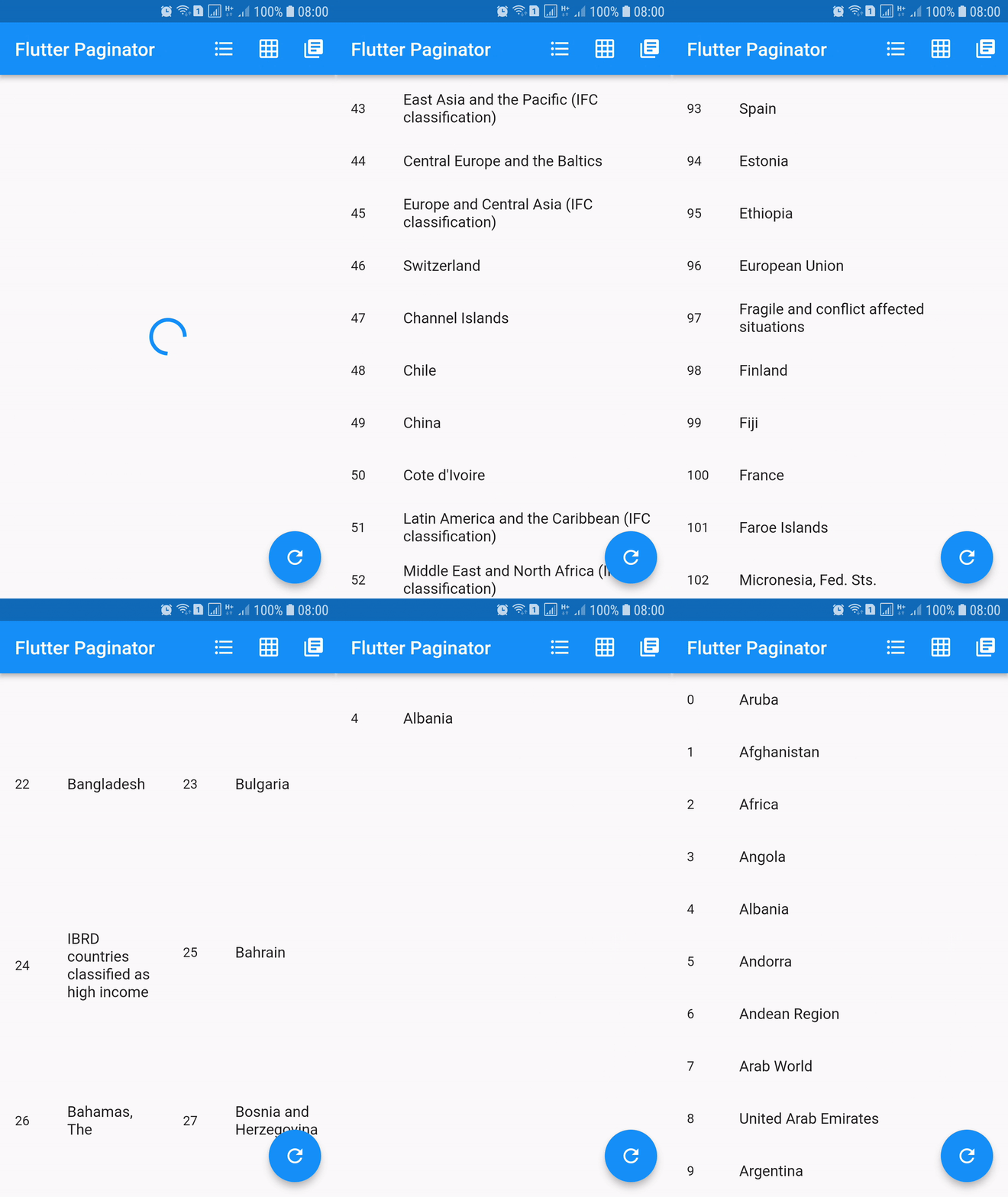
dependencies:
  flutter_paginator: ^0.0.6
Paginator extends StatefulWidget has 3 constructors namely Paginator.listView, Paginator.gridView and Paginator.pageView. Paginator.listView, Paginator.gridView and Paginator.pageView are descendants of ListView, GridView and PageView. Paginator.listView, Paginator.gridView and Paginator.pageView got all the features of their ancestors and they are need to provide additional functions that are essential in doing their task.
PageLoadFutureFuture.PageItemsGetterPageLoadFuture.ListItemBuilderWidget.LoadingWidgetBuilderWidget.ErrorWidgetBuilderWidget.EmptyListWidgetBuilderWidget.TotalItemsGetterPageErrorCheckerimport 'dart:async';
import 'dart:convert';
import 'dart:io';
import 'package:flutter/material.dart';
import 'package:http/http.dart' as http;
import 'package:flutter_paginator/flutter_paginator.dart';
import 'package:flutter_paginator/enums.dart';
void main() => runApp(MyApp());
class MyApp extends StatelessWidget {
@override
Widget build(BuildContext context) {
return MaterialApp(
title: 'Flutter Paginator',
home: HomePage(),
);
}
}
class HomePage extends StatefulWidget {
@override
State<StatefulWidget> createState() {
return HomeState();
}
}
class HomeState extends State<HomePage> {
GlobalKey<PaginatorState> paginatorGlobalKey = GlobalKey();
@override
Widget build(BuildContext context) {
return Scaffold(
appBar: AppBar(
title: Text('Flutter Paginator'),
actions: <Widget>[
IconButton(
icon: Icon(Icons.format_list_bulleted),
onPressed: () {
paginatorGlobalKey.currentState
.changeState(listType: ListType.LIST_VIEW);
},
),
IconButton(
icon: Icon(Icons.grid_on),
onPressed: () {
paginatorGlobalKey.currentState.changeState(
listType: ListType.GRID_VIEW,
gridDelegate: SliverGridDelegateWithFixedCrossAxisCount(
crossAxisCount: 2),
);
},
),
IconButton(
icon: Icon(Icons.library_books),
onPressed: () {
paginatorGlobalKey.currentState
.changeState(listType: ListType.PAGE_VIEW);
},
),
],
),
body: Paginator.listView(
key: paginatorGlobalKey,
pageLoadFuture: sendCountriesDataRequest,
pageItemsGetter: listItemsGetter,
listItemBuilder: listItemBuilder,
loadingWidgetBuilder: loadingWidgetMaker,
errorWidgetBuilder: errorWidgetMaker,
emptyListWidgetBuilder: emptyListWidgetMaker,
totalItemsGetter: totalPagesGetter,
pageErrorChecker: pageErrorChecker,
scrollPhysics: BouncingScrollPhysics(),
),
floatingActionButton: FloatingActionButton(
onPressed: () {
paginatorGlobalKey.currentState.changeState(
pageLoadFuture: sendCountriesDataRequest, resetState: true);
},
child: Icon(Icons.refresh),
),
);
}
Future<CountriesData> sendCountriesDataRequest(int page) async {
try {
String url = Uri.encodeFull(
'http://api.worldbank.org/v2/country?page=$page&format=json');
http.Response response = await http.get(url);
return CountriesData.fromResponse(response);
} catch (e) {
if (e is IOException) {
return CountriesData.withError(
'Please check your internet connection.');
} else {
print(e.toString());
return CountriesData.withError('Something went wrong.');
}
}
}
List<dynamic> listItemsGetter(CountriesData countriesData) {
List<String> list = [];
countriesData.countries.forEach((value) {
list.add(value['name']);
});
return list;
}
Widget listItemBuilder(value, int index) {
return ListTile(
leading: Text(index.toString()),
title: Text(value),
);
}
Widget loadingWidgetMaker() {
return Container(
alignment: Alignment.center,
height: 160.0,
child: CircularProgressIndicator(),
);
}
Widget errorWidgetMaker(CountriesData countriesData, retryListener) {
return Column(
mainAxisAlignment: MainAxisAlignment.center,
children: <Widget>[
Padding(
padding: const EdgeInsets.all(16.0),
child: Text(countriesData.errorMessage),
),
FlatButton(
onPressed: retryListener,
child: Text('Retry'),
)
],
);
}
Widget emptyListWidgetMaker(CountriesData countriesData) {
return Center(
child: Text('No countries in the list'),
);
}
int totalPagesGetter(CountriesData countriesData) {
return countriesData.total;
}
bool pageErrorChecker(CountriesData countriesData) {
return countriesData.statusCode != 200;
}
}
class CountriesData {
List<dynamic> countries;
int statusCode;
String errorMessage;
int total;
int nItems;
CountriesData.fromResponse(http.Response response) {
this.statusCode = response.statusCode;
List jsonData = json.decode(response.body);
countries = jsonData[1];
total = jsonData[0]['total'];
nItems = countries.length;
}
CountriesData.withError(String errorMessage) {
this.errorMessage = errorMessage;
}
}
依賴清單 2 項
{"sdk":"flutter"}{"sdk":"flutter"}先依使用情境篩選,再比較專案活躍情況,最後到原始儲存庫確認使用要求。
“A repository is the most basic element of GitHub.”
GitHub Docs — About repositories ↗