
 v0.0.2
status_view
顯示狀態,就像 WhatsApp 與 Instagram 一樣。此套件可幫助顯示使用者狀態,類似於 WhatsApp 狀態。在這裡我們可以指定狀態數量、已讀與未讀狀態,除此之外,相同套件也可用於顯示類似 Instagram 的狀態。
90喜歡 249近 30 天下載120Pub 分數
AndroidiOSWebmacOSWindowsLinux
顯示狀態,就像 WhatsApp 和 Instagram 一樣。
以下為英文專案原文快照,最新內容請造訪 GitHub。
Display status just like WhatsApp & Instagram. This package help to display users status like WhatsApp status. in this we can specify the number of status ,seen and unseen status as well, apart from that same package use to display status like Instagram.
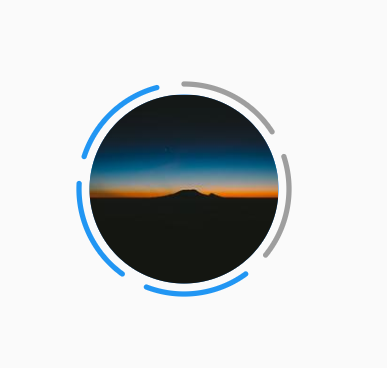
You just need to add status_view as a dependency in your pubspec.yaml file.
dependencies:
  status_view: ^0.0.1
StatusView(
            radius: 40,
            spacing: 15,
            strokeWidth: 2,
            indexOfSeenStatus: 2,
            numberOfStatus: 5,
            padding: 4,
            centerImageUrl: "https://picsum.photos/200/300",
            seenColor: Colors.grey,
            unSeenColor: Colors.red,
          ),
| Attributes | Description |
|---|---|
| radius | radius of status view circul |
| spacing | spacing between two status indicator |
| strokeWidth | strokeWidth of status indicator |
| indexOfSeenStatus | index of which status is already seen |
| numberOfStatus | total number of status |
| padding | padding between status indicator and center image |
| centerImageUrl | center image required |
| seenColor | color of already seen status |
| unSeenColor | color of unSeen status |
Pull requests are welcome. For major changes, please open an issue first to discuss what you would like to change.

依賴清單 2 項
{"sdk":"flutter"}{"sdk":"flutter"}先依使用情境篩選,再比較專案活躍情況,最後到原始儲存庫確認使用要求。
“A repository is the most basic element of GitHub.”
GitHub Docs — About repositories ↗