

v0.0.5
lua_dardo
用 Dart 編寫的 Lua 虛擬機,實現了 Lua5.3 版本。
47喜歡 582近 30 天下載115Pub 分數
AndroidiOSmacOSWindowsLinux
用 Dart 編寫的 Lua 虛擬機

以下為英文專案原文快照,最新內容請造訪 GitHub。

A Lua virtual machine written in Dart, which implements Lua5.3 version.
dependencies:
  lua_dardo: ^0.0.3
import 'package:lua_dardo/lua.dart';


void main(List<String> arguments) {
  LuaState state = LuaState.newState();
  state.openLibs();
  state.loadString(r'''
a=10
while( a < 20 ) do
   print("a value is", a)
   a = a+1
end
''');
  state.call(0, 0);
}
The LuaDardo library is compatible with most Lua C APIs. For the mutual call between Dart and Lua, please refer to the Lua C API guide.
Some simple examples:
LuaState state = LuaState.newState();
// Load the Lua standard library
state.openLibs();
state.loadString("print('hello')");
state.call(0, 0);
Get Lua variables:
-- test.lua
a = 100
b = 120
Dart code:
LuaState ls = LuaState.newState();
ls.openLibs();
ls.doFile("test.lua");

// a push into the stack
ls.getGlobal("a");
if(ls.isNumber(-1)){
    var a = ls.toNumber(-1);
    print("a=$a");
}
// b push into the stack
ls.getGlobal("b");
if(ls.isNumber(-1)){
    var b = ls.toNumber(-1);
    print("b=$b");
}
Get lua global table:
-- test.lua
mytable = {k1 = 1, k2 = 2.34, k3 = "test"}
Dart:
    ls.getGlobal("mytable");
    ls.pushString("k1");
    // Pop the key at the top of the stack, get the value of the key, and push the result onto the top of the stack
    ls.getTable(-2);

    if(ls.isInteger(-1)){
      // Get the value of key k1
      var k1 = ls.toInteger(-1);
    }

    // Repeat
    ls.pushString("k2");
    ls.getTable(-2);

    if(ls.isNumber(-1)){
      var k2 = ls.toNumber(-1);
    }
A simpler alternative: getField
    ls.getGlobal("mytable");
    ls.getField(-1, "k1");
    if(ls.isInteger(-1)){
      var k1 = ls.toInteger(-1);
    }
Call lua function:
-- test.lua

function myFunc()
    print("myFunc run")
end
Dart:
ls.doFile("test.lua");

ls.getGlobal("myFunc");
if(ls.isFunction(-1)){
    ls.pCall(0, 0, 0);
}
The pCall method has three parameters. The first parameter indicates the number of parameters of the called Lua function, and the second parameter indicates the number of return values of the called Lua function.
// Push value onto stack
ls.pushString("Alex");
// Set variable name
ls.setGlobal("name");
Lua:
-- Get global variable name
print(name) -- Alex
Define global table in Dart:
    // Create a table and push it onto the stack
    ls.newTable();
    // Push a key onto the stack
    ls.pushString("name");
    // Push the value onto the stack. Note that at this time the index of the table in the stack becomes -3
    ls.pushString("Alex");
    // Set the above key-value pair to the table, and pop up the key and value
    ls.setTable(-3);
    // Set the variable name to the table, and pop up the table
    ls.setGlobal("students");
Lua:
-- Equivalent to a table:students = {name="Alex"}
print(students.name)
Call Dart function:
import 'package:lua_dardo/lua.dart';
import 'dart:math';

//  wrapper function must use this signature:int Function(LuaState ls)
//  the return is the number of returned values
int randomInt(LuaState ls) {
  int max = ls.checkInteger(1);
  ls.pop(1);

  var random = Random();
  var randVal = random.nextInt(max);
  ls.pushInteger(randVal);
  return 1;
}

void main(List<String> arguments) {
  LuaState state = LuaState.newState();
  state.openLibs();

  state.pushDartFunction(randomInt);
  state.setGlobal('randomInt');

  // execute the Lua script to test the randomInt function
  state.loadString('''
rand_val = randomInt(10)
print('random value is '..rand_val)
''');
  state.call(0, 0);
}
Some people are curious about how to access Lua tables in Dart. Here is a simple example:
  state.loadString('''
rand_val = randomInt(10,{ ["hello"] = "World", ["hello22"] = "World132414" })
print('random value is '..rand_val)
''');
int randomInt(LuaState ls) {
  int? max = ls.checkInteger(1);
  ls.getField(2, "hello");
  // This is a debugging method that looks at the stack
  ls.printStack();
  var hello = ls.toStr(-1);
  print(hello);
  ls.pop(1);

  ls.getField(2, "hello22");
  var hello22 = ls.toStr(-1);
  print(hello22);
  ls.pop(1);

  var random = Random();
  var randVal = random.nextInt(max!);
  ls.pushInteger(randVal);
  return 1;
}
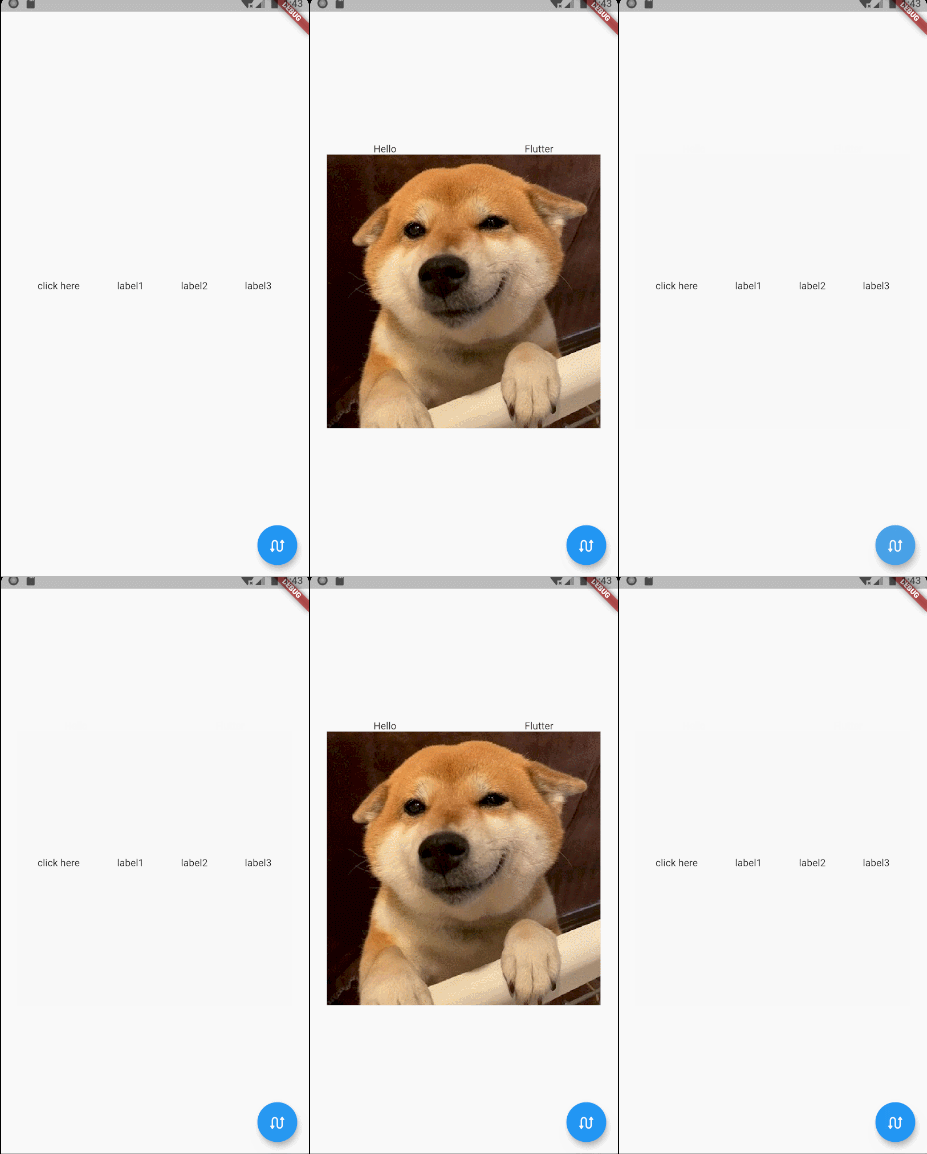
function getContent1()
    return Row:new({
        children={
            GestureDetector:new({
                onTap=function()
                    flutter.debugPrint("--------------onTap--------------")
                end,

                child=Text:new("click here")}),
            Text:new("label1"),
            Text:new("label2"),
            Text:new("label3"),
        },
        mainAxisAlign=MainAxisAlign.spaceEvenly,
    })
end

function getContent2()
    return Column:new({
        children={
            Row:new({
                children={Text:new("Hello"),Text:new("Flutter")},
                mainAxisAlign=MainAxisAlign.spaceAround
            }),
            Image:network('https://gitee.com/arcticfox1919/ImageHosting/raw/master/img/flutter_lua_test.png'
                ,{fit=BoxFit.cover})
        },
        mainAxisSize=MainAxisSize.min,
        crossAxisAlign=CrossAxisAlign.center
    })
end
For use in flutter, see here.
一些中文资料:
先依使用情境篩選,再比較專案活躍情況,最後到原始儲存庫確認使用要求。
“A repository is the most basic element of GitHub.”
GitHub Docs — About repositories ↗