

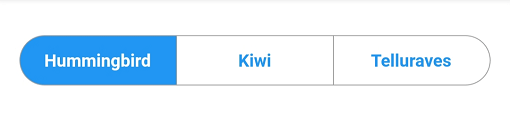
 v5.0.1
material_segmented_control
一個類似於 iOS 的分段控制元件,但採用 Material 設計。
103喜歡 1.1萬近 30 天下載150Pub 分數
AndroidiOSWebmacOSWindowsLinux
具有完整行為和設計控制權的 Material 風格分段控制項。

以下為英文專案原文快照,最新內容請造訪 GitHub。
A material segmented control like the one for iOS, in Material style.

We all know well the Cupertino segmented widget in Flutter. But there is no similar in Material, so I thought, why not to create one.
You can check it out on pub.dev: (see package on pub.dev)
In your pubspec.yaml, add
dependencies:
    material_segmented_control: ^5.0.1
Wherever you want to use this widget, import
import 'package:material_segmented_control/material_segmented_control.dart';
int _currentSelection = 0;

MaterialSegmentedControl(
    children: _children,
    selectionIndex: _currentSelection,
    borderColor: Colors.grey,
    selectedColor: Colors.redAccent,
    unselectedColor: Colors.white,
    selectedTextStyle: TextStyle(color: Colors.white),
    unselectedTextStyle: TextStyle(color: Colors.redAccent),
    borderWidth: 0.7,
    borderRadius: 32.0,
    disabledChildren: [3],
    onSegmentTapped: (index) {
      setState(() {
        _currentSelection = index;
      });
    },
);

Map<int, Widget> _children = {
  0: Text('Hummingbird'),
  1: Text('Kiwi'),
  2: Text('Rio'),
  3: Text('Telluraves')
};
selectionIndex to null. It un-selects all options.onPressed to null on a button) by setting disabledChildren. Give it a list with all indices that should be disabled. Give it either null or an empty list to not use the disabled feature.You might want to check out the example project.
依賴清單 3 項
{"sdk":"flutter"}{"sdk":"flutter"}^2.0.1先依使用情境篩選,再比較專案活躍情況,最後到原始儲存庫確認使用要求。
“A repository is the most basic element of GitHub.”
GitHub Docs — About repositories ↗