

 v1.1.3
hsluv
HSLuv 的 Dart 版本,一種基於人類實驗的人類友善型 HSL 替代方案。
11喜歡 2490近 30 天下載140Pub 分數
AndroidiOSWebmacOSWindowsLinux
HSLuv 的 Dart 版本,一種基於人類實驗的人類友善型 HSL 替代方案。

以下為英文專案原文快照,最新內容請造訪 GitHub。

Dart port of HSLuv (revision 4) with a Flutter sample. This was a direct conversion of the reference implementation. The sample is available as a web app.


HSLuv is a human-friendly alternative to HSL.
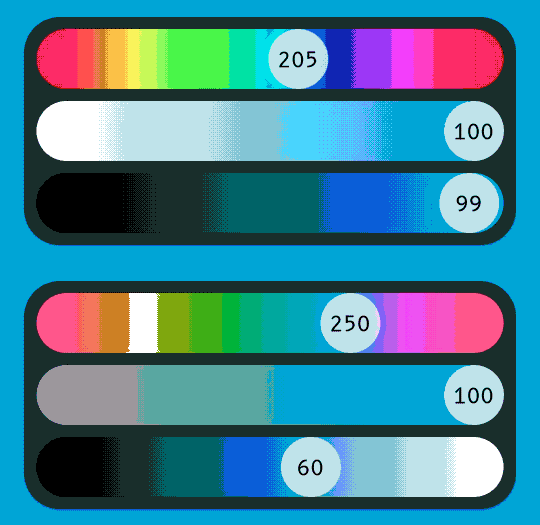
It is like HSL, but color only gets perceptually lighter or darker when the Lightness attribute changes. In HSL, if you go from a green hue to a red one, there will be big differences in the perceived lightness. In HSLuv, almost none.
If you want to see for yourself, check the sample app and open the Color Compare screen. Contrast "only" changes when Lightness changes. When Hue or Saturation attributes change, there might be minimal changes in contrast (in the 0.01 range), but nothing perceivable and certainly better than HSV/HSL.
This is specially useful when building acessible color systems. For more information, check: Designing Color Spaces / Wikipedia article
HPLuv is a similar color space where the perceptual saturation/chroma of a color always stays the same under hue changes. HPL is illustrated by the smaller circle within the hsluv homepage color picker, which consists of the maximum saturation HPL values available for the given lightness level. HPL is restricted to Pastel colors, as many hues cannot reach saturation levels that equal the other hues (eg, in the image, at lightness = 60.2, the most saturated cyan is only about half as saturated as the most saturated possible orange, so the maximum saturation of HPL colors there is constrained to that of cyan).
You can make a Color in HPLuv with toColor(Hsluv.hpluvToRgb([hue, saturation, lightness)) where hue: [0...360], saturation: [0..100], lightness: [0..100].
In the pubspec.yaml of your flutter project, add the following dependency:

dependencies:
  hsluv: ^VERSION
In your project you can use it in two different ways, either low level (directly accessing values as a list<double>) or high level (similar to HSLColor).
HSLuvColor is easier to use, but has less flexibility than a raw list.
import 'package:hsluv/hsluv.dart';

void main() {

  // Low level usage.
  final List<double> hsluvLow = Hsluv.rgbToHsluv([0.2,0.5,0.7]);
  print(Hsluv.hsluvToHex(hsluvLow));

  // High level usage.
  final hsluvFromColor = HSLuvColor.fromColor(Colors(0xffef3e4a));
  print(hsluvFromColor.toString());

  final hsluvFromHSL = HSLuvColor.fromHSL(300, 70, 60);
  print(hsluvFromHSL.toString());
}

Sample app showing HSV (top) vs HSLuv (bottom). See how the perceived lightness changes as the hue slider moves.
Important: Flutter's HSLColor has lightness and saturation ranging from 0 to 1.0. HSLuv uses 0 to 100. There is a class, called HSInterColor in the sample that tries to mitigate this.
The passing/returning values, when not String are List<double> containing each component of the given color space/system in the name's order :
xyzToRgb(List<double> tuple)rgbToXyz(List<double> tuple)xyzToLuv(List<double> tuple)luvToXyz(List<double> tuple)luvToLch(List<double> tuple)lchToLuv(List<double> tuple)hsluvToLch(List<double> tuple)lchToHsluv(List<double> tuple)hpluvToLch(List<double> tuple)lchToHpluv(List<double> tuple)lchToRgb(List<double> tuple)rgbToLch(List<double> tuple)hsluvToRgb(List<double> tuple)rgbToHsluv(List<double> tuple)hpluvToRgb(List<double> tuple)rgbToHpluv(List<double> tuple)hsluvToHex(List<double> tuple)hpluvToHex(List<double> tuple)hexToHsluv(String s)hexToHpluv(String s)rgbToHex(List<double> tuple)hexToRgb(String hex)Issues and Pull Requests are welcome. You can report here.
Copyright 2020 Bernardo Ferrari

Permission is hereby granted, free of charge, to any person obtaining a copy of this software and associated documentation files (the "Software"), to deal in the Software without restriction, including without limitation the rights to use, copy, modify, merge, publish, distribute, sublicense, and/or sell copies of the Software, and to permit persons to whom the Software is furnished to do so, subject to the following conditions:

The above copyright notice and this permission notice shall be included in all copies or substantial portions of the Software.

THE SOFTWARE IS PROVIDED "AS IS", WITHOUT WARRANTY OF ANY KIND, EXPRESS OR IMPLIED, INCLUDING BUT NOT LIMITED TO THE WARRANTIES OF MERCHANTABILITY, FITNESS FOR A PARTICULAR PURPOSE AND NONINFRINGEMENT. IN NO EVENT SHALL THE AUTHORS OR COPYRIGHT HOLDERS BE LIABLE FOR ANY CLAIM, DAMAGES OR OTHER LIABILITY, WHETHER IN AN ACTION OF CONTRACT, TORT OR OTHERWISE, ARISING FROM, OUT OF OR IN CONNECTION WITH THE SOFTWARE OR THE USE OR OTHER DEALINGS IN THE SOFTWARE.
依賴清單 2 項
{"sdk":"flutter"}{"sdk":"flutter"}先依使用情境篩選,再比較專案活躍情況,最後到原始儲存庫確認使用要求。
“A repository is the most basic element of GitHub.”
GitHub Docs — About repositories ↗