

 v0.5.2
flutter_redux_dev_tools
適用於 Flutter 的時間旅行 Redux 調試工具
14喜歡 2030近 30 天下載60Pub 分數
平台暫無資料
適用於 Flutter 的時間旅行 Redux 調試工具

以下為英文專案原文快照,最新內容請造訪 GitHub。


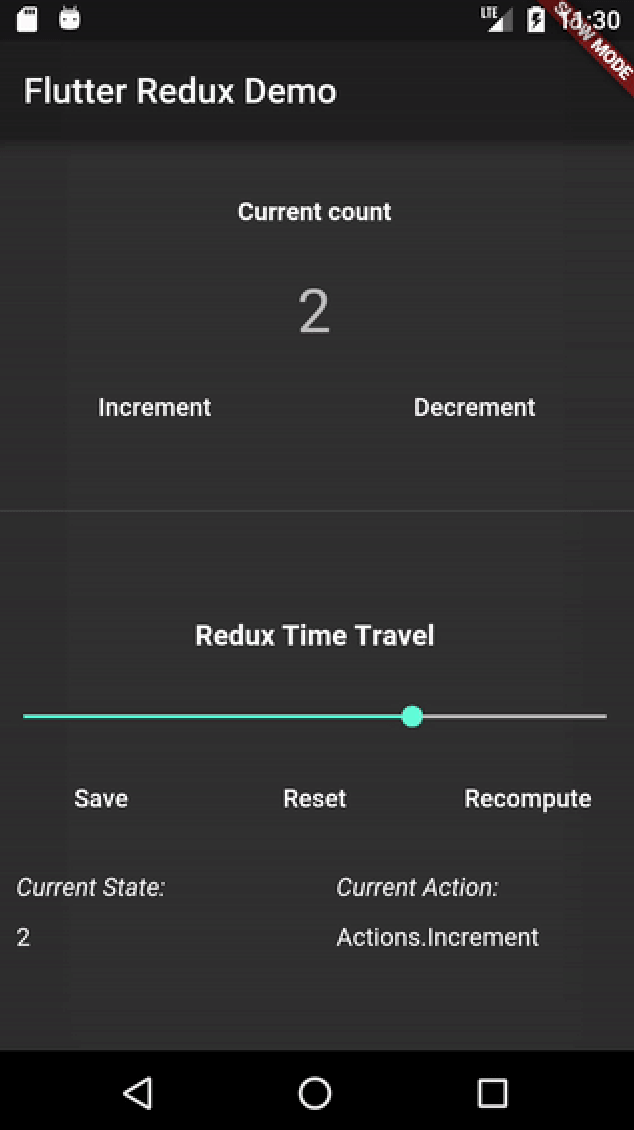
A Widget you can use to show a Redux Time Travel UI. Simply put it in a part of your UI that makes sense (Such as a Dev Tools Drawer), pass it a DevToolsStore and you'll be good to go!
Note: This Widget does not work with a normal Redux Store. It is meant to work with the redux_dev_tools package, which provides a DevToolsStore. The DevToolsStore is a drop-in replacement for your Store during Development!
A simple Flutter app that allows you to Increment and Decrement a counter.

main_dev.dart fileDevToolsStore in place of a normal redux StoreReduxDevTools widget, passing through the Store. You can place this Widget wherever makes sense in your app! One good suggestion: In a "Dev Tools Drawer." This is generally the endDrawer in your Scaffold, and can contain different types of tools for a Dev Build of your app.This example paints only a broad outline of how to use the ReduxDevTools. For a complete example, see the example folder.
int addReducer(int state, action) => state + 1;

// Create a DevToolsStore instead of a normal Store during Development
final store = DevToolsStore<int>(
  addReducer,
  initialState: 0,
);

// Finally, create your app with a Redux Dev Tools
main() {
  runApp(MaterialApp(
    home: Scaffold(
      endDrawer: ReduxDevTools<int>(store),
    ),
  ));
}
All of this is inspired by the original Redux Devtools.
依賴清單 6 項
{"sdk":"flutter"}>=0.8.2 <0.11.0>=5.0.0 <6.0.0>=0.7.0 <0.8.0{"sdk":"flutter"}1.11.0先依使用情境篩選,再比較專案活躍情況,最後到原始儲存庫確認使用要求。
“A repository is the most basic element of GitHub.”
GitHub Docs — About repositories ↗