
etch
在 Flutter 中使用 CustomPaint 的一種簡化、宣告式方法
- 星標
- 58
- 分支
- 0
- 最近推送(UTC)
- 2022年4月23日
- 專案狀態
- 未封存
原始 README
以下為英文專案原文快照,最新內容請造訪 GitHub。
✍️ Etch
A Simplified, Declarative Implementation Of CustomPaint For Flutter
Features
- Create your CustomPaint widget declaratively.
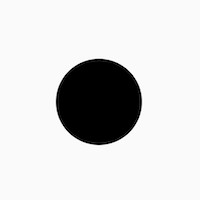
    EtchCanvas(
        etchElements: [
            EtchCircle.alignment(
                centerAlignment: Offset.zero,
                radius: 50.0,
            ),
        ],
        child: SizedBox(
          width: 100.0,
          height: 100.0,
        ),
    ),
- Use either points or alignments to define points everywhere
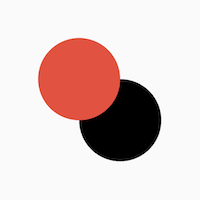
    EtchCanvas(
        etchElements: [
            EtchCircle(
              center: Offset(100, 100),
              radius: 50.0,
            ),
            EtchCircle.alignment(
               centerAlignment: Offset.zero,
               radius: 50.0,
               etchStyle: EtchStyle(
                   color: Colors.red,
               ),
           ),
        ],
        child: SizedBox(
          width: 100.0,
          height: 100.0,
        ),
    ),
- Easy support for Paths
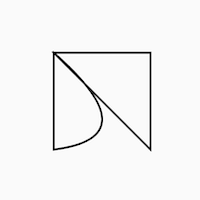
    EtchCanvas(
      etchElements: [
        EtchPath(
          etchPathElements: [
            EtchPathMoveTo(point: Offset(0, 0)),
            EtchPathAddPolygon.alignment(
              pointAlignments: [
                Offset(-1, -1),
                Offset(1, -1),
                Offset(1, 1),
              ],
            ),
            EtchPathQuadraticBezierTo.alignment(
              controlPointAlignment: Offset(1, 0.75),
              endPointAlignment: Offset(-1, 1),
            ),
            EtchPathClose(),
          ],
        ),
      ],
      child: SizedBox(
        width: 100.0,
        height: 100.0,
      ),
    ),
- Work with canvas layers easily
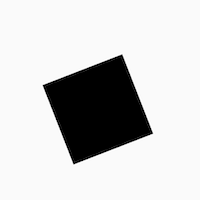
    EtchCanvas(
      etchElements: [
        EtchLayer.rotate(
          rotateZ: 1.2,
          etchElements: [
            EtchRect.alignment(
              topLeftAlignment: Offset(-1, -1),
              bottomRightAlignment: Offset(1, 1),
            ),
          ],
        ),
      ],
      child: SizedBox(
        width: 100.0,
        height: 100.0,
      ),
    ),
- Easy animations with
TweenAnimationBuilder
Add animations easily using TweenAnimationBuilder or using normal animation controllers without
having to pass down progress or other logic.
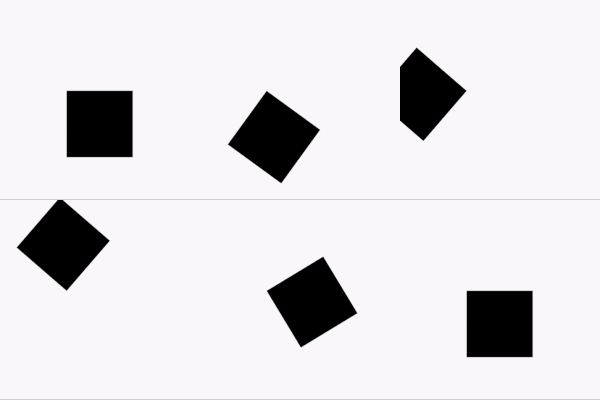
    TweenAnimationBuilder<double>(
      duration: const Duration(seconds: 1),
      tween: Tween(begin: 0, end: 2 * pi),
      builder: (context, val, _) {
        return EtchCanvas(
          etchElements: [
            EtchLayer.rotate(
              rotateZ: val,
              etchElements: [
                EtchRect.alignment(
                  topLeftAlignment: Offset(-1, -1),
                  bottomRightAlignment: Offset(1, 1),
                ),
              ],
            ),
          ],
          child: const SizedBox(
            width: 100.0,
            height: 100.0,
          ),
        );
      }
    ),
Getting started
- To get started, add an
EtchCanvasto your app:
    EtchCanvas(
        etchElements: [],
    ),
Any elements which have the format 'Etch----' can fit into these (EtchParagraph, EtchPath, EtchCircle, etc).
The default constructor arguments usually take in points while the .alignment constructor takes in
alignments. For alignments (-1, -1) is the top left while (1, 1) is the bottom right.
    EtchCanvas(
        etchElements: [
            EtchRect.alignment(
              topLeftAlignment: Offset.zero,
              bottomRightAlignment: Offset(1, 1),
            ),
            EtchOval.alignment(
              topLeftAlignment: Offset(-1, -1),
              bottomRightAlignment: Offset(0, 0),
            ),
            EtchArc.alignment(
              topLeftAlignment: Offset(-1, -1),
              bottomRightAlignment: Offset(1, 1),
              startAngle: 0,
              sweepAngle: 2,
            ),
        ],
    ),
- Use
EtchStyleto modify paint properties.
    EtchPath(
      etchPathElements: [
        //...
      ],
      etchStyle: EtchStyle(
        style: PaintingStyle.stroke,
      ),
    ),
You can also supply your own Paint object using EtchStyle.raw().
    EtchPath(
      etchPathElements: [
        //...
      ],
      etchStyle: EtchStyle.raw(
        Paint()..color = Colors.black..// add your props,
      ),
    ),
- To add a path to the elements, use
EtchPath. Etch path elements have the naming formatEtchPath---(EtchPathAddPolygon,EtchPathAddArc,EtchPathCubicTo, etc)
    EtchCanvas(
        etchElements: [
             EtchPath(
                 etchPathElements: [
                     EtchPathMoveTo(point: Offset(0, 0)),
                     EtchPathLine(point: Offset(110, 0)),
                     EtchPathLine(point: Offset(110, 110)),
                     EtchPathClose(),
                 ],
                 etchStyle: EtchStyle(
                     style: PaintingStyle.stroke,
                 ),
             ),
        ],
    ),
- To add a layer, use the
EtchLayerelement. This can have numerous EtchElements inside just like the normalEtchCanvas. Layers can have individual transformations without affecting the rest of the canvas - so you can rotate or scale one layer without affecting the others.EtchLayer, like theTransformwidget, has multiple inbuilt transformations - but you can pass in your ownMatrix4using the default constructor.
    EtchCanvas(
        etchElements: [
            EtchLayer.rotate(
              rotateX: 1.2,
              etchElements: [
                EtchRect.alignment(
                  topLeftAlignment: Offset(-1, -1),
                  bottomRightAlignment: Offset(1, 1),
                ),
              ],
            ),
            EtchLayer.scale(
              scale: Offset(1, 2),
              etchElements: [
                EtchRect.alignment(
                  topLeftAlignment: Offset(-1, -1),
                  bottomRightAlignment: Offset(1, 1),
                ),
              ],
            ),
            EtchLayer(
              transform: Matrix4.identity(),
              etchElements: [
                EtchRect.alignment(
                  topLeftAlignment: Offset(-1, -1),
                  bottomRightAlignment: Offset(1, 1),
                ),
              ],
            ),
        ],
    ),
Additional information
Note: This package is currently in an experimental stage and full metrics are not yet ascertained. Please feel free to launch issues or PRs if you face something unexpected while using it.

Deven Joshi ↗
分類
使用的依賴
依賴清單 3 項
- flutter
{"sdk":"flutter"} - flutter_test開發依賴
{"sdk":"flutter"} - flutter_lints開發依賴
^1.0.4
如何選擇適合專案的儲存庫?
先依使用情境篩選,再比較專案活躍情況,最後到原始儲存庫確認使用要求。
- 透過儲存庫名稱、作者或描述搜尋,再依技術分類縮小範圍。
- 綜合星標、分支與最近推送比較專案;星標反映社群關注,不保證品質。
- 使用前在 GitHub 確認 README、授權條款與 Issues。
來源與維護
“A repository is the most basic element of GitHub.”
GitHub Docs — About repositories ↗