
expansion_widget
一個經過編輯的 ExpansionTile,允許您自訂 tile 小部件和動畫。

- 星標
- 5
- 分支
- 4
- 最近推送(UTC)
- 2024年4月16日
- 專案狀態
- 未封存
原始 README
以下為英文專案原文快照,最新內容請造訪 GitHub。
expansion_widget
An edited version of Expansion Tile that allows you customize tile widget and animation.
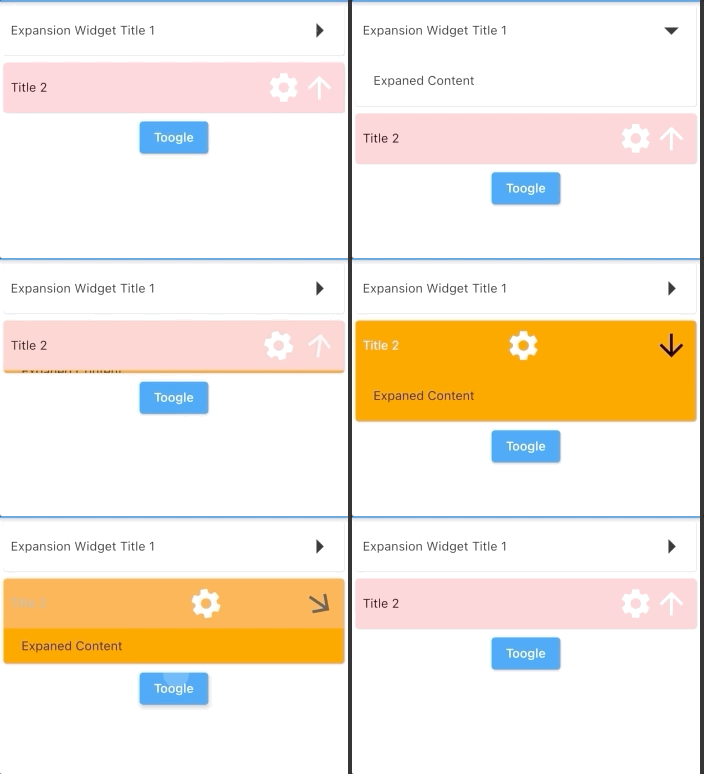
Parameters
| key | Key? | |
|---|---|---|
| titleBuilder | Widget Function( animationValue, easeInValue, isExpanded, toggleFunction) | required The builder of title. Typically a [Button] widget that call [toggleFunction] when pressed. |
| content | Widget | required The widget that are displayed when the expansionWidget expands. |
| initiallyExpanded | bool | default: false Specifies if the expansionWidget is initially expanded (true) or collapsed (false, the default). |
| maintainState | bool | default: false Specifies whether the state of the content is maintained when the expansionWidget expands and collapses. |
| expandedAlignment | Alignment? | default: Alignment.center Specifies the alignment of [content], which are arranged in a column when the expansionWidget is expanded. |
| onSaveState | Function (bool isExpanded)? | Function to save expansion state Called when expansion state changed |
| onRestoreState | bool? Function()? | default: null function to restore expansion state. Return null if there is no state to store, in this case, [initiallyExpanded] will be used |
| duration | Duration | default: 200 ms The length of time of animation |
| onExpansionWillChange | bool Function(bool)? | default: null Called when the widget will change expanded state. When the widget is going to start expanding/collapsing, this function is called with the value true/false. Return false to prevent expanded state to change. Return true(default) to allow expanded state changing. |
| onExpansionChanged | Function(bool)? | default: null Called when the widget expands or collapses. When the widget starts expanding, this function is called with the value true. When the tile starts collapsing, this function is called with the value false. |
Usage
import 'package:expansion_widget/expansion_widget.dart';
import 'dart:math' as math;

ExpansionWidget(
    initiallyExpanded: true,
    titleBuilder: (double animationValue, _, bool isExpaned, toogleFunction) {
      return InkWell(
          onTap: () => toogleFunction(animated: true),
          child: Padding(
            padding: EdgeInsets.all(8),
            child: Row(
              crossAxisAlignment: CrossAxisAlignment.center,
              children: [
                Expanded(child: Text('Expansion Widget Title 1')),
                Transform.rotate(
                  angle: math.pi * animationValue / 2,
                  child: Icon(Icons.arrow_right, size: 40),
                  alignment: Alignment.center,
                )
              ],
            ),
          ));
    },
    content: Container(
      width: double.infinity,
      color: Colors.grey.shade100,
      padding: EdgeInsets.all(20),
      child: Text('Expaned Content'),
    ))
Or using ExpansionWidget.autoSaveState() to auto save/restore expansion state.

GitHub 作者
datvu7 ↗
語言C++CMakeDartHTMLSwiftCKotlinObjective-C
分類
使用的依賴
依賴清單 2 項
- flutter
{"sdk":"flutter"} - flutter_test開發依賴
{"sdk":"flutter"}
如何選擇適合專案的儲存庫?
先依使用情境篩選,再比較專案活躍情況,最後到原始儲存庫確認使用要求。
- 透過儲存庫名稱、作者或描述搜尋,再依技術分類縮小範圍。
- 綜合星標、分支與最近推送比較專案;星標反映社群關注,不保證品質。
- 使用前在 GitHub 確認 README、授權條款與 Issues。
來源與維護
“A repository is the most basic element of GitHub.”
GitHub Docs — About repositories ↗