
 v1.0.6+6
overlay_pop_up
一個全新的 Flutter 插件,可在 Android 上即使應用已關閉或被終止時,仍能在其他應用之上顯示彈出視窗或畫面。
53喜歡 19近 30 天下載160Pub 分數
Android
Flutter 插件,用於在 Android 上的其他應用程式之上顯示基於小部件的彈出視窗。

{"sdk":"flutter"}^2.0.2{"sdk":"flutter"}^2.0.0以下為英文專案原文快照,最新內容請造訪 GitHub。
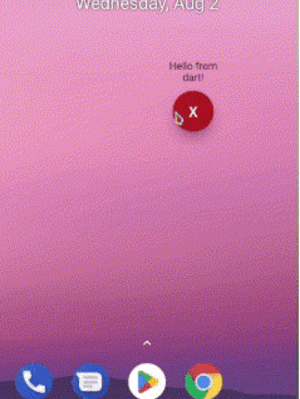
A new Flutter plugin to display pop ups or screens over other apps in Android even when app is closed or killed.
add this to your AndroidManifest.xml
 <uses-permission android:name="android.permission.SYSTEM_ALERT_WINDOW" />

 <application>
        ...
        <service
           android:name="com.requiemz.overlay_pop_up.OverlayService"
           android:exported="false" />
    </application>
applications that target SDK 34 and use foreground service should include foregroundServiceType attribute(see documentation).
 <uses-permission android:name="android.permission.SYSTEM_ALERT_WINDOW" />

 <application>
        ...
        <service
           android:name="com.requiemz.overlay_pop_up.OverlayService"
           android:exported="false"
           <!-- add this -->
           android:foregroundServiceType="camera, dataSync, location, etc" />
    </application>
configure your main.dart entry point a widget to display (make sure to add @pragma('vm:entry-point'))
NOTE: Now you can pass as parameter the dart entry point method name when showOverlay is called
@pragma("vm:entry-point")
void overlayPopUp() {
  WidgetsFlutterBinding.ensureInitialized();
  runApp(const MaterialApp(
    debugShowCheckedModeBanner: false,
    home: Text('Hello Pub.dev!'),
  ));
}
returns true when overlay permission is alreary granted if permission is not granted then open app settings
await OverlayPopUp.requestPermission();
returns true or false according to permission status
await OverlayPopUp.checkPermission();
display your overlay and return true if is showed
PARAMS
height is not required by default is MATCH_PARENT
width is not required by default is MATCH_PARENT
verticalAlignment is not required by default is CENTER for more info see: https://developer.android.com/reference/android/view/Gravity
horizontalAlignment is not required by default is CENTER for more info see: https://developer.android.com/reference/android/view/Gravity
backgroundBehavior by default is focusable flag that is you can take focus inside a overlay for example inside a textfield and [tapThrough] you can tap through the overlay background even if has MATCH_PARENT sizes.
screenOrientation by default orientation is portrait.
closeWhenTapBackButton by default when user presses back button the overlay no has any action if you pass true then back button will close overlay.
isDraggable by default is false therefore the overlay can´t be dragged.
entryPointMethodName by default is 'overlayPopUp' if you want you can change it
await OverlayPopUp.showOverlay();
returns true if overlay closed correctly or already is closed
await OverlayPopUp.closeOverlay();
returns the overlay status true = open, false = closed
await OverlayPopUp.isActive();
returns the last overlay position if drag is enabled
await OverlayPopUp.getOverlayPosition();
share dynamic data to overlay
await OverlayPopUp.sendToOverlay({'data':'hello!'});
await OverlayPopUp.sendToOverlay('hello');
receive the data from flutter as stream
await OverlayPopUp.dataListener();