搜尋套件、儲存庫與 APP 分類

GitHub 儲存庫enescerrahoglu/verification_code_field

驗證碼欄位

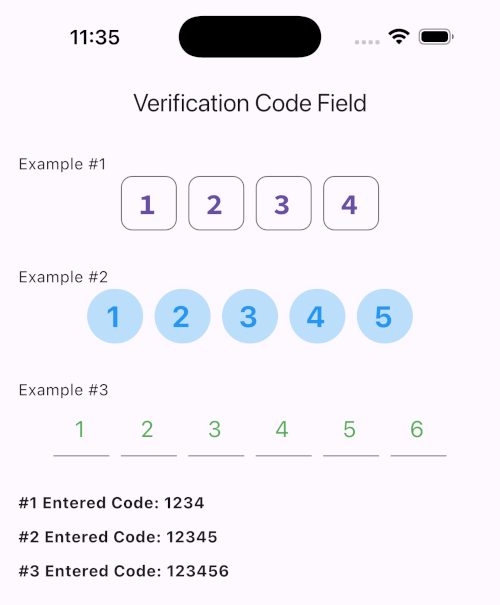
此套件提供了一個輸入欄位,讓您可在應用程式中輸入四位、五位或六位驗證碼。

驗證碼欄位 專案封面
星標
1
分支
1
最近推送(UTC)
2026年4月9日
專案狀態
未封存

原始 README

以下為英文專案原文快照,最新內容請造訪 GitHub。

VerificationCodeField

This package provides an input field that allows you to enter a 4, 5 or 6 digit verification code in your applications.

verification_code_field

Features

  • Customizable Digit Count: Supports verification codes of 4, 5, or 6 digits with CodeDigit enumeration, making it flexible for different authentication requirements.
  • Cursor and Focus Management: Allows seamless focus navigation between fields, automatically moving to the next field on entry or previous field on deletion.
  • Styling Options: Provides customization for border, fill color, cursor color, text style, and font to fit seamlessly into your app's theme.
  • Event Listener: Includes onSubmit callback to easily retrieve the entered code once all fields are filled.
  • Built-in Input Formatting: Ensures only digits are entered by default, preventing unintended characters in the verification code.
  • and more...

Getting started

Run this command:

flutter pub add verification_code_field

Usage

WhatsApp Image 2024-11-10 at 19 49 36

Additional information

  • Focus Management: The widget automatically handles focus changes, allowing a smooth user experience as users enter or delete code digits. The focus will move forward as the user types and backward if the current field is empty and the user deletes.
  • Event Handling: With onSubmit, you can easily retrieve the entire code once all fields are filled, making it perfect for submission in forms.
  • Modular and Reusable: The VerificationCodeField is designed to be reusable and adaptable, making it a valuable addition to any authentication or verification form within your app.

Screenshots

Enes Cerrahoğlu GitHub avatar
GitHub 作者

Enes Cerrahoğlu ↗

Tech Entrepreneur | Software Engineer | Flutter Developer

Istanbul
語言DartC++CMakeRubySwiftCHTMLKotlinObjective-C

分類

此儲存庫發佈的套件

使用的依賴

依賴清單 4 項

如何選擇適合專案的儲存庫?

先依使用情境篩選,再比較專案活躍情況,最後到原始儲存庫確認使用要求。

  1. 透過儲存庫名稱、作者或描述搜尋,再依技術分類縮小範圍。
  2. 綜合星標、分支與最近推送比較專案;星標反映社群關注,不保證品質。
  3. 使用前在 GitHub 確認 README、授權條款與 Issues。

來源與維護

“A repository is the most basic element of GitHub.”

GitHub Docs — About repositories ↗