


 v3.0.0
device_preview
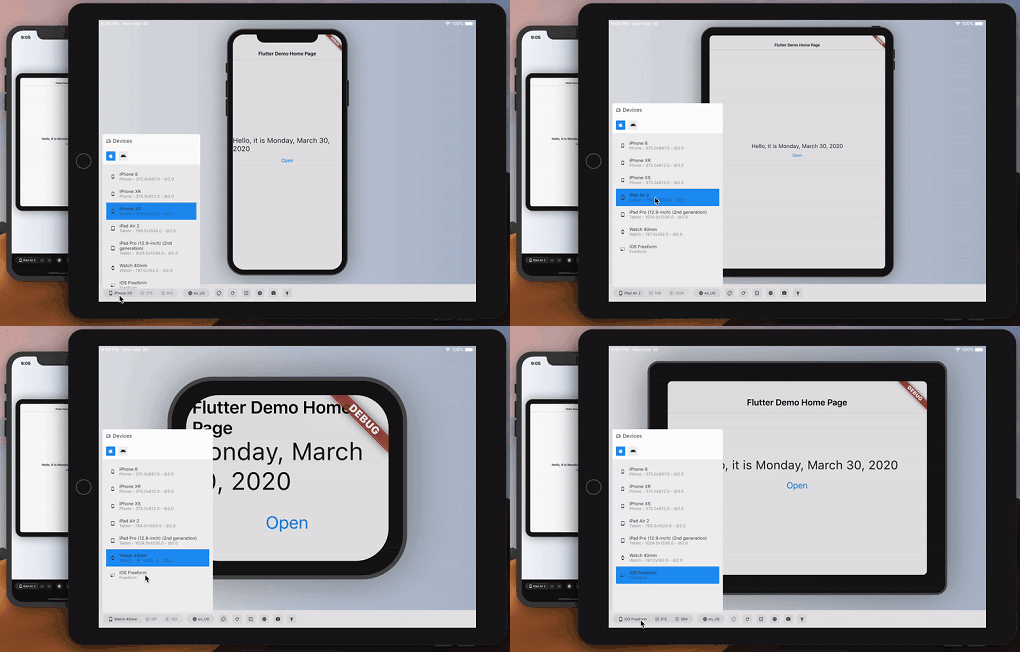
大致預覽您的 Flutter 應用在另一台設備上的外觀和效能。
4260喜歡 20.8萬近 30 天下載150Pub 分數
AndroidiOSWebmacOSWindowsLinux
使用 Flutter 建立的 Udemy 克隆,適用於桌面、Web 和行動裝置。

以下為英文專案原文快照,最新內容請造訪 GitHub。

A simple and awesome Udemy Clone made with Flutter, using sensational Responsiveness Techniques.
A clone made for study and learning, and I'm sure I acquired too much in this project.
If you want to learn how to do a similar one, access the course: Responsiveness in the Flutter | Mobile, Tablet, Web e Desktop, of which I am a teaching instructor! I hope you enjoy!
- I don't put a cool gif example (at least until now), because the gif I produced was bigger than the 10MB allowed by GitHub. But you can try it live!
- See in best quality:
- LIVE ON Firebase Hosting
- GIF
- MP4
With just one code you can generate applications for:
With this project, you can see a simple and practical example of how it works 😏
This was my first experience generating such an application with Flutter, with Total Responsiveness, adapting to all types of screens possible, using the super amazing DevicePreview package, among others experiencies that I contained, it was sensational!
Another challenge I had was to host, and I decided to do this with Firebase Hosting, which is very simple and practical to do. But for me, I had some extra problems, which took me hours and hours to understand, solve, and reach a final conclusion. In the end, luckily and as expected, everything went well!
It's a simple and basic, but I learned a lot about Responsiveness!!! 📱💻🖥
First of all, correctly configure the Flutter Web development environment on your machine, see https://flutter.dev/web

- Clone this repository:
$ git clone https://github.com/felipecastrosales/fludemy fludemy

- Enter in directory:
$ cd fludemy

- For install dependencies:
$ flutter pub get

- Run the app:
$ flutter run
- Fork the project

- Create a new branch with your changes:
$ git checkout -b my-feature

- Save your changes and create a commit message telling you what you did:
$ git commit -m "feature: My new feature"

- Submit your changes:
$ git push origin my-feature
This project was developed with ❤️ by @Felipe Sales, with the instructor @Daniel Ciolfi, in the course "Responsividade no Flutter | Mobile, Tablet, Web e Desktop" on Udemy.
If it helped you, give ⭐, contribute, it will help me too 😉
依賴清單 9 項
^3.0.0^1.0.8^1.2.0^1.3.2{"sdk":"flutter"}^2.0.10+1^4.0.0{"sdk":"flutter"}{"sdk":"flutter"}先依使用情境篩選,再比較專案活躍情況,最後到原始儲存庫確認使用要求。
“A repository is the most basic element of GitHub.”
GitHub Docs — About repositories ↗