
左滾動操作
Flutter 的左滑刪除組件

- 星標
- 84
- 分支
- 15
- 最近推送(UTC)
- 2024年12月19日
- 專案狀態
- 未封存
原始 README
以下為英文專案原文快照,最新內容請造訪 GitHub。
left_scroll_actions
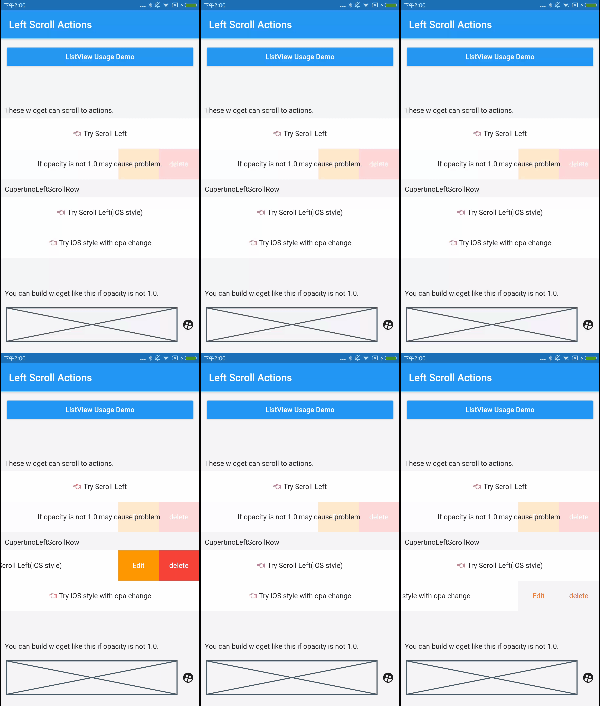
A useful left scroll actions widget like WeChat.
一款仿微信效果的 Flutter 左滑菜单插件。现在支持 iOS 的展开与弹性效果。
很轻松的打开关闭指定组件。 或者在同一个列表内通过 tag 实现联动关闭(打开一个关闭其他)。
Install
Add this to your package's pubspec.yaml file:
把如下字段加入你的pubspec.yaml文件:
dependencies:
  flutter:
    sdk: flutter
  // 添加下面这一行。 Add this row.
  left_scroll_actions: any
然后运行flutter packages get即可
Usage
CupertinoLeftScroll (1.4.0)
  final key = Key('MY CUSTOM KEY, use id/title');
  final closeTag = LeftScrollCloseTag('MyTestListTag');

  // widget
  CupertinoLeftScroll(
    // important, each Row must have different key.
    // DO NOT use '$index' as Key! Use id or title.
    key: key,
    // left scroll widget will auto close while the other widget is opened and has same closeTag.
    // 当另一个有相同closeTag的组件打开时,其他有着相同closeTag的组件会自动关闭.
    closeTag: closeTag,
    buttonWidth: 80,
    child: Container(
      height: 60,
      color: Colors.white,
      alignment: Alignment.center,
      child: Text('👈 Try Scroll Left'),
    ),
    onTap: () {
      print('tap row');
      closeTag.of(key).open();
    },
    buttons: <Widget>[
      LeftScrollItem(
        text: 'edit',
        color: Colors.orange,
        onTap: () {
          print('edit');
          closeTag.of(key).close();
        },
      ),
      LeftScrollItem(
        text: 'delete',
        color: Colors.red,
        onTap: () {
          // with animation
          closeTag.of(key).remove(() async {
            print('delete');
            setState(() {
              list.remove(id);
            });
            // return false; // restore dismiss status
            return true;
          });
        },
      ),
    ],
    onTap: () {
      print('tap row');
    },
  );
LeftScroll
You can use this widget as same as CupertinoLeftScroll.
Custom define you slide animation by implements onScroll function.
弹性 (1.5.0)
- 设置
CupertinoLeftScroll的bounce参数为true,即可获得弹性效果 - 通过
CupertinoLeftScroll的bounceStyle参数控制弹性效果
左滑联动列表(1.3.0)
- 对于提供同一个
LeftScrollCloseTag的 LeftScroll 组件,可以在一个打开时,关闭其他组件 - 想要关闭特定的行,只需使用以下代码
// 找到对应tag与key的row状态,改变状态即可
LeftScrollGlobalListener.instance.targetStatus(tag,key).value = LeftScrollStatus.close;

LSTag("list").of(Key(id)).to(LeftScrollStatus.close)

GitHub 作者
FlutterCandies ↗
語言DartRubyObjective-CShellJava
使用的依賴
依賴清單 2 項
- flutter
{"sdk":"flutter"} - flutter_test開發依賴
{"sdk":"flutter"}
如何選擇適合專案的儲存庫?
先依使用情境篩選,再比較專案活躍情況,最後到原始儲存庫確認使用要求。
- 透過儲存庫名稱、作者或描述搜尋,再依技術分類縮小範圍。
- 綜合星標、分支與最近推送比較專案;星標反映社群關注,不保證品質。
- 使用前在 GitHub 確認 README、授權條款與 Issues。
來源與維護
“A repository is the most basic element of GitHub.”
GitHub Docs — About repositories ↗