
 v0.3.0+2
sticky_headers
Flutter 粘性標題 - 讓您在可滾動內容上放置標題,當內容滾動時,標題將黏附在容器頂部。
903喜歡 1.8萬近 30 天下載140Pub 分數
AndroidiOSWebmacOSWindowsLinux
Flutter 粘性標題 - 讓您在 Flutter 應用中的任何可捲動內容中放置「黏性標題」。無需特殊包裝或神奇操作。維護者:@slightfoot

依賴清單 3 項
{"sdk":"flutter"}—{"sdk":"flutter"}以下為英文專案原文快照,最新內容請造訪 GitHub。
Flutter Community: sticky_headers
Lets you place headers on scrollable content that will stick to the top of the container whilst the content is scrolled.
You can place a StickyHeader or StickyHeaderBuilder
inside any scrollable content, such as: ListView, GridView, CustomScrollView,
SingleChildScrollView or similar.
Depend on it:
dependencies:
  sticky_headers: "^0.3.0"
Import it:
import 'package:sticky_headers/sticky_headers.dart';
Use it:
class Example extends StatelessWidget {
  @override
  Widget build(BuildContext context) {
    return ListView.builder(itemBuilder: (context, index) {
      return StickyHeader(
        header: Container(
          height: 50.0,
          color: Colors.blueGrey[700],
          padding: EdgeInsets.symmetric(horizontal: 16.0),
          alignment: Alignment.centerLeft,
          child: Text('Header #$index',
            style: const TextStyle(color: Colors.white),
          ),
        ),
        content: Container(
          child: Image.network(
            imageForIndex(index),
            fit: BoxFit.cover,
            width: double.infinity,
            height: 200.0,
          ),
        ),
      );
    });
  }
}
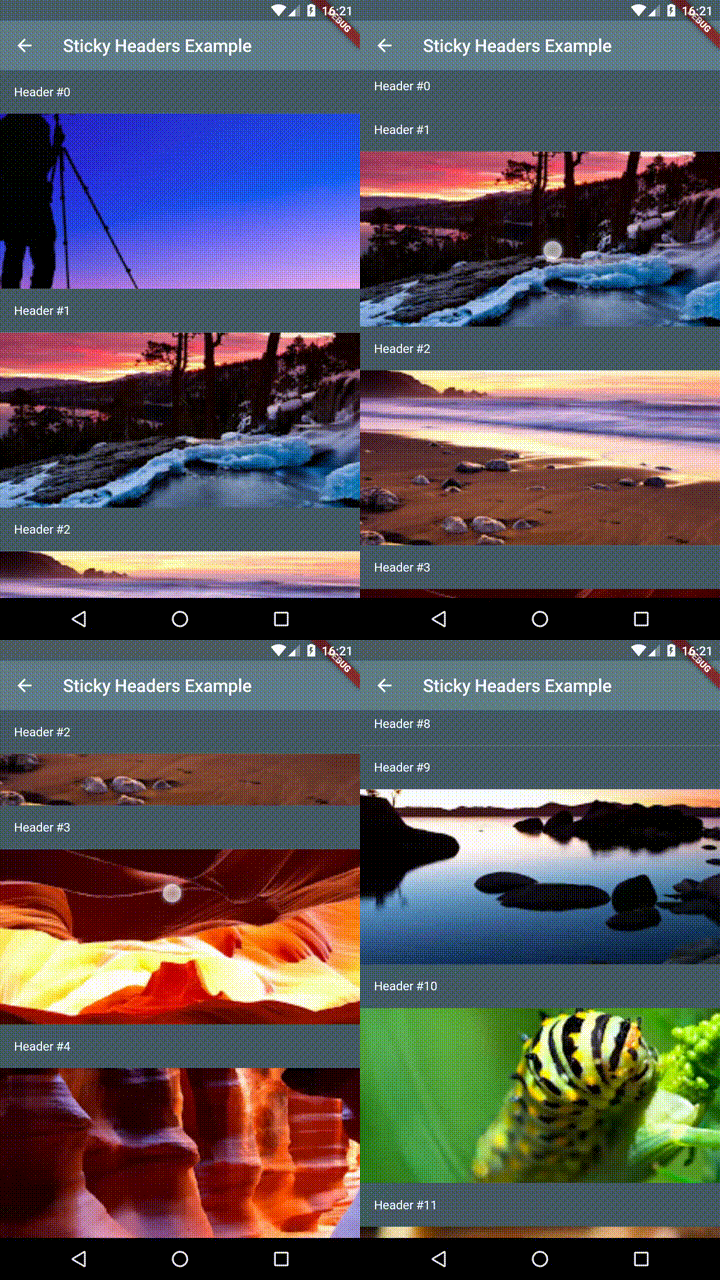
Demo 1
Demo 2
Demo 3
If you encounter any problems feel free to open an issue. If you feel the library is missing a feature, please raise a ticket on Github and I'll look into it. Pull request are also welcome.