

 v2.2.0
flutter_decorated_text
一個根據規則來樣式化和互動文字部分的組件。匹配單字、短語或模式,並套用自訂樣式或動作。
60喜歡 294近 30 天下載155Pub 分數
AndroidiOSWebmacOSWindowsLinux
gabdsg/flutter_decorated_text open-source repository details.

以下為英文專案原文快照,最新內容請造訪 GitHub。
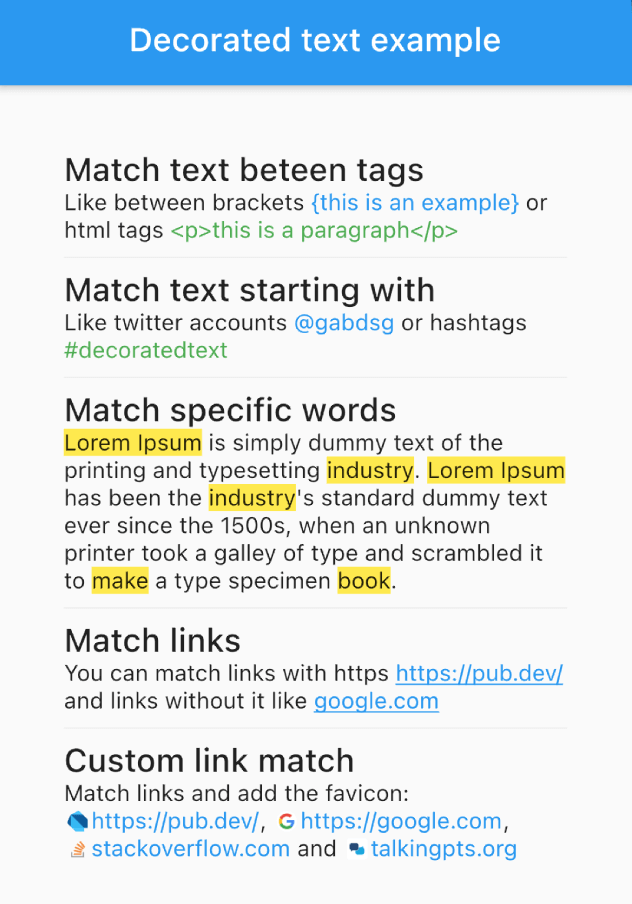
The DecoratedText widget allows you to style and interact with different parts of a text string based on predefined rules. It's versatile, easy-to-use, and can handle different scenarios such as matching specific words, phrases, or patterns, allowing you to style the matched text differently.

selectable: true) to allow text selection in the DecoratedText widget.onTap callback, which returns the matched text, allowing you to implement interactive behavior such as opening a link when a URL is tapped.DecoratedText(
text: "Like between brackets {this is an example} or html tags <p>this is a paragraph</p>",
rules: [
DecoratorRule.between(
start: "{",
end: "}",
style: TextStyle(
color: Colors.blue,
),
),
DecoratorRule.between(
start: "<p>",
end: "</p>",
style: TextStyle(
color: Colors.green,
),
),
],
);
DecoratedText(
    text: "Like twitter accounts @gabdsg or hashtags #decoratedtext",
    rules: [
        DecoratorRule.startsWith(
            text: "@",
            onTap: (match) {
                print(match);
            },
            style: TextStyle(
                color: Colors.blue,
            ),
        ),
        DecoratorRule.startsWith(
            text: "#",
            onTap: (match) {
                print(match);
            },
            style: TextStyle(
                color: Colors.green,
            ),
        ),
    ],
);
DecoratedText(
    text: "Lorem Ipsum is simply dummy text of the printing and typesetting industry. Lorem Ipsum has been the industry's standard dummy text ever since the 1500s, when an unknown printer took a galley of type and scrambled it to make a type specimen book.",
    rules: [
        DecoratorRule.words(
            words: ["lorem ipsum", "industry", "book", "make"],
            onTap: (match) {
                print(match);
            },
            style: TextStyle(
                background: Paint()..color = Colors.yellow,
            ),
        ),
    ],
);
DecoratedText(
    text: "You can match links with https https://pub.dev/ and links without it like google.com",
    rules: [
        DecoratorRule.url(
            onTap: (url) {
                print(url);
            },
            style: TextStyle(
                color: Colors.blue,
                decoration: TextDecoration.underline,
            ),
        ),
    ],
);
DecoratedText(
    text: "Match links and add the favicon: https://pub.dev/, https://google.com, stackoverflow.com and talkingpts.org",
    rules: [
        DecoratorRule(
            regExp: RegExp(
                r'((https?:\/\/)?(www\.)?[-a-zA-Z0-9@:%._\+~#=]{2,256}\.[a-z]{2,4}\b([-a-zA-Z0-9@:%_\+.~#?&//=]*))',
                caseSensitive: false,
                dotAll: true,
                multiLine: true,
            ),
            onTap: (url) {
                print(url);
            },
            style: TextStyle(
                color: Colors.blue,
            ),
            leadingBuilder: (match) => Container(
                width: 16 * 0.8,
                height: 16 * 0.8,
                margin: const EdgeInsets.only(right: 2, left: 2),
                child: CachedNetworkImage(
                    imageUrl: "${sanitizeUrl(match)}/favicon.ico",
                ),
            ),
        ),
    ],
);
DecoratedText(
    text: "I love Flutter! 😍",
    rules: [
        DecoratorRule(
            regExp: RegExp(r'(\p{Emoji_Presentation})', unicode: true),
            style: const TextStyle(
                fontSize: 30.0,
            ),
            onTap: (emoji) {
                debugPrint('You tapped on the emoji: $emoji');
            },
        ),
    ],
);
For best performance when using custom RegExp patterns, cache them outside the build() method:
// Cache at the class or file level — avoid creating inside build()
final _myRegExp = RegExp(r'my-pattern');

@override
Widget build(BuildContext context) {
    return DecoratedText(
        text: "...",
        rules: [
            DecoratorRule(regExp: _myRegExp, style: TextStyle(...)),
        ],
    );
}
Built-in rules like DecoratorRule.words(), DecoratorRule.url(), etc. handle caching automatically.
Remember, with the DecoratedText widget, you can style your text based on predefined rules, add interactivity, and handle complex matching scenarios with ease. Happy coding!
依賴清單 4 項
{"sdk":"flutter"}^1.19.1{"sdk":"flutter"}^6.0.0先依使用情境篩選,再比較專案活躍情況,最後到原始儲存庫確認使用要求。
“A repository is the most basic element of GitHub.”
GitHub Docs — About repositories ↗