

 v2.0.3
ansicolor
想為你的終端日誌增添一些色彩嗎?`ansicolor` 是一個支援 xterm-256 顏色的程式庫,可讓你變更文字的前景色與背景色。
171喜歡 340萬近 30 天下載160Pub 分數
AndroidiOSWebmacOSWindowsLinux
google/ansicolor-dart open-source repository details.

以下為英文專案原文快照,最新內容請造訪 GitHub。
Feel like you're missing some color in your terminal programs? Use AnsiPen to add ANSI color codes to your log messages.
Easy to disable for production, just set color_disabled = true and all codes will be empty - no re-writing debug messages.
Note: color_disabled is a global variable for all pen colors.
Note: Be mindful of contrasting colors. If you set "bright white" foreground and don't adjust the background, you'll have a bad time with lighter terminals.
Foreground to bright white with default background:
AnsiPen pen = AnsiPen()..white(bold: true);
print(pen("Bright white foreground") + " this text is default fg/bg");
Background as a peach, foreground as white:
AnsiPen pen = AnsiPen()..white()..rgb(r: 1.0, g: 0.8, b: 0.2, bg: true);
print(pen("White foreground with a peach background"));
If color isn't working for you; try setting ansiColorDisabled = false;. We're relying on the stdio object to inform us of ANSI terminal support. Sometimes this is wrong.
Prior versions of this library just turned on color by default.
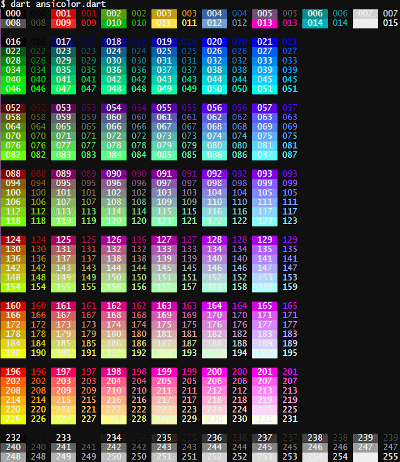
If you want a specific color, you can call the xterm() with the index listed in the rainbow below. To show the rainbow on your own terminal, pub run examples/ansicolor.dart

先依使用情境篩選,再比較專案活躍情況,最後到原始儲存庫確認使用要求。
“A repository is the most basic element of GitHub.”
GitHub Docs — About repositories ↗