
 v0.6.2
image_fade
一個在圖像載入時顯示佔位符和可選進度指示器,然後漸變為已載入圖像的組件。對 FadeInImage 進行了改進。與 CachedNetworkImageProvider 兼容。
87喜歡 7950近 30 天下載150Pub 分數
AndroidiOSWebmacOSWindowsLinux
gskinner/image_fade open-source repository details.
以下為英文專案原文快照,最新內容請造訪 GitHub。
A widget for Flutter that displays a placeholder widget while a specified image loads, then cross-fades to the loaded image. Also handles progress and errors. It uses Image.opacity when appropriate for improved performance.
If image is changed, it will cross-fade to the new image once it is finished loading. Setting image to null will cross-fade back to the placeholder.
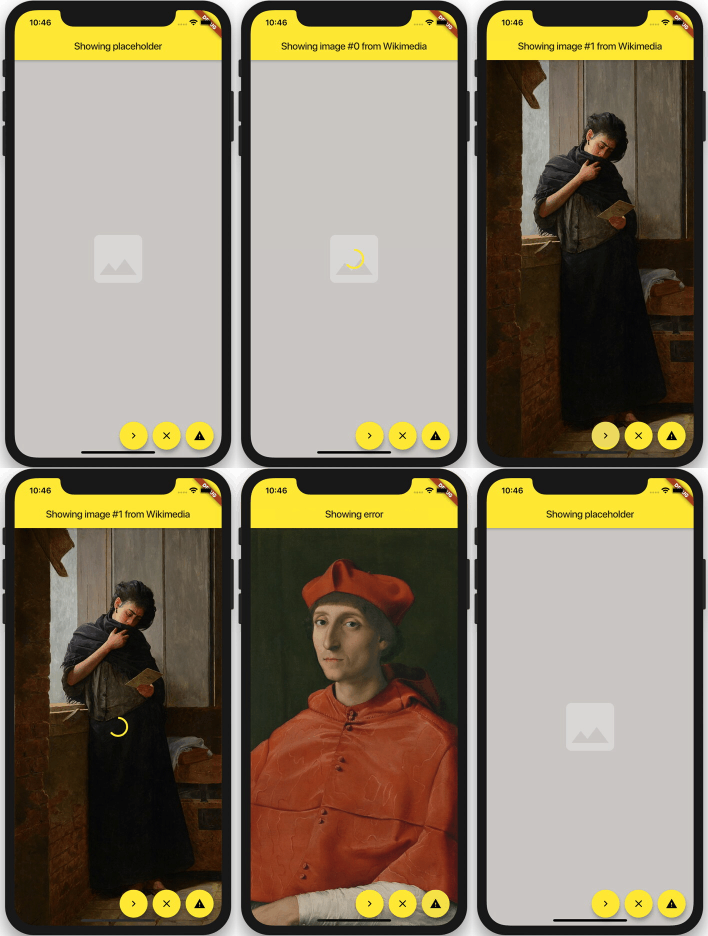
You can set duration and curve, as well as most Image properties:
width, height, fit, alignment, repeat, matchTextDirection, excludeFromSemantics and semanticLabel.
Use loadingBuilder and errorBuilder to display load progress or error states. Optionally specify syncDuration to
use a different (usually faster) duration for fading in a synchronously loaded image, error, or placeholder.
ImageFade(
  // whenever the image changes, it will be loaded, and then faded in:
  image: NetworkImage(url),

  // slow fade for newly loaded images:
  duration: const Duration(milliseconds: 900),

  // if the image is loaded synchronously (ex. from memory), fade in faster:
  syncDuration: const Duration(milliseconds: 150),

  // supports most properties of Image:
  alignment: Alignment.center,
  fit: BoxFit.cover,

  // shown behind everything:
  placeholder: Container(
    color: const Color(0xFFCFCDCA),
    alignment: Alignment.center,
    child: const Icon(Icons.photo, color: Colors.white30, size: 128.0),
  ),

  // shows progress while loading an image:
  loadingBuilder: (context, progress, chunkEvent) =>
    Center(child: CircularProgressIndicator(value: progress)),

  // displayed when an error occurs:
  errorBuilder: (context, error) => Container(
    color: const Color(0xFF6F6D6A),
    alignment: Alignment.center,
    child: const Icon(Icons.warning, color: Colors.black26, size: 128.0),
  ),
)
ImageFade is compatible with CachedNetworkImageProvider.
The published version of this package is availble on pub.dev.
See the example directory for a simple example.

依賴清單 2 項
{"sdk":"flutter"}{"sdk":"flutter"}先依使用情境篩選,再比較專案活躍情況,最後到原始儲存庫確認使用要求。
“A repository is the most basic element of GitHub.”
GitHub Docs — About repositories ↗