
可滾動的表格視圖
herbertamukhuma/scrollable_table_view open-source repository details.

- 星標
- 17
- 分支
- 8
- 最近推送(UTC)
- 2023年11月23日
- 專案狀態
- 未封存
原始 README
以下為英文專案原文快照,最新內容請造訪 GitHub。
This is a multi axis scrollable data table, that allows you to scroll on both the vertical and horizontal axis, with the header remaining static on the vertical axis. Please look at the demo below.
Features
Demo
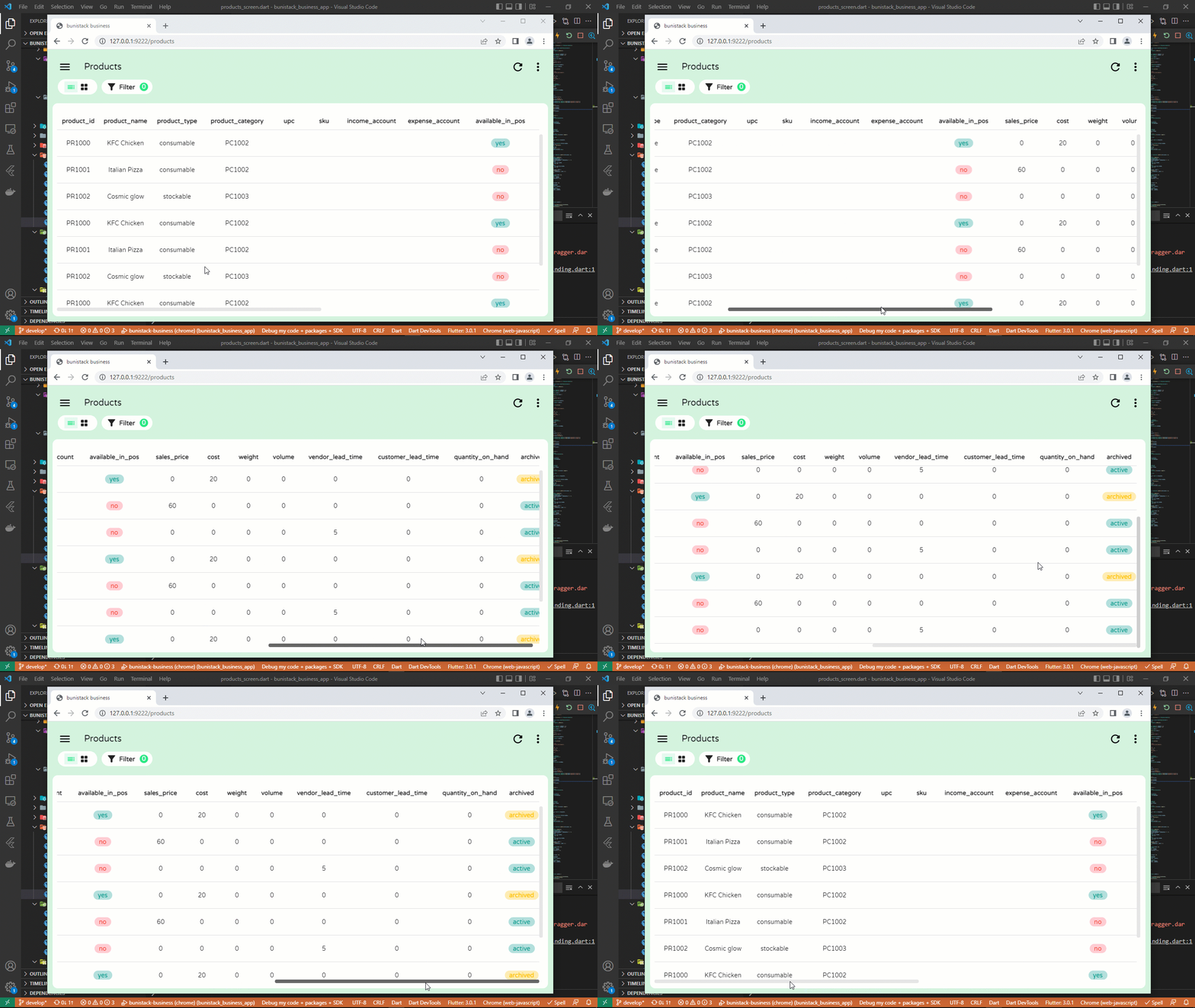
This widget serves the same purpose as a DataTable, with the advantage that it can scroll in both the horizontal and vertical axis, while maintaining the vertical position of the header.
Note
For more complex features like freezing columns and rows, kindly take a look at the data_table_2 package
Getting started
Simply add into your dependencies the following line.
dependencies:
  scrollable_table_view: <latest-version>
Usage
ScrollableTableView(
  headers: [
    "product_id",
    "product_name",
    "price",
  ].map((label) {
    return TableViewHeader(
      label: label,
    );
  }).toList(),
  rows: [
    ["PR1000", "Milk", "20.00"],
    ["PR1001", "Soap", "10.00"],
  ].map((record) {
    return TableViewRow(
      height: 60,
      cells: record.map((value) {
        return TableViewCell(
          child: Text(value),
        );
      }).toList(),
    );
  }).toList(),
);
Pagination
Pagination is supported from version 1.0.0-beta. First, initialize a PaginationController as follows:
final PaginationController paginationController = PaginationController(
    rowCount: many_products.length,
    rowsPerPage: 10,
  );
Next, initialize your table and pass the pagination controller to the paginationController parameter:
ScrollableTableView(
  paginationController: paginationController,
  headers: labels.map((label) {
    return TableViewHeader(
      label: label,
    );
  }).toList(),
  rows: many_products.map((product) {
    return TableViewRow(
      height: 60,
      cells: labels.map((label) {
        return TableViewCell(
          child: Text(product[label] ?? ""),
        );
      }).toList(),
    );
  }).toList(),
)
With the above setup, navigate forward and backwards using paginationController.next() and paginationController.backwards() respectively. To jump to a page directly, use paginationController.jumpTo(pageToJumpTo).
For the full example, go to the main.dart file in the example project.
Additional information
GitHub Repo: https://github.com/herbertamukhuma/scrollable_table_view Raise Issues and Feature requests: https://github.com/herbertamukhuma/scrollable_table_view/issues
Common Issues
- Loading too many records: From version 1.0.0-beta, pagination has been implemented. Kindly use this to avoid loading too many records at a time, which will inturn overwhelm your app.

Herbert Amukhuma ↗
使用的依賴
依賴清單 3 項
- flutter
{"sdk":"flutter"} - flutter_test開發依賴
{"sdk":"flutter"} - flutter_lints開發依賴
^2.0.0
如何選擇適合專案的儲存庫?
先依使用情境篩選,再比較專案活躍情況,最後到原始儲存庫確認使用要求。
- 透過儲存庫名稱、作者或描述搜尋,再依技術分類縮小範圍。
- 綜合星標、分支與最近推送比較專案;星標反映社群關注,不保證品質。
- 使用前在 GitHub 確認 README、授權條款與 Issues。
來源與維護
“A repository is the most basic element of GitHub.”
GitHub Docs — About repositories ↗