
 v2.0.0
scaled_list
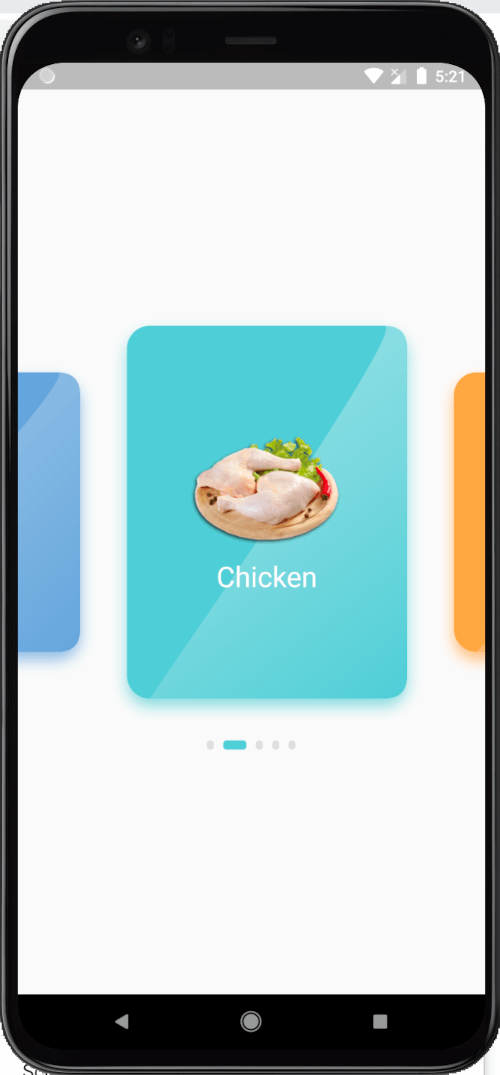
一個水平列表視圖,包含大量修改,包括縮放的當前項目和彎曲的自定義繪製。
140喜歡 93近 30 天下載150Pub 分數
AndroidiOSWebmacOSWindowsLinux
一個水平列表視圖,包含大量修改,包括縮放的當前項目、曲線自定義繪製和下方的圓點指示器。
以下為英文專案原文快照,最新內容請造訪 GitHub。


A Horizontal List view With Lots of modification including a scaled current item.


  @override
  Widget build(BuildContext context) {
    return Scaffold(
      body: ScaledList(
        itemCount: Data.categories.length,
        itemColor: (index) {
          return kMixedColors[index % kMixedColors.length];
        },
        itemBuilder: (index, selectedIndex) {
          final category = Data.categories[index];
          return Column(
            mainAxisAlignment: MainAxisAlignment.center,
            children: [
              Container(
                height: selectedIndex == index
                    ? 100
                    : 80,
                child: Image.asset(category.image),
              ),
              SizedBox(height: 15),
              Text(
                category.name,
                style: TextStyle(
                    color: Colors.white,
                    fontSize: selectedIndex == index
                        ? 25
                        : 20),
              )
            ],
          );
        },
      ),
    );
  }

依賴清單 2 項
{"sdk":"flutter"}{"sdk":"flutter"}先依使用情境篩選,再比較專案活躍情況,最後到原始儲存庫確認使用要求。
“A repository is the most basic element of GitHub.”
GitHub Docs — About repositories ↗