
 v0.1.2
smooth_highlight
此套件允許您在想向使用者強調某個內容時,透過閃爍動畫來強調特定的 widget。
32喜歡 1420近 30 天下載160Pub 分數
AndroidiOSWebmacOSWindowsLinux
此套件允許您在想向使用者強調某個內容時,透過閃爍動畫來強調特定的 widget。
以下為英文專案原文快照,最新內容請造訪 GitHub。
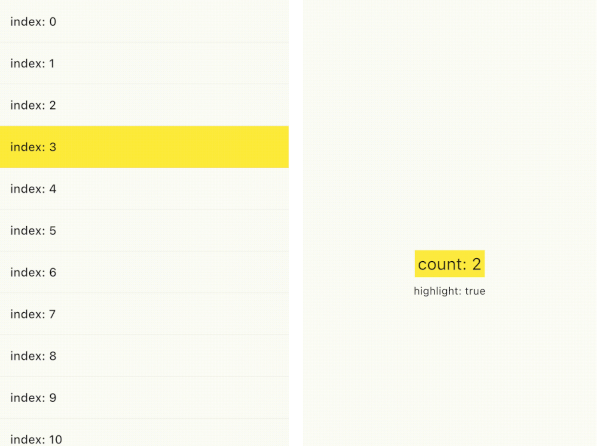
You can emphasize a specific widget by highlight animation when you want to emphasize something to your users. As you can see from the following samples, you can use smooth_highlight in any widget.
And also, you can use ValueChangeHighlight that is useful when you simply want to highlight only the text changes(refer to Sample2). It is inspired by the Cloud Firestore value change animation in the Firebase console.
| Sample1 | Sample2 | Sample3 |
|---|---|---|
 |
 |
 |
You just wrap SmoothHighlight in your widget.
SmoothHighlight(
  // set your custom color
  color: Colors.yellow,
  child: Text('Highlight'),
);
and you can also define custom behavior.
SmoothHighlight(
  // highlight in initState phase.
  useInitialHighLight: true,

  // Set custom duration.
  duration: const Duration(seconds: 1),

  // highlight whenever count is even.
  enabled: count % 2 ==0,
);
If you want to highlight the widget only the value changed, ValueChangeHighlight is useful. It requires highlight trigger value.
ValueChangeHighlight(
  // highlight if count changes
  value: count,
  color: Colors.yellow,
  child: Text('count: $count'),
);
if you don't want to highlight a specific values, disableFromValues property prevents it.
ValueChangeHighlight(
  value: count,

  // disable highlight if count changes from `null` or `2` to some value.
  // In this counter example, `0`, `3`, won't be highlighted.
  disableFromValues: const [null, 2],
);
Following gif is Firestore GUI in Firebase Console. Firestore realtime listener is powerful, but it is hard for your user to see what value changed. You can make the user notice by highlighting the changed value. It's probably a user-friendly consideration, I think.


依賴清單 3 項
{"sdk":"flutter"}{"sdk":"flutter"}^2.0.0先依使用情境篩選,再比較專案活躍情況,最後到原始儲存庫確認使用要求。
“A repository is the most basic element of GitHub.”
GitHub Docs — About repositories ↗