
scroll_to_animate_tab
ishafiul/scroll_to_animate_tab open-source repository details.

- 星標
- 3
- 分支
- 1
- 最近推送(UTC)
- 2026年4月10日
- 專案狀態
- 未封存
原始 README
以下為英文專案原文快照,最新內容請造訪 GitHub。
scroll_to_animate_tab
A Flutter widget that is customizable and syncs the ScrollView with the tabs. Create distinct tabs that are coordinated with the internal ScrollView. The tabs come after the index of the scroll view.
Demo
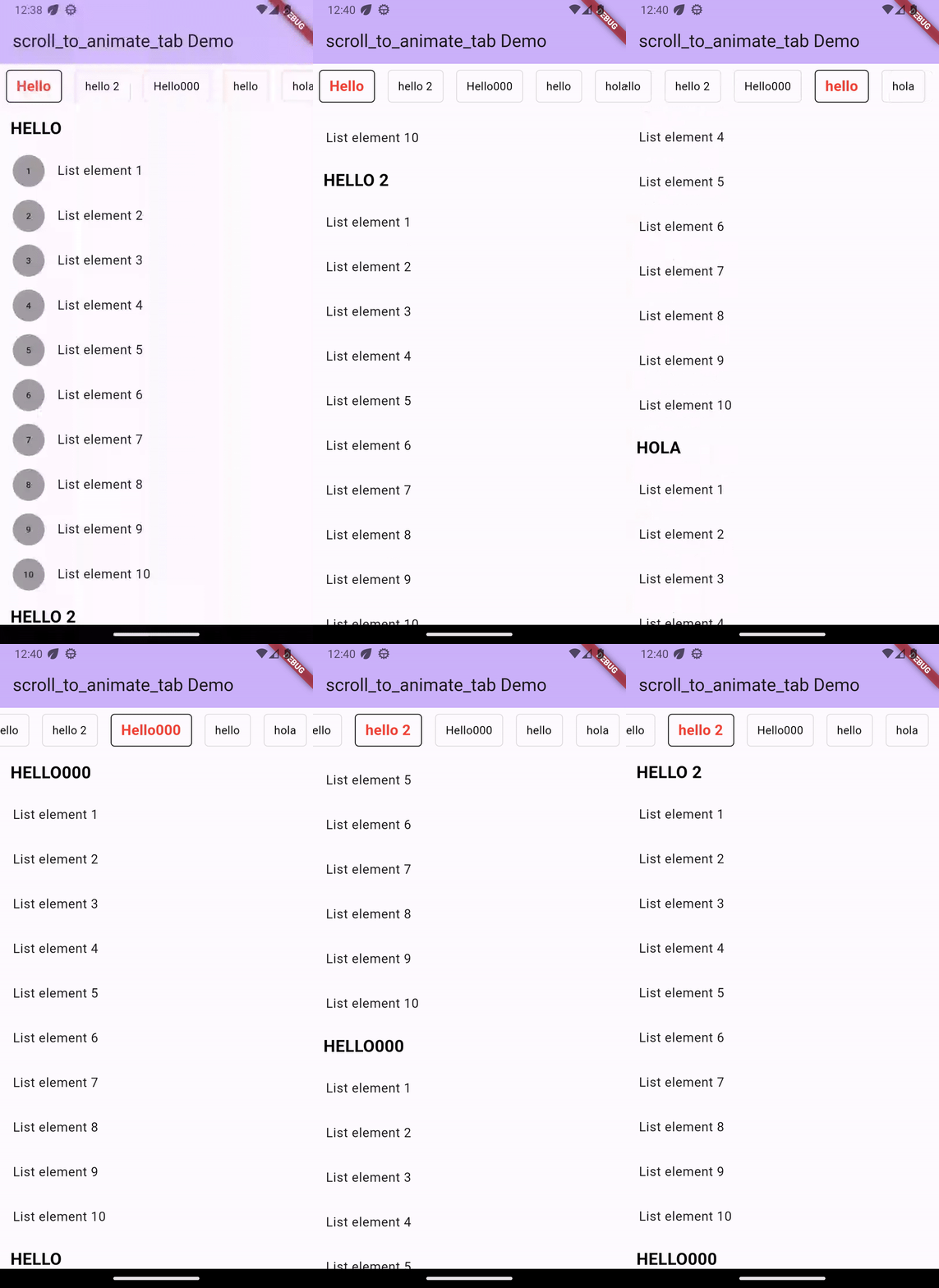
Installation
Add dependency for package on your pubspec.yaml:
    dependencies:
	    scroll_to_animate_tab: latest
or
flutter pub add scroll_to_animate_tab
API
ScrollToAnimateTab
| Parameter | Definition |
|---|---|
List<ScrollableList> tabs |
List of tabs to be rendered |
double tabHeight |
Height of the tab at the top of the view |
Duration? tabAnimationDuration |
[Optional] Duration of tab change animation |
Duration? bodyAnimationDuration |
[Optional] Duration of tab change animation |
Curve? tabAnimationCurve |
[Optional] Animation curve used when animating tab change |
Curve? bodyAnimationCurve |
[Optional] Animation curve used when changing index of inner [ScrollView]s |
Color? backgroundColor |
[Optional] This property will help you to change the background color of tab bar |
TabDecoration? activeTabDecoration |
[Optional] Change active tab decoration |
TabDecoration? inActiveTabDecoration |
[Optional] Change inactive tab decoration |
TabDecoration
| Parameter | Definition |
|---|---|
| TextStyle textStyle | TextStyle for tab label |
| Decoration? decoration | decoration for tabs |
ScrollableList
| Parameter | Definition |
|---|---|
| String label | A String for tab label and as headline of [ScrollableList.body] |
| Widget? bodyLabelDecoration | A widget label for decorate body widget. by default its a Text widget as context [ScrollableList.label] with color: Colors.black,fontWeight: FontWeight.bold,fontSize: 21 |
| Widget body | A single widget in the scrollable tab list. You can use [Column] or any single scrollable widget. If you want to use [ScrollView] ([ListView]) then we suggest make sure that [body] is created with [ScrollView.shrinkWrap] = true and [ScrollView.physics] = [NeverScrollableScrollPhysics]. |
inside this [TabDecoration], it gives us textStyle property which is required that helps us to
change tab label style and other is optional named decoration property which helps us to decorate
our tab.
How to use
Basic Example ->
ScrollToAnimateTab(
    activeTabDecoration: TabDecoration(
        textStyle: const TextStyle(
          color: Colors.red, fontWeight: FontWeight.bold, fontSize: 18),
        decoration: BoxDecoration(
            border: Border.all(color: Colors.black),
            borderRadius: const BorderRadius.all(Radius.circular(5))
        )
    ),
    inActiveTabDecoration: TabDecoration(
        textStyle: const TextStyle(color: Colors.black),
        decoration: BoxDecoration(
            border: Border.all(color: Colors.black12),
            borderRadius: const BorderRadius.all(Radius.circular(5))
        )
    ),
    tabs: [
        ScrollableList(
            label: "Hello",
            body: ListView.builder(
                shrinkWrap: true,
                physics: const NeverScrollableScrollPhysics(),
                itemCount: 10,
                itemBuilder: (_, index) => ListTile(
                title: Text('List element ${index + 1}'),
                ),
            )
        ),
        ScrollableList(
            label: "hello 2",
            body: Column(
                children: List.generate(
                    10,
                    (index) => ListTile(
                    title: Text('List element ${index + 1}'),
            )),
            )
        ),
  ]
)

GitHub 作者
Safiul islam ↗
語言C++CMakeDartHTMLSwiftCKotlinObjective-C
使用的依賴
依賴清單 5 項
- flutter
{"sdk":"flutter"} - scrollable_positioned_list
^0.3.8 - flutter_test開發依賴
{"sdk":"flutter"} - mocktail開發依賴
^0.3.0 - very_good_analysis開發依賴
^5.0.0
如何選擇適合專案的儲存庫?
先依使用情境篩選,再比較專案活躍情況,最後到原始儲存庫確認使用要求。
- 透過儲存庫名稱、作者或描述搜尋,再依技術分類縮小範圍。
- 綜合星標、分支與最近推送比較專案;星標反映社群關注,不保證品質。
- 使用前在 GitHub 確認 README、授權條款與 Issues。
來源與維護
“A repository is the most basic element of GitHub.”
GitHub Docs — About repositories ↗