
 v1.0.4+1
side_sheet
適用於所有平台和響應式 UI 的側邊欄實作套件。
83喜歡 821近 30 天下載150Pub 分數
AndroidiOSWebmacOSWindowsLinux
一個用於實現側邊抽屜的 Flutter 套件

{"sdk":"flutter"}{"sdk":"flutter"}以下為英文專案原文快照,最新內容請造訪 GitHub。
A flutter package for implementing of side sheets
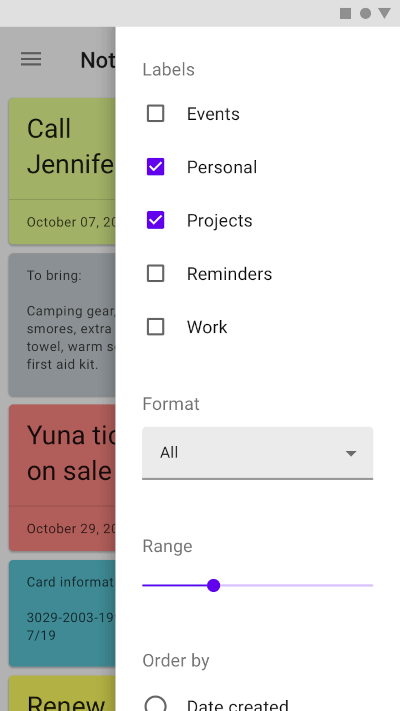
A sample. font: https://material.io/components/sheets-side#usage
sampleSimple Usage:
ElevatedButton(
    onPressed: () =>
        SideSheet.right(
            body: Text("Body"),
                context: context
        ),
    child: Text('OPEN RIGHT SIDE SHEET')),


ElevatedButton(
    onPressed: () =>
        SideSheet.left(
            body: Text("Body"),
                context: context
        ),
    child: Text('OPEN LEFT SIDE SHEET')),
Custom Width Side Sheet:
ElevatedButton(
    onPressed: () =>
        SideSheet.right(
            context: context
            width: MediaQuery.of(context).size.width * 0.3,
            body: Text("Body"),
        ),
    child: Text('OPEN RIGHT SIDE SHEET WITH CUSTOM WIDTH')),


ElevatedButton(
    onPressed: () =>
        SideSheet.left(
            context: context
            width: MediaQuery.of(context).size.width * 0.3,
            body: Text("Body"),
        ),
    child: Text('OPEN LEFT SIDE SHEET WITH CUSTOM WIDTH')),
With return arguments
ElevatedButton(
    onPressed: () async {
      final data = await SideSheet.left(
            body: IconButton(icon: Icon(Icons.close),
                      onPressed: () => Navigator.pop(context, 'Data Returns Left')),
            context: context);

      print(data);
    },
    child: Text('OPEN LEFT SIDE SHEET WITH RETURN DATA')
),

ElevatedButton(
    onPressed: () async {
      final data = await SideSheet.right(
            body: IconButton(
                      icon: Icon(Icons.close),
                      onPressed: () => Navigator.pop(context, 'Data Returns Right')),
            context: context);

      print(data);
    },
    child: Text('OPEN RIGHT SIDE SHEET WITH RETURN DATA')
),
Close sheet in body
Navigator.pop(context);
With arguments
Navigator.pop(context, 'data return');